clusterz settings explained
Every clusterz setting in one place: slippage, Jito tip, stop loss, take profit and Copy Trade. What each one does, where it starts and when to change it.
Settings are where money leaks quietly. One wrong number sits there for weeks and taxes every trade you make.
This page is the map. Every screen, every setting, its default and when to touch it, with a link to the full page for each.
New here? Keep the defaults for your first week in Practice. Then change one thing at a time, so you know what moved your results.
What to set for each kind of trade, on any terminal: the best settings for trading Solana memecoins.
Where your settings live
| Screen | Where you open it | What it sets |
|---|---|---|
| Trade settings | The gear on a token page | Buy and sell sizes, max price move, speed, P&L after fees, exits for new buys |
| Exits on a position | Set exits on a position | The levels and rules of that one position |
| Copy setup and More settings | Copy on a trader, or New copy in My copies | A copy's size, exits, daily loss limit, filters and caps |
| Fast, together and dev copy setup | New copy, then A dev, or Their first buy, fastest on a trader | The same, for copies that buy in the same block or at the launch |
| Notification settings | The gear in the bell | What rings the bell |
| Account | Your picture in the header | Practice or Live, USD or SOL, exits while closed, the slice you keep |
Two rules hold on every trading screen:
- In Trade settings, exits and copy setups, nothing saves until you press Save (or Start copying, Save changes). Cancel drops your edits. Most switches in Account and Notification settings apply at the tap.
- New settings apply to new buys. Open positions keep the exits they opened with.
Trade settings
The gear on a token page. Set it once, so you never fiddle mid-pump. Full detail: Trade settings.
| Setting | Starts at | Change it when |
|---|---|---|
| Buy presets | $10, $25, $50, $100 (0.01, 0.05, 0.1 and 0.5 SOL in SOL) | Always. Make them the sizes your plan allows, so a one-tap buy is never too big. |
| Sell sizes | 25%, 50%, 75%, and All (fixed) | Rarely. Only if you scale out in other steps. |
| Max price move | 10% | Only when Live buys keep failing on price, on a token you really want. |
| Speed | Off | Only when Live trades land late. Never on small buys. |
| P&L after fees | On | Keep it on. Off reads the price against your average buy and hides the fees. |
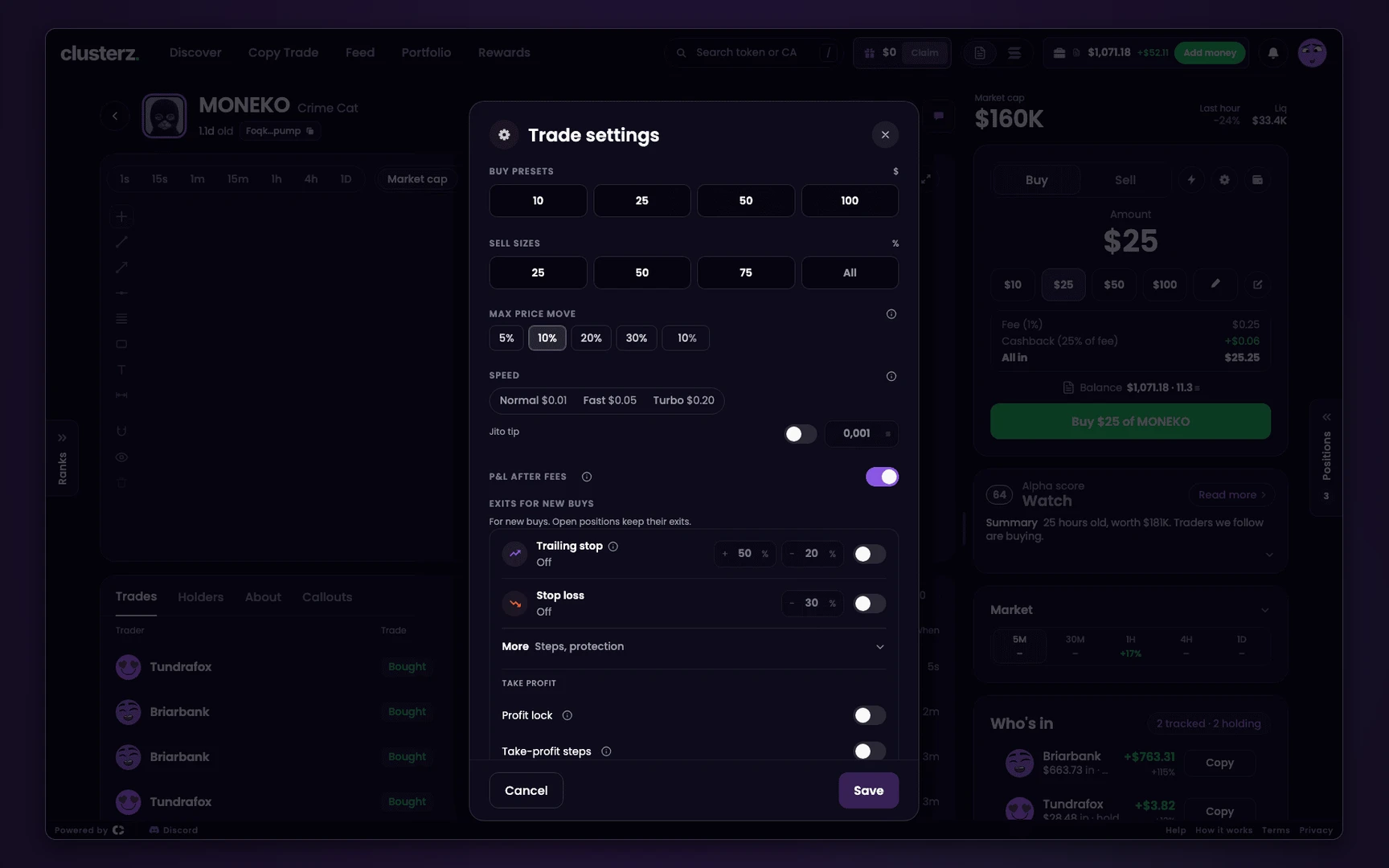 Trade settings: presets, sell sizes, max price move and speed.
Buy presets. A buy preset is a decision you make once, calm, instead of a hundred times in a hurry.
Work it out with the position size calculator: your wallet, the share you accept losing on one trade, and your stop loss. Put that size in the first preset.
Presets run from 1 to 100,000 USD, or 0.001 to 100 SOL, and must rise from left to right.
Max price move is your slippage. It caps how far the price can move against you between the press and the fill. Pick 5%, 10%, 20% or 30%, or type your own, up to 100%.
Above 25% the field turns amber. That is us yelling at you: a fill can land far worse than the price on screen.
A buy that fails on price says "price moved past your slippage". It paid a network fee and bought nothing. Raise the setting only if you accept the worse fill. More: Slippage.
Speed is the Jito tip. Normal, Fast and Turbo tip about 0.01, 0.05 and 0.20 USD a trade, paid in SOL at today's price. Or switch on Jito tip and type 0.0001 to 0.01 SOL.
The tip is paid on the buy and again on the sell. A 0.001 SOL tip on a 0.1 SOL trade costs 1% going in and 1% going out, as much as our fee again.
A trade under 0.05 SOL pays at most 0.0002 SOL. Count the cost before you turn it on with the profit calculator. More: Priority fees and tips.
Exits for new buys
Also in Trade settings, under Exits for new buys. Every token you buy yourself from then on opens with them. Full detail: Exits.
Every switch starts off. Until you turn one on, nothing sells a token you bought yourself. Forget this and a bag rides all the way down with you.
| Setting | When you turn it on | What it does |
|---|---|---|
| Stop loss | 30% | Sells all at -30%. 1% to 95%. |
| Trailing stop | From +50%, 20% under its high | Starts at the gain you pick, then sells all once the price falls your percent from its high. Start 0% to 10,000%, drop 1% to 90%. |
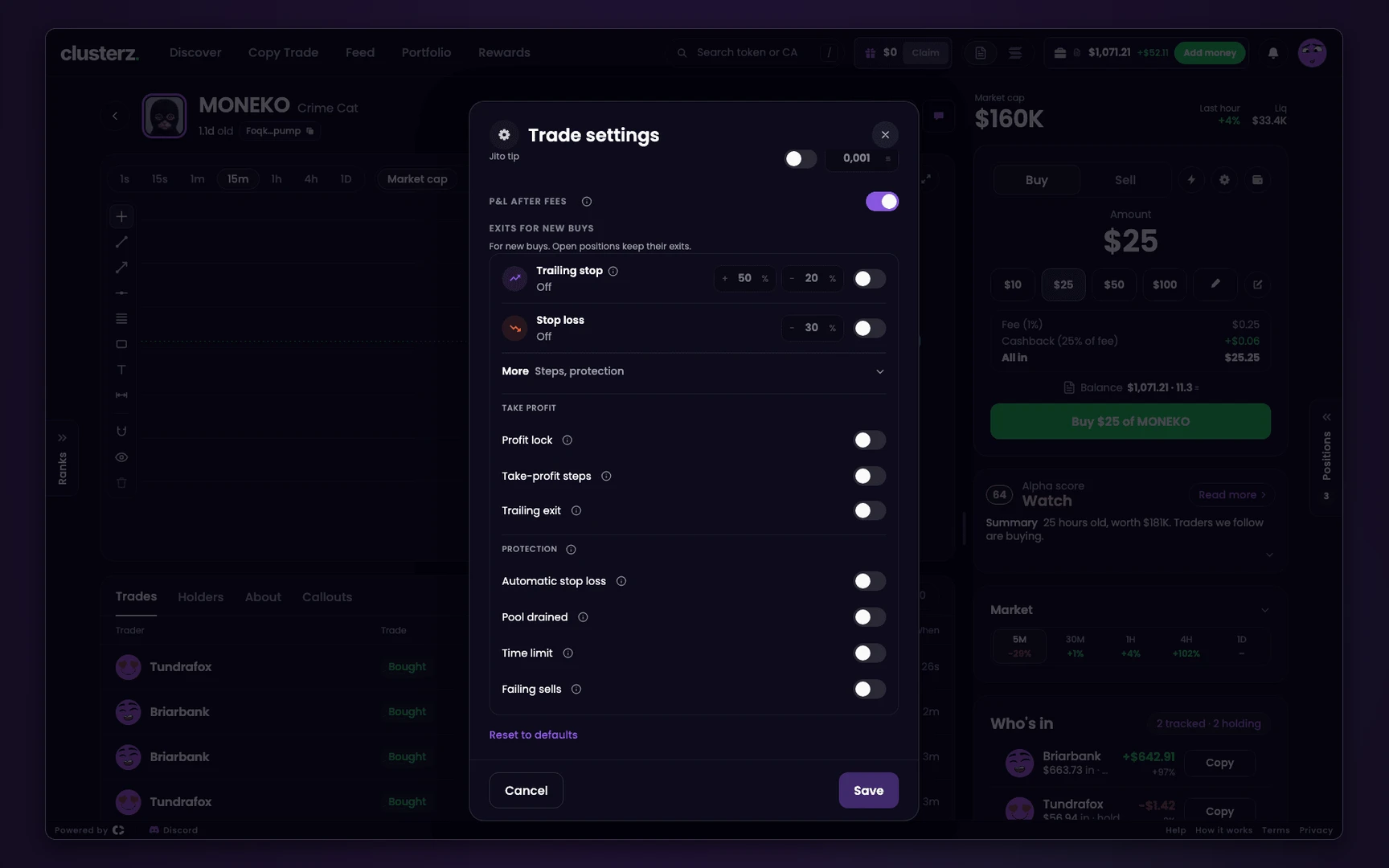 Exits for new buys: trailing stop and stop loss, both off until you turn them on.
Press More (Steps, protection) for the rules. Each is a switch, off until you turn it on.
| Rule | What it does |
|---|---|
| Profit lock | Peak +50% locks your entry, peak +100% locks +50%, past +300% it sells 40% under the high. It runs the take-profit side, so the take-profit steps, the trailing exit, your take profit and your trailing stop stand down. |
| Take-profit steps | Sells part at each step. 1 to 5 steps, each a gain and a share of what you bought. Until you edit them: +100% sells 50%, +300% sells 25%. |
| Trailing exit | After a step sells, sells the rest 18% under the high. |
| Automatic stop loss | Sells all at -50%, wider on big swings, never past -80%. Your own stop loss replaces it. |
| Pool drained | Sells all if the pool loses 45% of its liquidity. |
| Time limit | Sells all after 4 hours. |
| Failing sells | Sells by any route left when another rule's sells keep failing. |
On Live, everything under More sells only while a clusterz tab is open. Your Stop loss, Trailing stop and a position's Take profit can run with the app closed once you allow it. See Live exits while the app is closed.
No plan yet? Your first exit plan gives you one, and Set a stop loss helps you pick the number. Plan the levels in money first with the profit calculator.
Exits on one position
Set exits on a position, or Edit on one that has some, sets its own levels. A take profit is set here, per position.
- Take profit: +1% to +10,000%, with +50%, +100% and +200% as presets.
- Stop loss: 1% to 95%, with 20%, 30% and 50% as presets.
- Trailing stop: trails from the moment you save it, 1% to 95% under the high.
A line under each shows where it sells as a market cap. Think in market cap, set in percent. See Set exits on one position.
Copy Trade
A copy has its own settings. Your Trade settings and exits for new buys never touch it. Full detail: Copy Trade.
| Setting | Starts at | Change it when |
|---|---|---|
| How to copy | The way that did best for that trader (the Best way tag) | Rarely. The tag shows which way made the most per trade on their record. |
| Per trade: Fixed amount | 0.1 SOL | Size it like any buy: the size your plan allows, never more. |
| Per trade: Share of their buy | 10%, capped at 0.5 SOL, Add when they add 3 times | When their size says how sure they are. Max per trade is required. |
| Exits | +25% take profit, -50% stop loss, sell after 30 minutes, and sell when they sell (on First buy, sell after 20 s: sell after 20 s instead) | When their style is not yours: a scalper needs a short timer, a holder a wider stop. |
| Daily loss limit | 0.5 SOL | Set it to the most you accept losing on this copy in one day. |
The cost line under the size is the one to read: "Costs take about N% of each trade." It counts the tip on the buy and the sell, pump.fun's fee of about 1.25% each way, and our 0.2% each way.
That makes about 5% at 0.1 SOL and about 4% at 0.25 SOL. Even at large sizes it stays near 3%. Under 0.25 SOL the line turns amber. Small copies bleed.
More settings sits at the bottom of a copy of a trader:
| Setting | Starts at | Change it when |
|---|---|---|
| Slippage | 20% | Only if buys keep failing on price. Needs you suggests a number when they do. |
| Jito tip | 0.001 SOL, on each buy and each sell | Lower it on small copies. 0.0001 to 0.01 SOL. |
| Skip if later than | 3 s | Keep it short. Late copies buy their top. |
| Min their buy | 0.05 SOL | Raise it to skip their test buys. |
| Max open | 5 | Lower it to cap how much one trader can tie up. |
| Max buys per hour | 30 | Lower it on a trader who fires dozens of buys an hour. |
| Trailing stop | Off | Turn it on to keep more of a runner. |
| Keep moonbag | 0% | When you want a slice of every copy to ride. A stop loss sells all of it. |
| Market cap, Age, Venue | Off, Any | To copy only the part of their trading you like. A filter whose figure is not known yet skips the token. |
| Skip a token when | Nothing ticked | Tick the signs you would never buy yourself. What each one checks: More settings. |
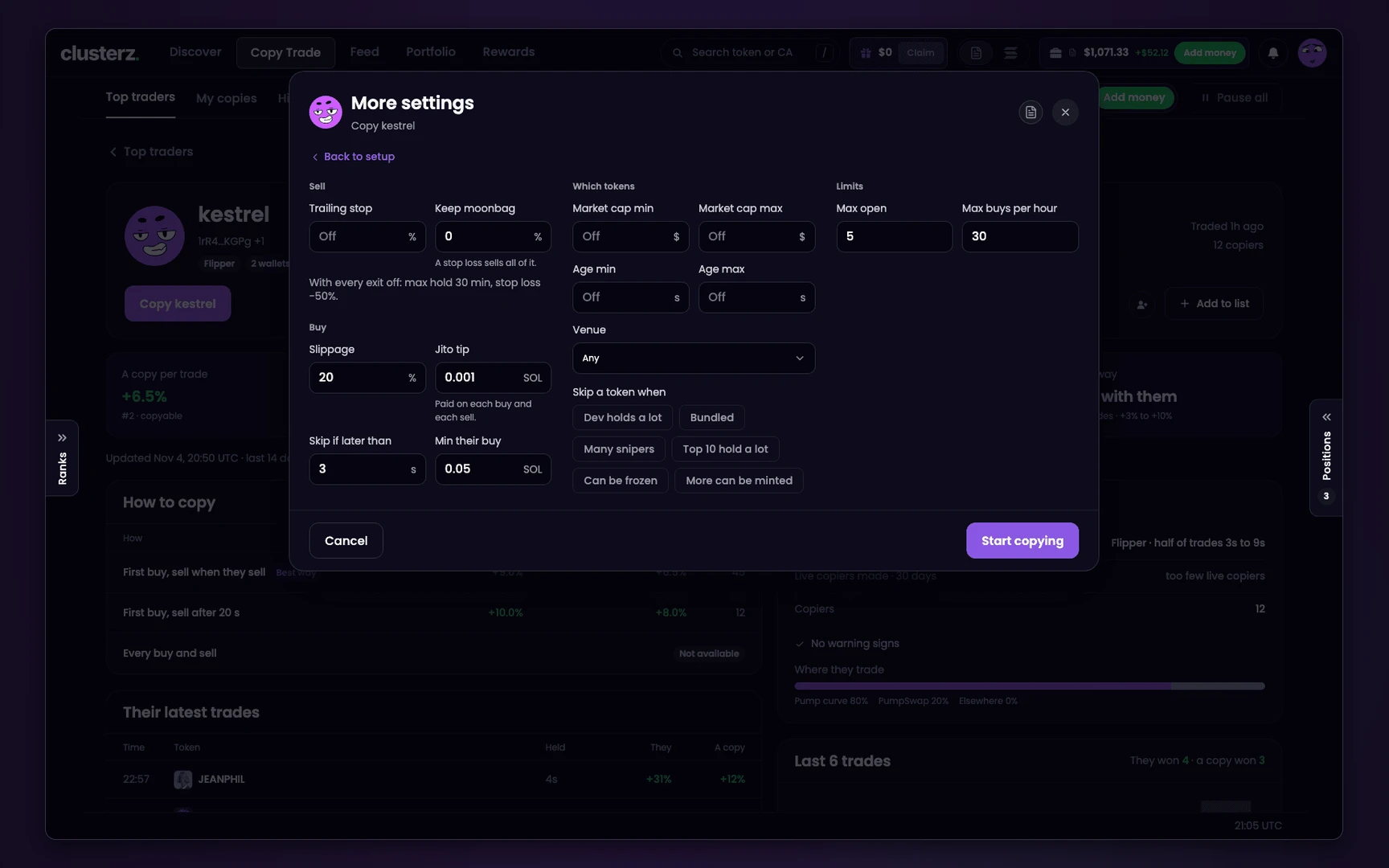 More settings on a copy: slippage, tip, filters and limits.
A copied list has no Exits or More settings. Each of its traders runs on the defaults above, at the list's size and under the list's daily loss limit.
A copy that fails 3 buys in a row the same way pauses under Needs you. Fix the one setting the reason names, or resume as it was. Not every skip needs fixing.
Fast, together and dev copies
These buy in the same block as the wallets you follow, or at a launch. Same idea as a copy, tighter starting points. Full detail: Snipe new launches.
| Setting | Starts at | Change it when |
|---|---|---|
| Per buy | 0.1 SOL | Same rule as any buy: the size your plan allows. Under 0.25 SOL the cost line turns amber. |
| Exits | A dev copy: take profit +100%. A fast or together copy: sell after 20 s | You need at least one. A stop loss starts at -15% when you turn it on. |
| Daily loss limit | 0.25 SOL | Set it to the most you accept losing on this copy in one day. |
| Skip repeat names | Off | Turn it on for dev copies on Launch. Same dev, same name, same rug. |
| Skip Mayhem tokens | Off | Turn it on unless you mean to trade them. See Mayhem mode. |
| Max open | 3 | Leave it low. It caps what is at risk at once. |
| Max buys per hour | 20 | Lower it on All grade A devs. Launch hours get busy. |
| Skip if later than | 2 s | Keep it short. Late is the top. |
| Slippage, Jito tip | 20%, 0.001 SOL | As for a copy. The tip is paid on each buy and each sell. |
| First seconds only, Curve, Market cap, Venue | Off, Any | To buy only the launches you want. A filter whose figure is not known yet skips the token. |
Every snipe also keeps two rules on: Pool drained and Failing sells. Your Trade settings exits don't touch it.
Notification settings
The gear in the bell, or Notifications in Account. Nine switches under Show these in the bell, all on to start. Details: Feed notifications.
Replies and mentions, reactions, new followers, your copies, cluster buys on tokens you hold, and rewards ready all ring the bell. Posts from people you follow, Price moves on tokens you hold and Callouts from traders you copy have switches, but the bell sends none of those yet.
Mute the social ones if you only trade. Keep Your copies buy and sell and Cluster buys on tokens you hold on. Those are the ones about your money.
Account
Press your picture in the header. Full detail: Account and security.
| Setting | Starts at | Change it when |
|---|---|---|
| Practice or Live | Set for your whole account | Live only once Practice has earned it. See Practice to Live. |
| Show values in | USD | Pick SOL if you think in SOL. This browser remembers it, so set it on each device. |
| Keep exits running when I close the app | Off | Turn it on if you trade Live and walk away. Without it, a stop loss hit while you sleep waits for you. |
| Keep a slice when selling all | Off, at 10% | Turn it on if you want a moonbag from every All. Only you, or a level you set on that position yourself, sell the slice. |
| Others can see your holdings | On | Turn it off if you don't want your bags on your Feed posts. |
Starter setups
Starting points to copy, not promises. Each one is the app's defaults plus the fewest changes that matter. Try each in Practice before it touches real SOL.
Your first week, in Practice:
- Put the size from the position size calculator in your first buy preset.
- In Exits for new buys, turn on Stop loss at 30%. Under More, turn on Take-profit steps, Trailing exit, Pool drained and Failing sells. That is your first exit plan.
- Leave Max price move at 10%, Speed off and P&L after fees on.
- Change nothing mid-week. Write ideas down for next week.
Your first Live trades:
- Same presets and exits as your Practice week. Day one of Live is not the day to size up.
- In Account, turn on Keep exits running when I close the app if you will walk away. It covers your stop loss, trailing stop and take profit. The rules under More still need an open tab.
- Run your size through the profit calculator. Our 1% each way plus the pool and the network is what a trade has to beat.
Ready to move? Practice to Live sets the bar.
Copy only:
- Pick a trader the way your first copy trade shows, and keep the way that wears Best way.
- Read the cost line before you pick a size: about 5% a trade at 0.1 SOL, about 4% at 0.25 SOL.
- Keep the default exits. Set the Daily loss limit to a loss you can take in one day.
- In More settings, lower Max open to 3 and tick the Skip a token when signs you would not buy yourself.
Settings FAQ
What are the best settings for trading memecoins on clusterz?
There is no best set, only one that fits your plan. A sensible start is the defaults plus three changes: buy presets sized to your plan, a stop loss in Exits for new buys, and take-profit steps. Then change one thing at a time, in Practice.
What should I set Max price move (slippage) to?
Start at the default Max price move of 10%. Raise it only when buys fail with "price moved past your slippage" on a token you still want. Above 25% the field turns amber, because a fill can land far worse than the price you see. See Slippage.
Do I need a Jito tip?
No. Speed is off by default, and off means no tip. The tip is paid on the buy and the sell, so on a small trade it can cost as much as our fee. Turn it on only when trades land late on a token you really want. See Priority fees and tips.
What priority fee should I set?
None. On clusterz the priority fee is set for you, and it moves with how busy the network is. The one speed setting you control is the tip, under Speed in Trade settings. See Priority fees and tips.
What is a good stop loss setting for memecoins?
No number fits every token. clusterz starts the Stop loss at 30% when you turn it on, and you can set 1% to 95%. Pick it together with your buy size: size times stop is what a losing trade costs you. A stop is a trigger, not a price, so on a thin pool the fill can land below your level. See Set a stop loss.
Why didn't my new exits change my open positions?
Exits for new buys apply to new buys only. Open positions keep the exits they opened with, so a save never rewrites a bag you hold. To change one, open it and press Edit on its exits. See Set exits on one position.
What does Reset to defaults do?
It fills every field in Trade settings with the defaults: the buy presets, 25%, 50% and 75% sell sizes, 10% max price move, Speed off, P&L after fees on, and every exit switch off. Nothing changes until you press Save.
Do copies and snipes use my Trade settings?
No. Each copy has its own size, exits, slippage and tip, set in its setup and More settings. Your Trade settings and exits for new buys cover only the tokens you buy yourself. See Copy Trade.