Memecoin position sizing: how much per trade
Memecoin position sizing on Solana: pick a buy amount from what you can lose, set buy presets, size against the pool, cap copies and test your size in Practice.
Nobody blows up on one bad token. They blow up on one bad token at the wrong size.
Size is the one part of a trade you fully control. This guide gives the arithmetic and where to set it in clusterz. It does not tell you what share to risk. That number is yours, and none of this is advice.
Try a size with play SOL first: paper trading memecoins on Solana.
Position sizing in crypto starts with what you can lose
Position sizing means picking the buy amount from the loss you can take, not from the gain you hope for. Start from the wallet, then work down to one trade.
Step one: the wallet. Fund your Main wallet only with SOL you can lose in full. Everything below is a share of that, so if this number is wrong, the rest is too. See Funding your wallet.
Step two: the planned loss. Your planned loss on a trade is the buy amount times the distance to your stop. An invented example:
| What | Amount |
|---|---|
| Wallet | 2 SOL |
| Buy | 0.1 SOL, 5% of the wallet |
| Stop loss | 30% |
| Planned loss | 0.1 × 0.30 = 0.03 SOL, 1.5% of the wallet |
Step three: the worst case. A memecoin can gap through your stop or go to zero. So the worst case on that trade is the full 0.1 SOL, 5% of the wallet.
Size so that both numbers are ones you can live with. Most traders only look at the first.
Step four: a losing run. Ten stopped trades in a row at that size cost about 0.3 SOL plus costs, 15% of the wallet. Ten rugs cost the whole 1 SOL, half of it. Losing runs happen. Run the numbers before the run does.
Turn it around to find a size: pick the planned loss you accept per trade, divide by your stop distance, and that is the most to buy. Accept 0.02 SOL with a 25% stop and the buy is 0.08 SOL at most.
How much SOL per trade: the cost floor
Small trades lose more to costs. That puts a floor under any sensible size. The costs on a Live trade you place yourself, from Fees:
- Our fee: 1% on the buy and 1% on the sell.
- The pool's fee: about 1.25% each way on pump.fun.
- Token account rent: about 0.002 SOL on the first buy of a token, back once you sell to zero.
- The network fee, and a Speed tip only if you turn it on.
That is about 4.5% of a pump.fun trade, there and back, before the price moves at all. The rent is a bigger share the smaller you go: on a 0.05 SOL buy it is 4% held until the account closes, on a 0.5 SOL buy 0.4%.
Leave P&L after fees on in Trade settings. Your P&L then counts every fee and shows a break-even line, so you see what the size really costs.
Set your buy presets
Your presets are your sizes. Set them once, so a buy in a hurry is still a size you chose.
- Press the gear (Trade settings) on a token page.
- Under Buy presets, set four amounts. They go from 1 to 100,000 USD, or 0.001 to 100 SOL when you show values in SOL, and must rise from left to right.
- Press Save.
The defaults are 10, 25, 50 and 100 USD, or 0.01, 0.05, 0.1 and 0.5 SOL. Pick USD or SOL under Show values in in Account. You can also edit them in place with the pencil (Edit buy amounts). Those edits save to Trade settings too.
Make your largest preset the most you would put in one token, and a fat-finger tap cannot go past it.
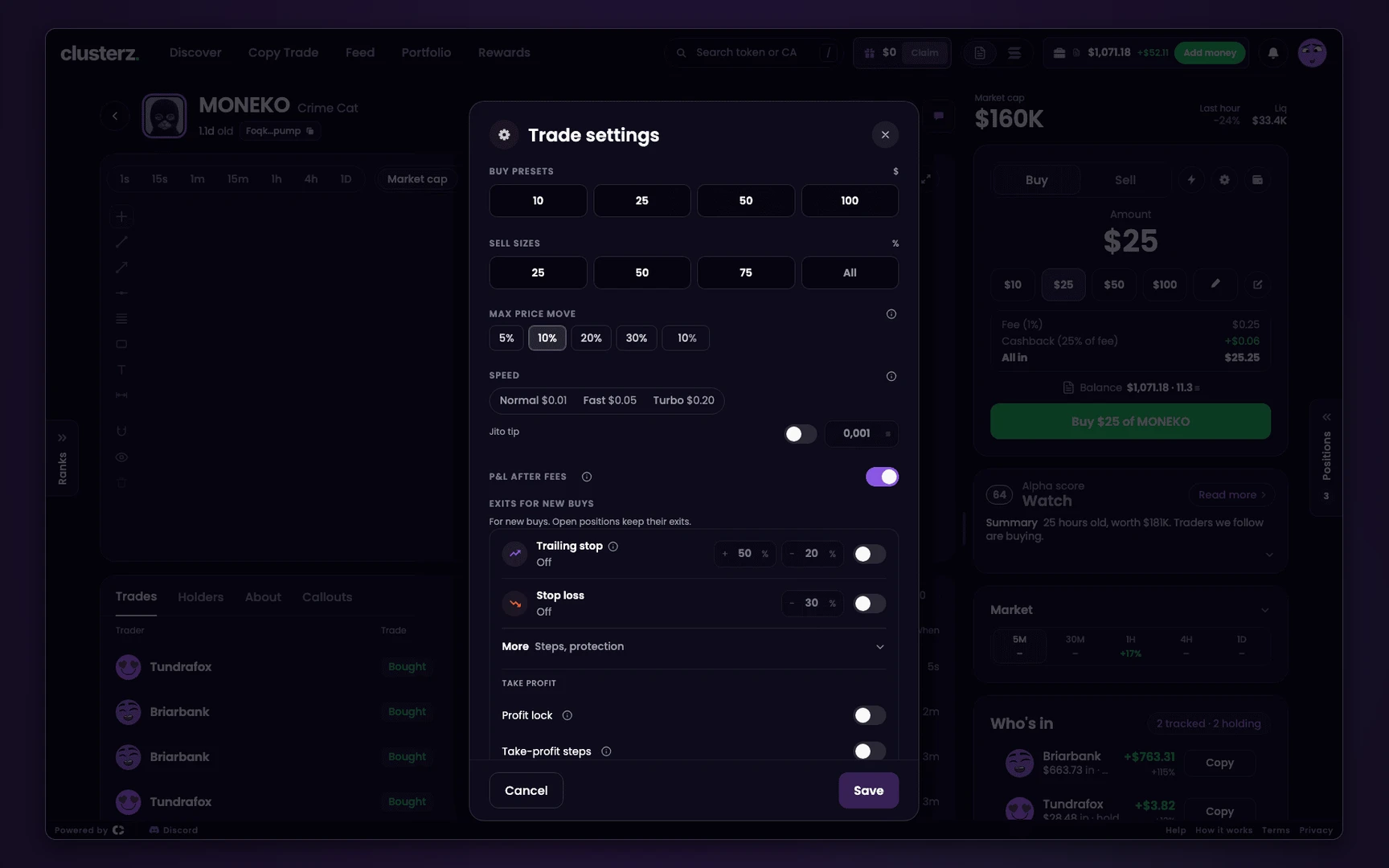 Trade settings: buy presets, sell sizes, max price move and speed.
Set the quick-buy amount
The one-tap Buy buttons do not ask. They spend your buy amount.
- Trending, the Map and Trenches cards buy at the amount on the chip beside One-tap buy. Press the chip to change it. On a phone, hold One-tap buy.
- Trenches columns can each keep their own amount on the column's amount pill. A column with none uses your quick-buy amount. Smaller on New than on Graduated is the usual way round. See Trenches.
- The quick-buy grid on a token page turns your four presets into four buy buttons. The bolt icon switches it on and off. See Buying and selling.
Check the chip before a session. Last night's size is not always tonight's.
Size against the pool: price impact
Price impact is how far your own trade pushes the price. Deep pool, next to nothing. Thin pool, your buy pushes it up and your sell later pushes it down.
On the token page, read Liq beside Market cap. That is the money in the token's pools. A ~ in front means one source only, unconfirmed.
Put your buy next to it. A buy that is a large share of Liq pays for that twice: once on the way in, and again on the way out, usually at a worse moment.
Check it against what you would need to sell, as the rug check puts it, not only what you buy.
Max price move in Trade settings caps how far the price can move against you on a Live trade: 5%, 10%, 20%, 30% or your own value, 10% by default.
Above 25% it turns amber. A big size in a thin pool is exactly when a trade hits that cap, so a failed buy there is information. Slippage in plain words: what slippage is.
Cap copy trades with their own size and a daily loss limit
Copies do not use your presets. Each has its own size, and they buy while you sleep.
- Per trade. A copy of a trader takes a Fixed amount, 0.1 SOL by default, from 0.01 to 100 SOL, or a Share of their buy, which starts at 10% capped by Max per trade at 0.5 SOL. Fast, together and dev copies take a fixed Per buy.
- The cost line. Under the size, the setup reads "Costs take about N% of each trade." Under 0.25 SOL it turns amber. At 0.1 SOL with the default tip it is about 5%.
- Max open. In More settings, 5 for a copy of a trader, 3 for fast, together and dev copies. Max open times per buy is the most one copy has in play at once: 3 × 0.1 SOL is 0.3 SOL.
- Daily loss limit. Once the day's sold positions are down your amount in total, wins minus losses, buying stops for the day and resets at 00:00 UTC. It starts at 0.5 SOL for a trader or a list, 0.25 SOL for the others.
- The Copy wallet. In Live, copies buy only from the Copy wallet. Buys that do not fit its balance are skipped. What you put in it is the hard cap.
One catch: the daily loss limit counts sold positions only. Open positions can lose more on top before they sell. Full setup: Copy Trade.
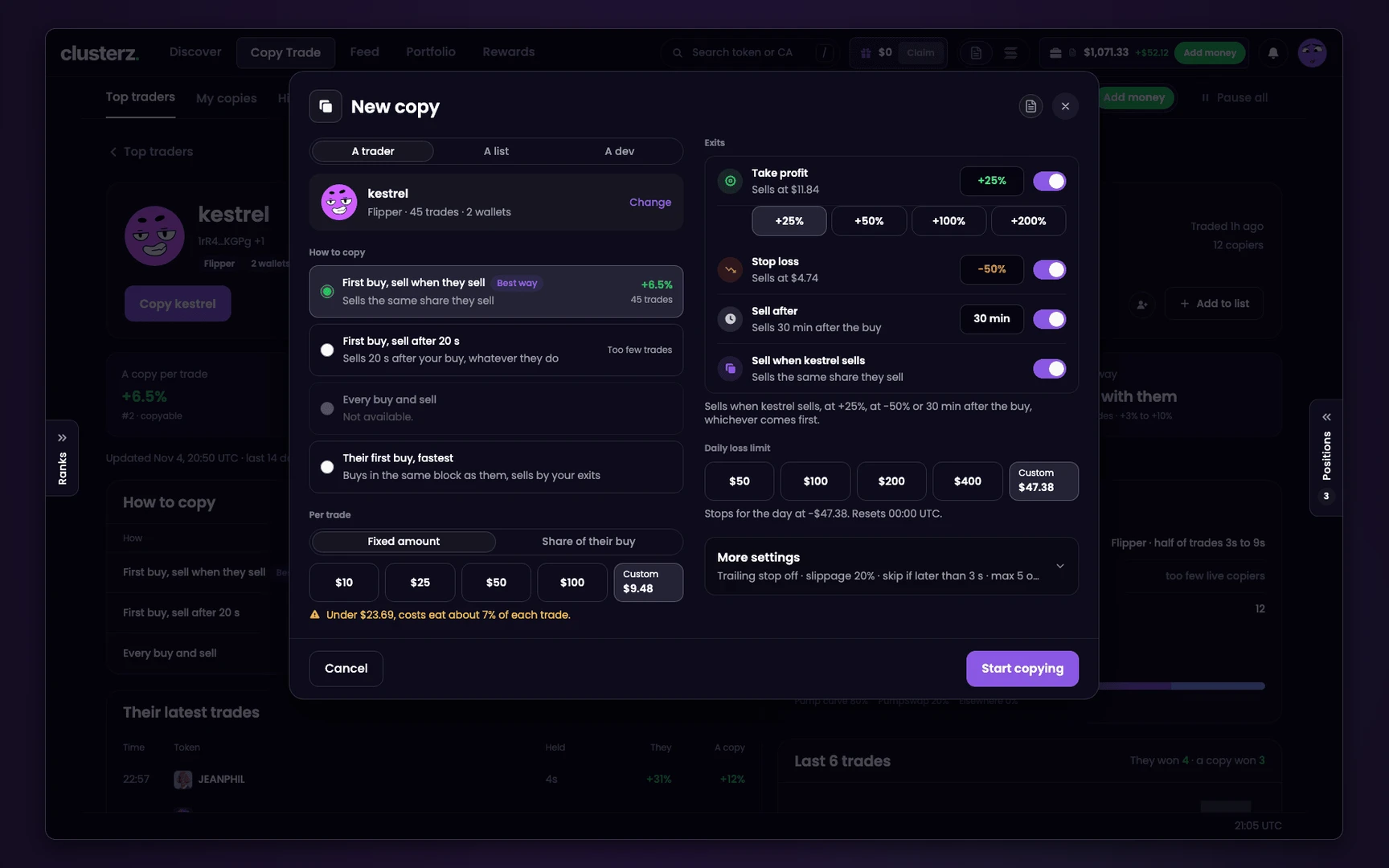 Copy setup: how to copy, size, daily loss limit and exits.
Test the size in Practice first
Practice gives you 1,000 USD worth of SOL against the live market. Trade the size you will trade in Live, not a share of the play money. If you will fund 2 SOL, trade as if Practice holds 2 SOL. The smallest practice buy is 0.01 SOL.
After a week, open Stats in Portfolio: Average loss, Biggest drop, then your worst day on the P&L calendar. In real SOL, would that day have changed what you did next? Then the size is too big.
Practice fills carry costs, but Live costs more, copies especially. Leave room for that. See Practice to Live.
What position sizing cannot do
- Save a bad trade. A small loss is still a loss. Sizing only keeps one from ending the account.
- Stop a gap. Your planned loss assumes the stop fills near its level. A rug fills at zero. See setting a stop loss.
- Tell you the right share. The arithmetic is the same for everyone. The number is not.
Before you send it
- Write down your wallet, planned loss and worst case per trade.
- Set Buy presets to sizes you chose, the largest being your maximum.
- Check the quick-buy chip and each Trenches column amount.
- Read Liq before a buy you will need to sell.
- Cap every copy with a size, Max open and a Daily loss limit, and fund the Copy wallet with only what copies may use.
- None of this is advice, and no size promises a result.