Solana bundle checker: spot bundles, snipers and insiders
A free bundle checker for Solana memecoins: spot bundled launches, snipers and insiders, read the warning lines and see when a bundle has already exited.
Someone always gets in before you. The question is how much they still hold and whether they started selling.
These checks read the launch tape and the funding trail, nothing else. A patient crew on clean wallets can pass every one.
Bundle, sniper and insider checks on every new pair's card: pump.fun new pairs, live.
Bundle, sniper, insider: what each one is
- Bundle: wallets that bought in the same slot as the create, before a normal buyer could react. The dev's own buy does not count.
- Sniper: any wallet that bought in the first 60 seconds of trading, dev excluded.
- Insider: a top 20 holder the dev funded, or one of three or more top 20 holders funded together. The dev's own wallets are left out.
Do not add the pills up. Every bundle wallet is also a sniper, and one wallet can be all three.
Free bundle checker: where to read it
Reading the checks costs nothing. Our fee is on trades, not on looking. The pills sit on every Trenches card and under Indicators on a token page. Hover on a computer, tap on a phone.
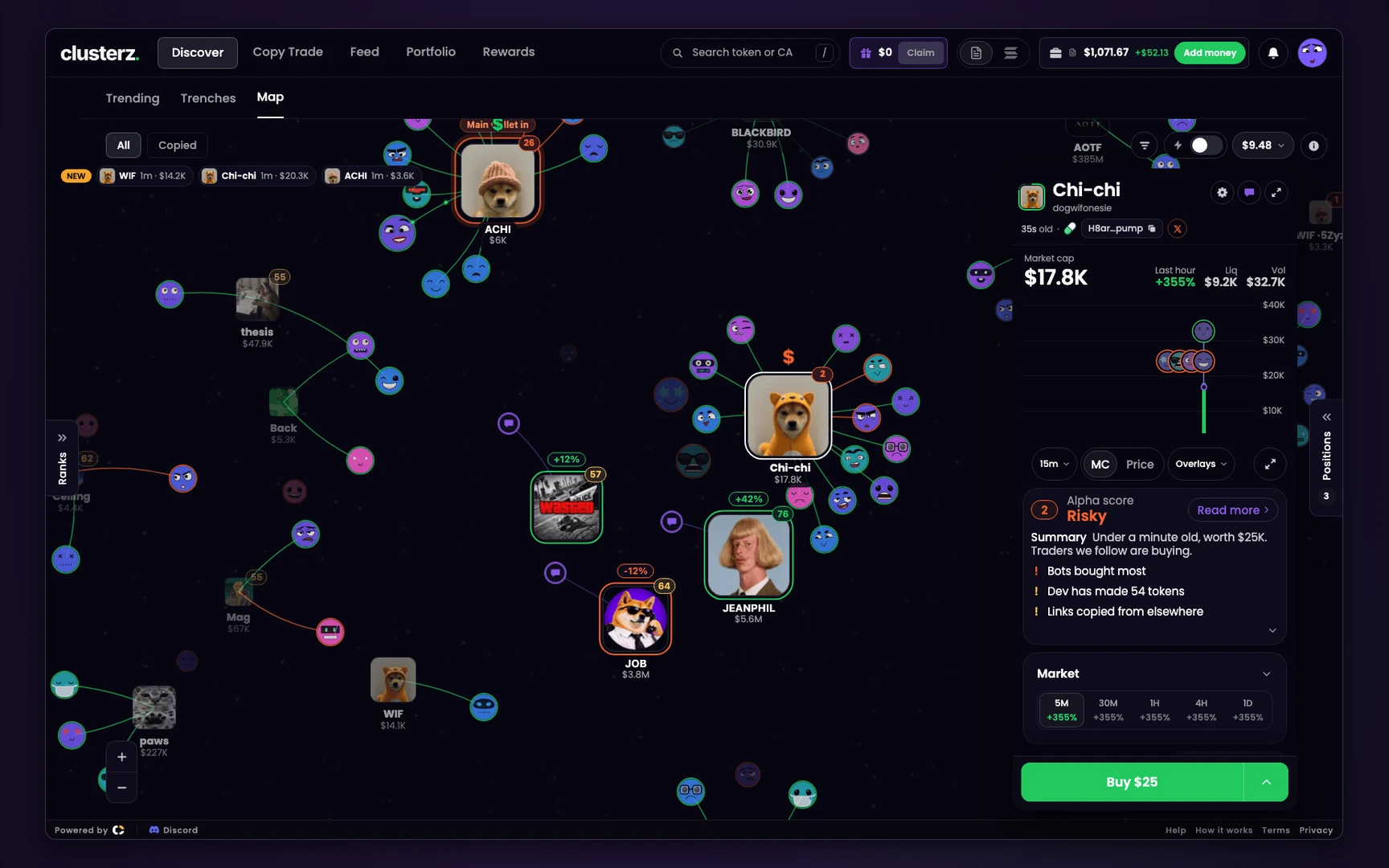 A token card on the Map. Risky, with "Bots bought most" leading the reasons.
What the checks measure
Every percent is a share of supply, and it is what they hold now, not what they bought. Figures in quotes are examples.
| Pill | Hover text | Warning colour when | Line under Against | Alpha score |
|---|---|---|---|---|
| Bundle | "Bundle holds 12%, most 41%, 9 wallets" | it still holds over 20% | "Insiders bought at launch" | -10 over 20% |
| Snipers | "14 snipers hold 8%" | they hold over 20% | "Bots bought a lot", or "Bots bought most" at 50% | -10 over 10%, -14 over 20% |
| Insiders | "Insiders (wallets linked by funding) hold 24%" | they hold over 20% | "Linked wallets own a lot" | No points |
| Fresh wallets | "4 fresh wallets in the top 20, 3.2 SOL" | 3 or more | "New wallets among top holders" | No points |
Two traps in that table.
The names cross over. "Insiders bought at launch" is the Bundle line. "Linked wallets own a lot" is the Insiders pill. Read the small line under each, "They hold 34%", and match the figure to the pill.
The last two rows move no points. Linked wallets and fresh wallets take nothing off the score, so a high number says nothing about them. Read the pills, not just the ring.
Funded together has a strict meaning: the same funder or the same exchange inside an hour, or different funders inside 5 minutes, in amounts within 25% of each other. A fresh wallet is one first funded in the last 24 hours.
How to read a launch
- Hover Bundle. Read how much it holds, the most it ever held and how many wallets. More wallets does not mean more people. One crew on 30 wallets is still one seller.
- Read Snipers as count and share. The pill says 14 · 8%. Five wallets at 19% are a few loaded hands sitting just under the warning line. Sixty at 19% is more likely a crowd of sniper bots racing each other.
- Look for the Insiders pill. No pill means no reading, not no insiders. More below.
- Look at Fresh wallets. Three or more wallets born yesterday in the top 20 reads as a farm. A farm does not need a bundle to dump on you.
- Put it together. One loud pill is a yellow flag. Bundle, Insiders and top 10 all warning is usually the same few hands seen three ways, whatever the chart says.
How to tell a bundle has already exited
The warning leaves as they sell. "Insiders bought at launch" only shows while the bundle holds over 20%. The -10 goes with it. A vanishing line and a rising score can be the bundle walking out with your money, not the token getting better.
So read most against the current share:
| Hover text | What happened |
|---|---|
| "Bundle holds 38%, most 38%" | Not one token sold. All of it still sits above you. |
| "Bundle holds 14%, most 38%" | Selling, no warning colour, and more to come. |
| "Bundle holds 1%, most 38%" | Out. Someone bought all of that. |
| "Bundle holds 3%, most 3%" | There was never much of a bundle. |
A low share is firm, because only sells lower it. A high share can be stale, because tokens moved to another wallet still count with the buyer.
Snipers have no most, so watch the share against the count. 14 · 1% means fourteen wallets got in and almost nothing is left.
Then check the sells. In the Trades tab, pick Market and read Market cap then. Big sells at low market caps, early on, are usually the launch crew getting paid.
An exited bundle is one seller fewer. It is not a reason to buy.
Filter them out in Trenches
Bundle holds takes a percent. Snipers takes a count of wallets, not a percent. Insiders is a card check, not a filter. A ready-made setup: Clean Soon. Filters hide what they can measure, so a card with no reading stays on screen.
What these checks cannot catch
- Launches we missed. Bundle and Snipers figures need our tape to have seen the create. No reading, no pill. A launch with 200 or more wallets in its first minute gets no figure either.
- Anything outside the read window. Insiders and Fresh wallets are read only past 30% of the curve, at 100 or more trades, inside the first 40 minutes, and they show only when all of the top 20 could be read.
- Insiders selling. That read runs twice at most, 10 minutes apart. The Insiders figure does not tick down as they sell.
- Small or spread crews. Two linked wallets are not a group. A bag split below the top 20 is out of frame. An old, busy wallet often has no funding trail to compare.
- Transfers. They are not on our tape, so a bundle that moved its bag still reads as holding it.
- After graduation. Our tape follows only the pools we watch, so a graduate's figures can stop moving.
None of this is advice, and a quiet row of pills promises nothing.
Before you send it
- Hover Bundle and read most. A low share with a high most means someone already got paid.
- Match each line to its pill. "Insiders bought at launch" is the bundle.
- No Insiders pill is not a clean result. It is no result.
- Check Fresh wallets on a launch that looks too tidy.
- Run the full rug check, then look at the dev.