Exits: take profit, stop loss, trailing stop
You can't stare at a chart all night. We tried. The token we stopped watching was always the one that rugged.
Exits sell your positions at the levels you pick. Gains get locked. Losses get capped. You get to sleep.
Where you set them
Two places:
- Trade settings holds the exits for new buys. Every token you buy yourself from then on opens with them.
- Exits on a position sets or changes the levels for that one position.
Exits for new buys never touch a bag you already hold. Open positions keep the exits they opened with. No surprise rewrites. The section says so ("For new buys. Open positions keep their exits."). Change the stop loss or trailing stop while you hold positions that opened with the old ones and the save tells you straight: "Saved. Open positions keep their exits."
Every switch starts off. We don't sell your bags behind your back. Until you flip one on, nothing sells a position you bought yourself. You sell it with the 25%, 50%, 75% and All buttons, and the position reads "No exits. Only you sell this."
An exit level is a percent from your average entry price. The editor also shows where that sits as a market cap, for example "Sells all at about $508K market cap". Think in mcap, set in percent.
The big three
- Take profit sells all of the position once it is up by your percent. Range +1% to +10,000%.
- Stop loss sells all of the position once it is down by your percent. Range 1% to 95%.
- Trailing stop follows the highest price after it starts and sells all once the price falls your percent below that high. In Trade settings it starts at a gain you pick ("From +50%, sells 20% under its high"). One you turn on in a position's exit editor has no start gain and trails from the moment you save it ("Trails from now, sells 20% under its high"). One that came from Trade settings keeps its start gain.
Take profit is set per position. Trade settings carries the stop loss and the trailing stop for new buys.
Set exits for new buys
- Press the gear (Trade settings).
- Scroll to Exits for new buys.
- Turn on Trailing stop and set the start gain and the drop from the high. The defaults when you first turn it on are +50% and 20%. The start gain can be 0% to 10,000%, the drop 1% to 90%.
- Turn on Stop loss and set the percent. The default is 30% ("Sells all at -30%"), within 1% to 95%.
- Press Save.
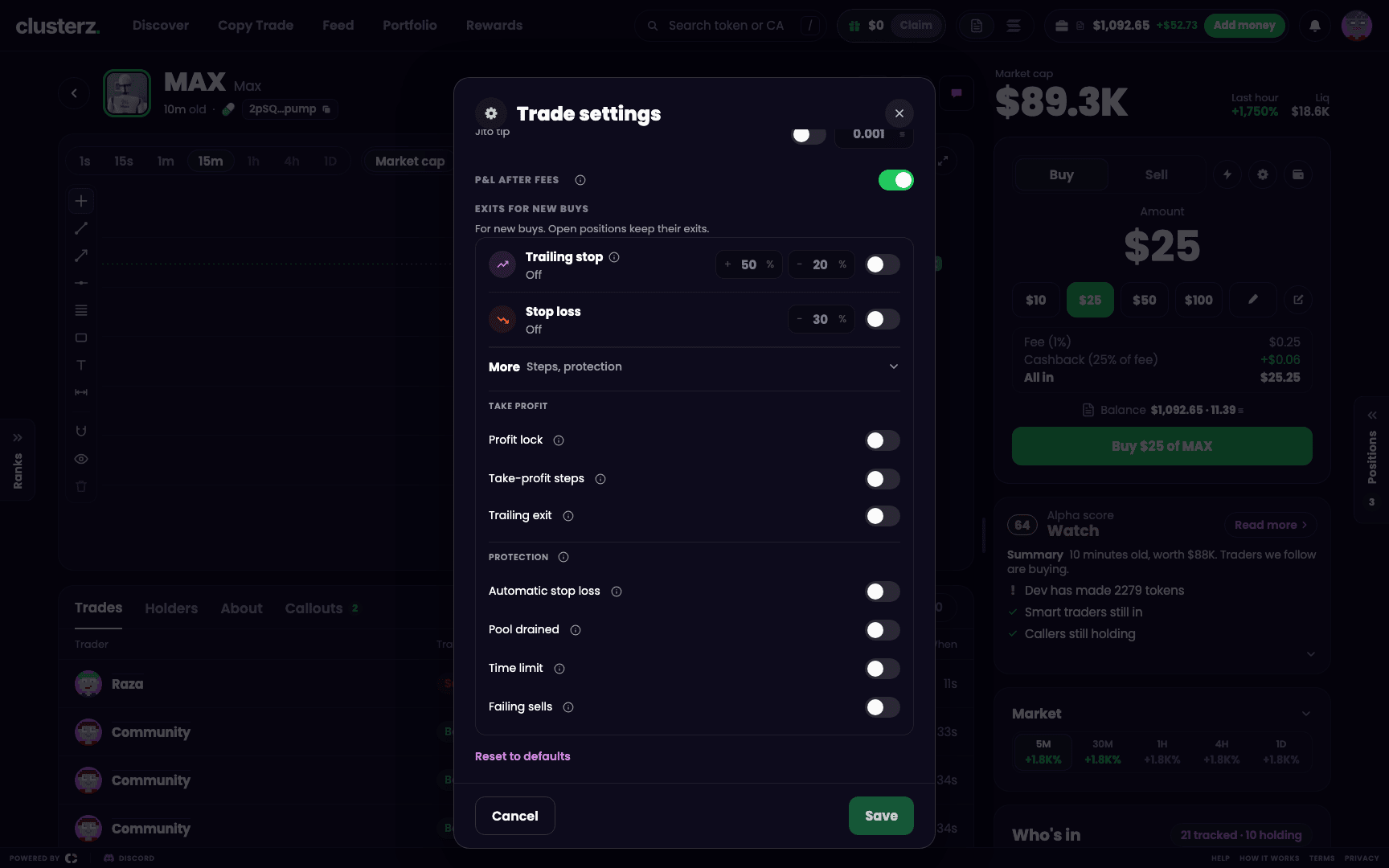 Exits for new buys: trailing stop and stop loss. Set once, every token you ape yourself after that is covered.
Steps and protection
This is where you stop round-tripping winners and start dodging rugs. Press More (Steps, protection) under the levels. Every rule is a switch, off until you turn it on.
Under Take profit:
- Profit lock protects a winner as it climbs. Once the position peaks at +50%, it sells if the price falls back to your entry. Once it peaks at +100%, it sells if the gain falls to +50%. Past +300%, it sells 40% under the high. No more round-tripping a winner back to nothing.
- Take-profit steps sells part of the position at each step. You set 1 to 5 steps, each a gain from +1% to +10,000% and a sell of 1% to 100%. Each step's gain must be higher than the one before, and the steps together can sell 100% of the position or less. Every step's percent is of the position you bought, not of what is left. Until you edit them the steps read +100% sells 50% and +300% sells 25%. Press + Add step to add one.
- Trailing exit sells the rest 18% under the high after a step has sold.
Under Protection:
- Automatic stop loss sells all at -50%, wider when the token swings hard, never past -80%.
- Pool drained sells all if the token's pool loses 45% of its liquidity. Liquidity walking out the door is your cue too.
- Time limit sells all after 4 hours. Dead token, dead money. Get out.
- Failing sells tries every other way to sell when another rule's sells keep failing.
One check is always on and has no switch: clusterz never sells on a price it cannot confirm. A bad price print does not get to sell your bag.
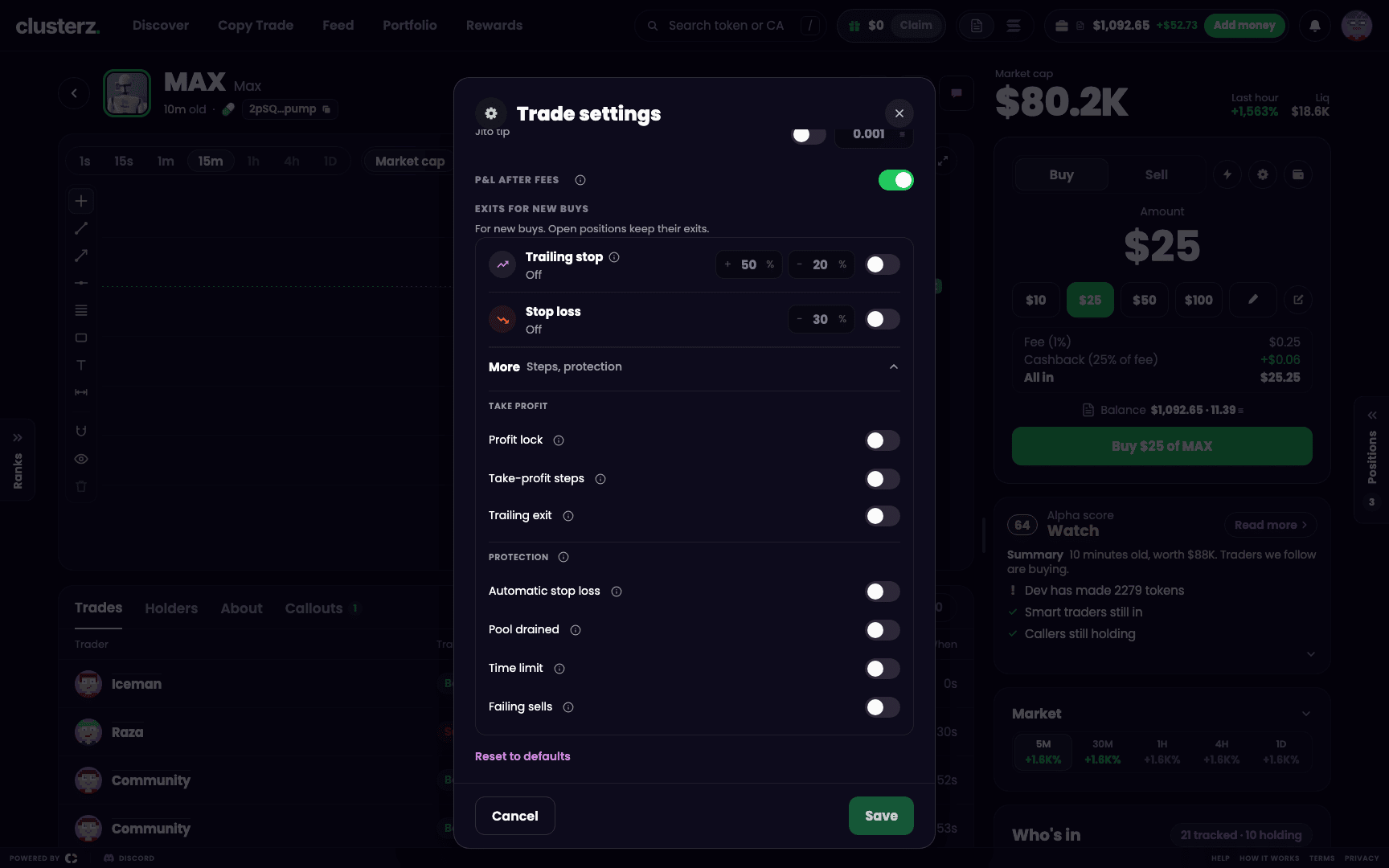 Take-profit steps and protection rules. Bank the run, keep the rug off you.
What wins when rules overlap
Some rules beat others. The loser turns grey, with a note saying why.
- Profit lock on: it runs the take-profit side, so take-profit steps, the trailing exit, your take profit and your trailing stop stand down ("Profit lock is managing the exit.").
- Your own take profit on a position replaces the take-profit steps ("Your take profit replaces it.").
- A trailing stop with a start gain, like the one in Trade settings, also replaces the take-profit steps.
- Your trailing stop replaces the trailing exit.
- Your stop loss replaces the automatic stop loss ("Your stop loss replaces it.").
Greyed values are kept. They run again once the setting that replaced them is off.
Set exits on one position
- Open the position in Portfolio, on the token page, or on its card.
- Press Set exits, or Edit on a position that already has some.
- In Exits for the token, turn on Take profit, Stop loss or Trailing stop and type the percent, or tap a preset under the box (+50%, +100% or +200% for a take profit; 20%, 30% or 50% for a stop loss). A line under each shows where it sells as a market cap. A take profit can be +1% to +10,000%, a stop loss or trailing stop 1% to 95%.
- Open More to switch the step and protection rules for this position.
- Press Save exits. A toast confirms the levels, for example "Exit set on $TOKEN: TP +100%, SL -30%".
To wipe every level, press Clear exits. It shows once the position has levels set.
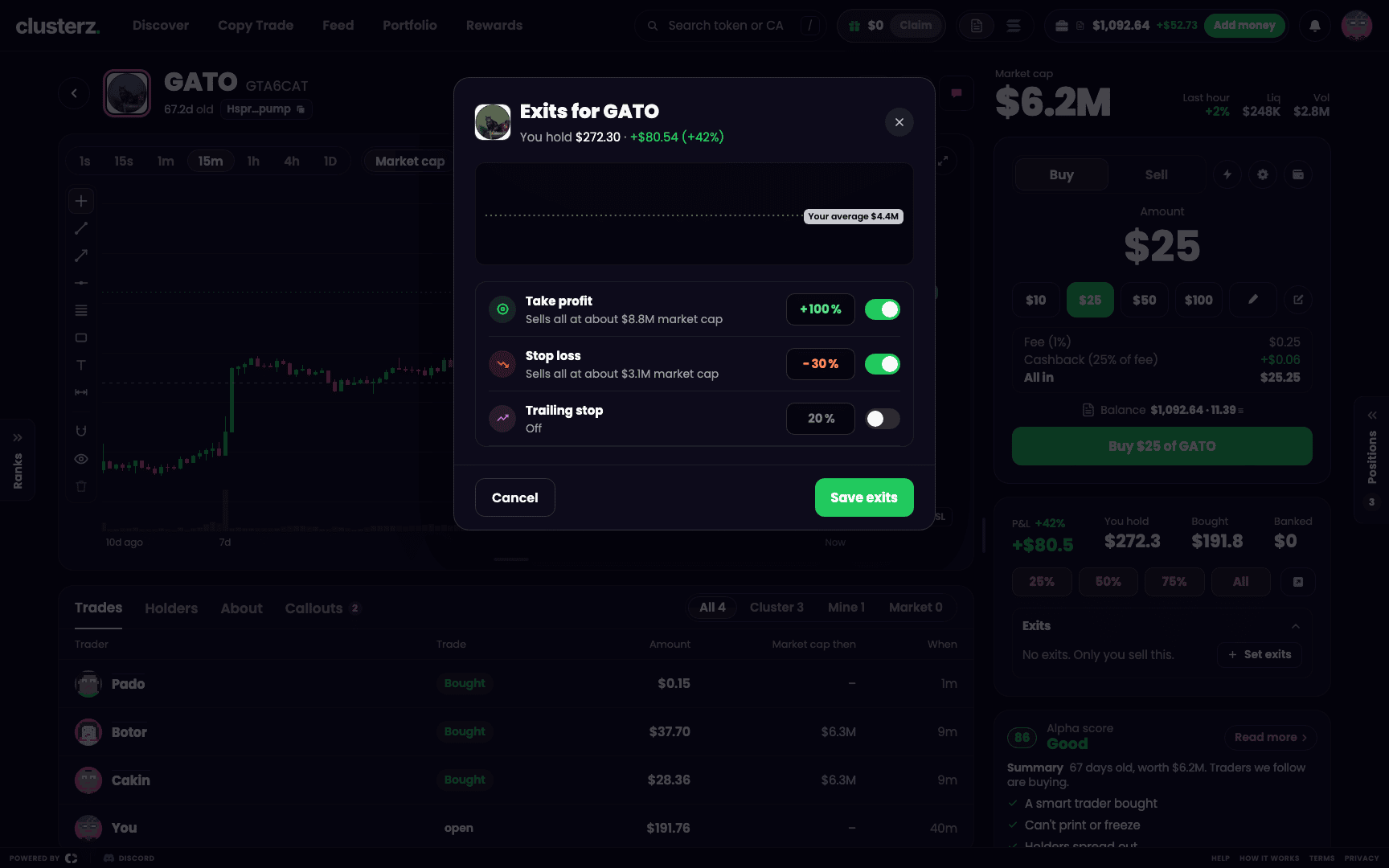 Set exits on one position. Your bag, your levels.
Once set, the position shows its levels under Exits, each with the market cap it sits at, and a tag for when it runs.
Drag levels on the chart
Hold a token and its chart draws your take profit (TP) and stop loss (SL) as lines. Each is tagged with its level and the P&L you would have there, next to the dashed Avg line at your average buy.
Drag a line to move the level. Release to save. Only the level you dragged changes, and the toast's Undo puts the old one back. A take profit stays between +1% and +10,000%, a stop loss between 1% and 95%. Drag a level to the wrong side of the price and it snaps back.
No take profit or stop loss set? Press + TP / SL on the price axis to open the exit editor. On a phone, drag on the full-screen chart.
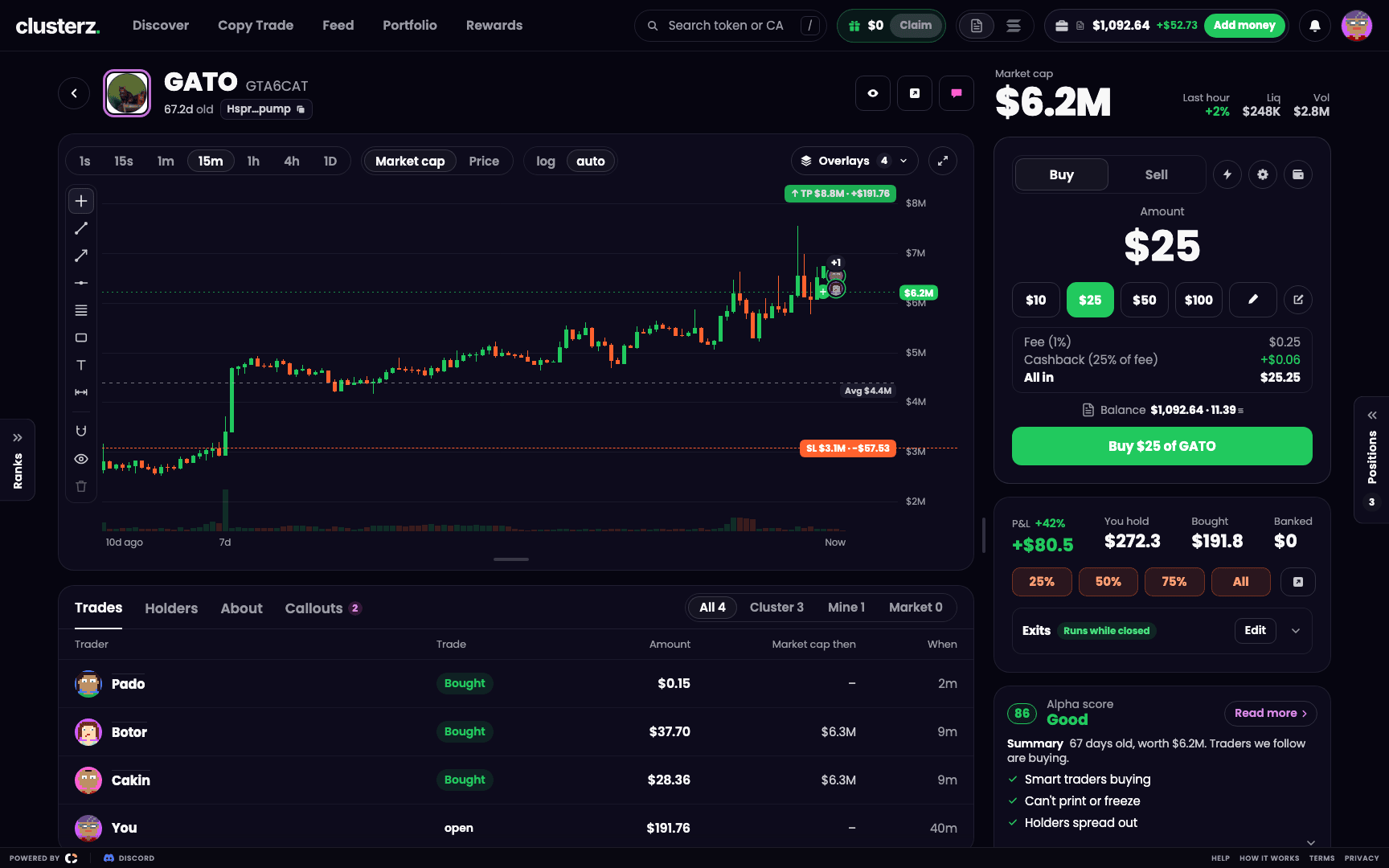 Exit levels on the chart. Grab a line, move it, done.
When an exit sells
A level hits and you get one toast, for example "Your take profit +100% hit on $TOKEN (+101%): selling". Then "Sold $TOKEN at your take profit +100%" with the return, your P&L and a link to the transaction. If the fill lands well away from the level, the toast gives the real return instead. No pretty fake numbers.
On Live, a sell that fails retries by itself and the position shows Retrying.
Live exits while the app is closed
In Live your wallet signs each sell. Your keys, your call. So by default an exit sells only while a clusterz tab is open. The position's tag reads Needs an open tab.
To let exits sell with no tab open:
- In the exit editor press Run while closed, or go to Account and turn on Keep exits running.
- Read the permission. clusterz uses it only to sell all of a position you hold, at a level you set. The wallet permission itself is broader, and clusterz enforces that limit.
- Press Allow exits while closed and approve it in your wallet.
The tag then reads Runs while closed. Pull the permission any time in Account. Your keys stay yours either way.
No permission? A level hit with no tab open waits. The sell goes the second you open clusterz again. But if the level was hit more than two minutes earlier and the price is now more than 15 points below it, we don't blindly dump into the hole. clusterz asks first: the position shows Not sold with the level it hit. Press Sell now to sell, or Keep to hold and clear only that level. Your other levels stay.
Exits that sold while you were away land in one card the next time you open clusterz. What sold, at what return, the SOL you got back. Morning recap.
Practice positions need no signature, and their tag reads Runs while closed.
Copies, snipes and moonbags
- A position opened by a copy sells by that copy's own exits. See Copy Trade.
- A snipe sells by its setup ("A snipe: its setup sells it."). It also keeps the Pool drained and Failing sells protection. See Copy Trade.
- A moonbag you keep when selling all is never sold by any rule ("A moonbag: only you sell it."). See Buying and selling. That one rides to the moon or to zero, your call.
Before you walk away
- Set a stop loss and a trailing stop in Trade settings once. Every token you buy yourself opens with them.
- Use take-profit steps to bank part of a runner. Let the rest ride on the trailing exit or profit lock.
- On Live, allow exits while closed if you trade and walk away. Without it, a stop loss hit overnight waits for you.
- A fast move can fill past your level. The toast shows the real return when that happens.