Bluechips and Stocks
Not every trade has to be a fresh launch. Sometimes you want something that will still exist tomorrow.
Bluechips and Stocks are two ready-made lists on Trending: established Solana tokens and tokenized stocks. Same screen as the fresh stuff. Same Buy button.
What's on them
Trending normally shows what tracked wallets are buying right now. The Bluechips and Stocks chips swap that for a plain market list:
- Bluechips is a fixed set of established Solana tokens. TRUMP, BONK, PENGU, WIF, Fartcoin, POPCAT. The ones that made it.
- Stocks is tokenized stocks on Solana, the xStock tokens. Tickers end in "x". A stock token needs at least $10K of liquidity to make the list. Two tokens on the same ticker? The deeper pool stays, the other one is gone.
No wallets here. These lists run on market data, so they get their own columns and no Tracked, Callouts or Alpha. Prices and changes refresh every few minutes. While a list is open, the page pulls new rows once a minute.
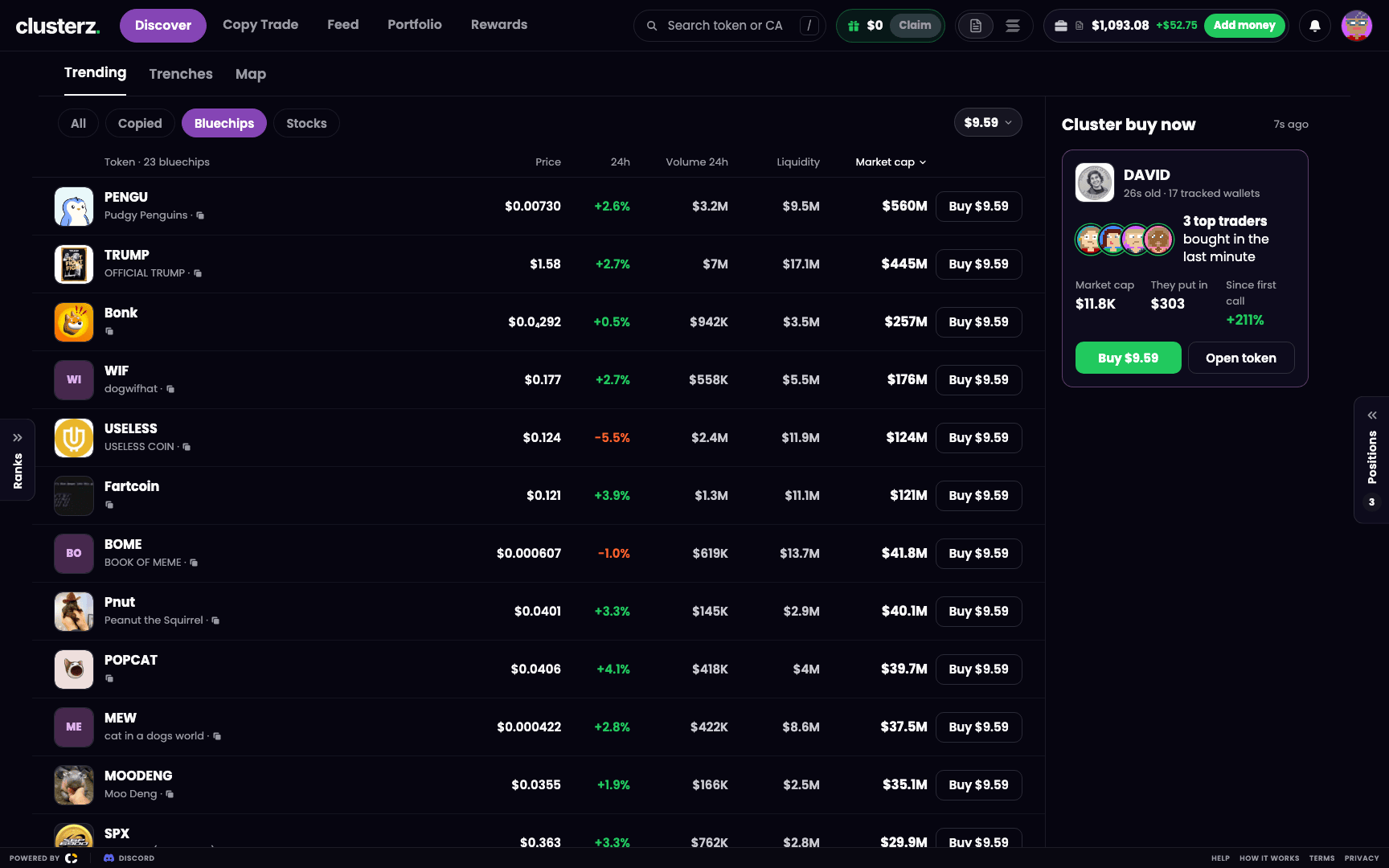 Bluechips: the names that survived the trenches, in one list.
Open a list
- Go to Discover and pick Trending.
- In the chip row over the list (All, Copied, then Bluechips and Stocks at the end), press Bluechips or Stocks.
- Press All to go back to the tracked-wallet list.
The two chips live on Trending only. Jump to the Map or Trenches and the list snaps back to All.
Reading a row
The header counts them, like "Token · 23 bluechips". Then every row:
| Column | What you get |
|---|---|
| Token | Logo, ticker, name, and a button to copy the token address |
| Price | Current price in USD |
| 24h | Price change over the last 24 hours, green up, red down |
| Volume 24h | Trading volume over the last 24 hours, in USD |
| Liquidity | Liquidity in the token's pools, in USD |
| Market cap | Market cap in USD |
| Buy button (right edge) | Buys your quick-buy amount |
No figure, you get a dash. Never a zero. Rows missing a figure sink to the bottom. We don't fake numbers.
Sorting
- Bluechips opens on Market cap, biggest first.
- Stocks opens on Volume 24h, biggest first. Why: a thinly traded stock token can flash a market cap way above what actually trades. Volume doesn't lie.
- Click any column header to sort by it. Click again to flip it. Each list keeps its own sort while the page is open.
Filters don't touch these lists. Filters, Hide risky tokens and the rest only work on the tracked-wallet list.
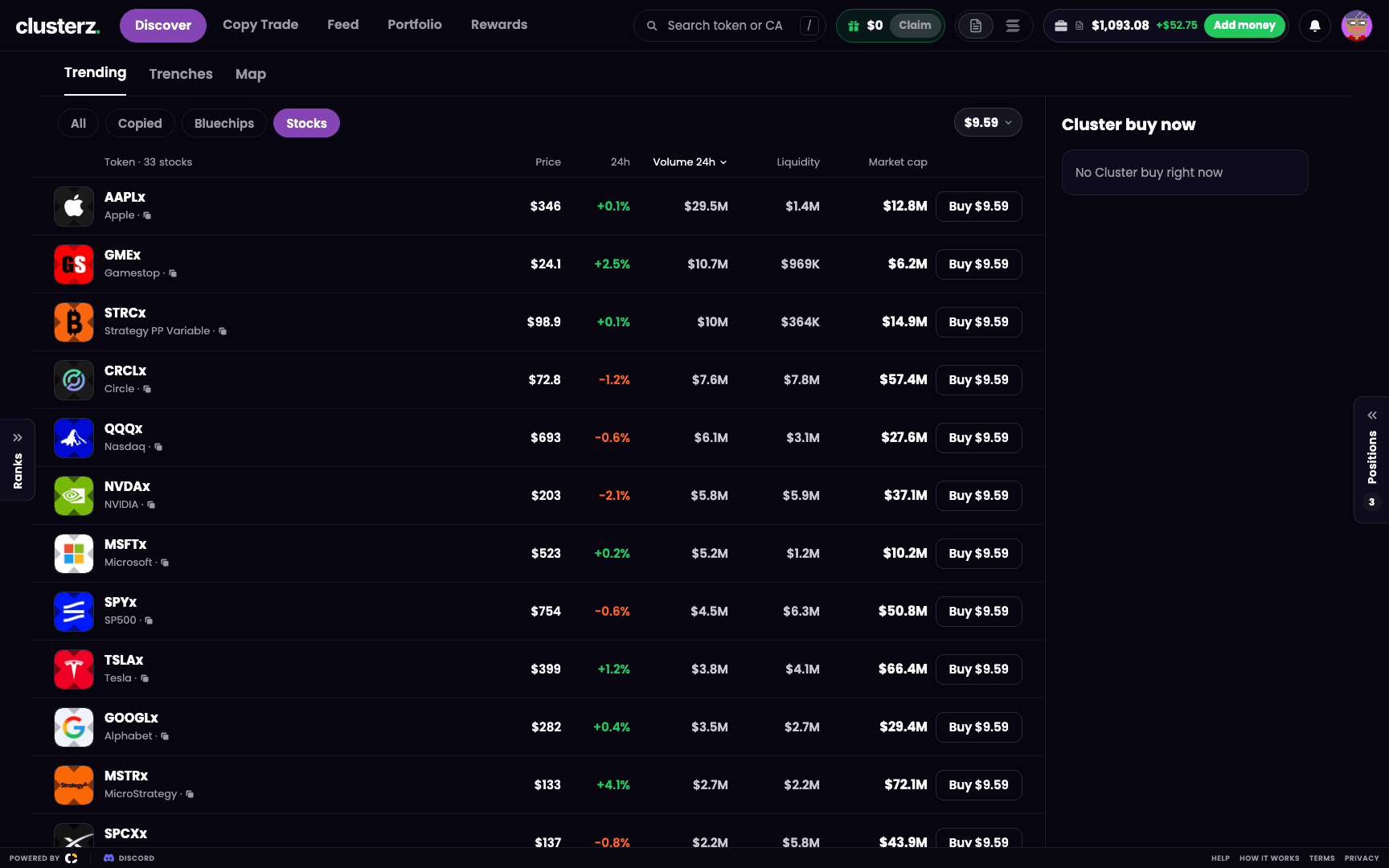 Stocks: tokenized stocks, one tab over from your memecoins.
Send it from the list
- Set your quick-buy amount. On a computer, it's the amount chip on the toolbar. On a phone, the amount pill sits on the All list, and whatever you set there is what Buy spends here.
- Hit Buy on a row. That amount goes in, in whatever mode you're in, Practice or Live.
- Want more control? Click the row for the token page. Chart, any buy amount you like, your exits.
Once you're holding, the row swaps the Buy button for your position value and P&L, plus a Buy button and sells: 25%, 50%, 75%, All. On a computer they pop up when you point at the row.
Live trades come out of your own wallet. Your keys, your bags. We never hold your funds. The trading fee is the same as on any other token, see Fees.
On your phone
Each list turns into cards. Ticker and 24h change on top. Name and price under that. Market cap (MC) over volume (VOL). Buy button on the right. Can't see Stocks? Swipe the chip row sideways.
Empty list?
- "Loading bluechips" or "Loading stocks": first rows are on the way.
- "Could not load stocks. Trying again in a minute.": the last read failed. It retries by itself, you do nothing.
- "Stocks are not available right now": the list is switched off for now.
Before you ape
- Check Liquidity before you buy a stock token. Thin pool means bigger price impact on your buy and your sell. Getting in is easy. Getting out is where you get cooked.
- Hit the copy button next to the name and check the token address before you trade.
- More on Trending and its chips: Discover. The token page: Token page. Buying and selling: Buying and selling.