
Pump.fun new pairs, live, with holder checks
Watch new pump.fun pairs live in three columns: New, Soon and Graduated. Dev, bundle, sniper and top 10 checks on every card, and one-tap buys. Free.
Opens clusterz.fun. Trenches is under Discover. Sign in with Google, X, a wallet or an email code to buy from it.
How to watch new pump.fun pairs on clusterz
Five steps from the firehose to a list you can actually read.
Open Trenches
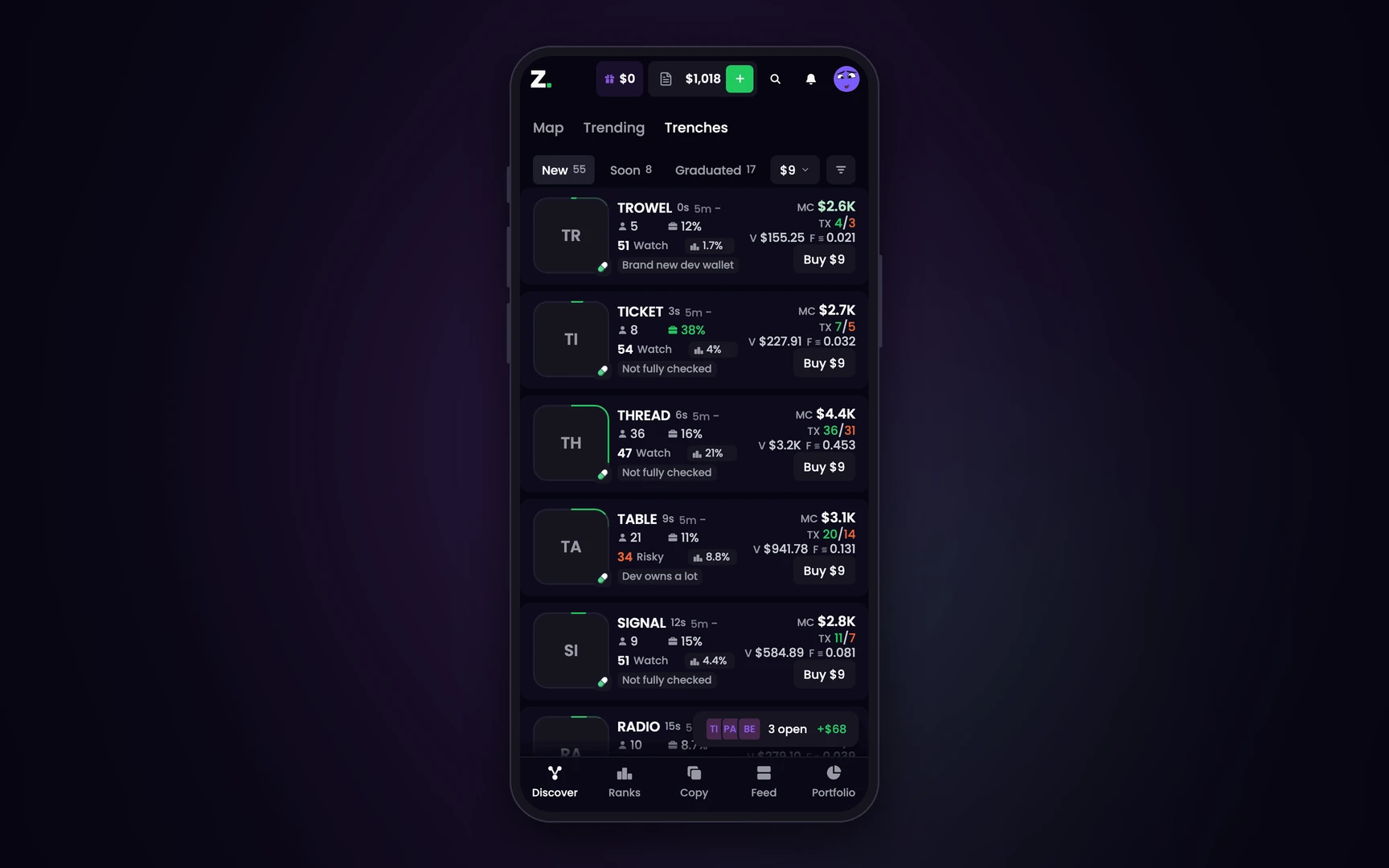
Open Discover and pick Trenches. Three live columns: New, Soon and Graduated. On a phone they are tabs.
Read the ring
The green ring round a logo is its bonding curve. New holds launches under 50% of their curve, Soon holds 50% or more, and Graduated tokens trade in their own pool.
Read the pills
Top 10 holders, dev, snipers, insiders and bundle. A pill turns warning colour when it crosses its line, and DS means the dev has sold.
Filter the column
Each column has its own filters: market cap, age, holders, dev holding, bundle, snipers and more. Your setup rides the page address, so you can share the link.
Buy, or do not
Pick an amount on the column's amount pill and press Buy on a card. It uses the mode you are in: play money in Practice, real SOL in Live.
Ready-made setups with links: Trenches filters. Every part of a card: Trenches
New pairs with the rug checks on the card
A new pairs list without holder checks is a list of ways to get dumped on. Every card here carries its own.
Holder checks
Top 10 holders over 30%, snipers, insiders or the launch bundle over 20%, a dev holding more than 5%: each one turns its pill warning colour.
The dev's record
Graduated over created. 1/3 means one of the dev's three launches graduated.
Alpha score
Every launch gets a score from 1 to 99 with its top reason under it. Red flags keep it low, however pretty the chart.
Tracked traders
Each card shows the tracked traders already in the token, with a count and their net flow.
Reading one new pair's card
One card in the Soon column, pill by pill. The figures are an example.
The card as Trenches draws it on a wide column. A narrow column or a phone shows fewer of its pills.
The ring reads 62%
It has sold 62% of its curve tokens, so it sits in Soon. On a pump.fun curve that is still under a quarter of the market cap it would graduate at.
The dev pill reads DS
The dev has sold. Hover the pill for how much. The dev's record beside it reads graduated over created.
Bundle reads 31%
The wallets that bought in the launch bundle still hold 31% of the supply. Over 20% turns the pill warning colour: that supply is waiting for buyers.
Top 10 reads 24%
Under the 30% line, so that pill stays quiet. One quiet pill does not cancel the two above it.
Seven launchpads on one screen
Trenches reads pump.fun, bonk.fun, Raydium LaunchLab and Meteora's curve, which Bags, Moonshot and Jup Studio launch on. A pill on each logo says where the token was born.
- Mayhem marked. A pump.fun Mayhem launch wears a red pill and a Mayhem badge, and Hide Mayhem tokens takes them off the board.
- Graduation in view. A token that finishes its curve reads Migrating while its pool opens, then moves to Graduated.
- On your phone. The three columns become three tabs, each with its count. There is nothing to download from an app store.
Pump.fun custom pairs in Trenches
pump.fun's Custom Pairs let a creator launch a token priced in another asset from pump's list, such as USDC, PUMP or a tokenized stock, and not only in SOL. Trenches shows those launches next to everything else.
- A chip names the quote. A curve priced in another token carries a small chip on the bottom left corner of its logo with that token's name.
- Market cap is converted. The market cap is worked out from the quote token's price in SOL. No price for it yet, no number.
- A filter for them. The Quote filter in a column has SOL, Stables (USDC, USDT or USD1) and Other tokens, like PUMP or a tokenized stock. Turn one off and the curves priced in it leave the column.
- One more fee. A trade on such a curve also passes through the quote token's own pool, and that pool keeps its fee too.
What a new pairs feed cannot tell you
The checks catch the lazy rugs. Four things they do not catch.
- Side wallets. A sell from a wallet nobody has linked to the dev shows no DS.
- Not known is not safe. A faded placeholder means a figure is not known yet. We do not make numbers up.
- A clean card. Plenty of new launches go to zero with every pill clean.
- The first block. Snipers and bundles buy before you can. The card shows how much they still hold, not when they sell.
Watching is free. Our fee applies to Live trades only: 1% on trades you place yourself, with a quarter of it back as cashback. The pump.fun pool takes its own fee of about 1.25% each way.
Next: rug-check a token in about a minute, compare the Solana launchpads, or paper trade first.
Pump.fun new pairs: questions
Where can I see new pump.fun pairs live?
Trenches on clusterz lists new pump.fun launches as they appear, in three live columns: New, Soon and Graduated. Open Discover and pick Trenches.
What do New, Soon and Graduated mean?
New holds launches under 50% of their bonding curve. Soon holds launches at 50% or more, the ones closest to graduating. Graduated holds tokens that finished the curve and trade in their own pool.
How do I check a new pump.fun token for a rug?
Read the pills on its card: top 10 holders, dev, snipers, insiders and bundle. A pill turns warning colour when it crosses its line, and DS means the dev has sold. The full steps are in the rug check guide.
Can I filter new pairs?
Yes. Each column has its own filters, including market cap, age, holders, top 10 holders, dev holding, bundle, snipers and tracked traders in the token. Your setup rides the page address, so you can share the link.
Does it show launches from other launchpads?
Yes. Besides pump.fun, Trenches reads bonk.fun, Raydium LaunchLab and Meteora's curve, which Bags, Moonshot and Jup Studio launch on. Launchpad chips in the filters turn each one on or off.
Does Trenches show pump.fun custom pairs?
Yes. A launch priced in another token, such as USDC, PUMP or a tokenized stock, shows in the same columns with a chip naming its quote token. Its market cap is worked out from that token's price in SOL, and the Quote filter can show or hide them.
Is watching new pairs free?
Yes. Trenches is free to watch. Our fee applies only when you trade in Live: 1% on trades you place yourself.
Can I buy a new pair from the list?
Yes. Pick an amount on the column's amount pill and press Buy on a card. In Practice it uses play money, in Live the SOL in your wallet.
Watch new pump.fun pairs live
Free to watch. Read the card before you ape the launch.