KOL wallet tracker: how to read a KOL wallet on Solana
Track KOL wallets on Solana and read them properly: banked P&L, win rate, holds, what they already sold, linked alts and the calls that make you exit liquidity.
The post is the ad. The wallet is the receipt.
What the tracker is, on one page: the KOL wallet tracker.
We do not publish the tracked list. No names here, no addresses, no spreadsheet to copy. That list is the product.
You meet tracked traders in the app when they trade, and this guide is how you read them when you do. How a wallet gets on the list is in What "tracked" means.
KOL tracker on Solana: where tracked trades show up
You do not go looking for wallets. Their trades come to you:
- The Map and Trending. Live tokens with the tracked traders in them.
- The token chart. The Tracked overlay draws their buys and sells with the trader's face.
- Who's in, on the token page. What each tracked trader put in and still holds. Anyone out is marked Sold.
- The Trades tab. Pick Cluster. Every row has Market cap then and When.
- Copy Trade. The Trading now chip, and Piling in: tokens 3 or more rated traders bought in the last 30 minutes.
Press a tracked name in any of these and you land on that trader's page. What each block means is in Wallet tracker. This guide is the order to read it in, and when to close the tab.
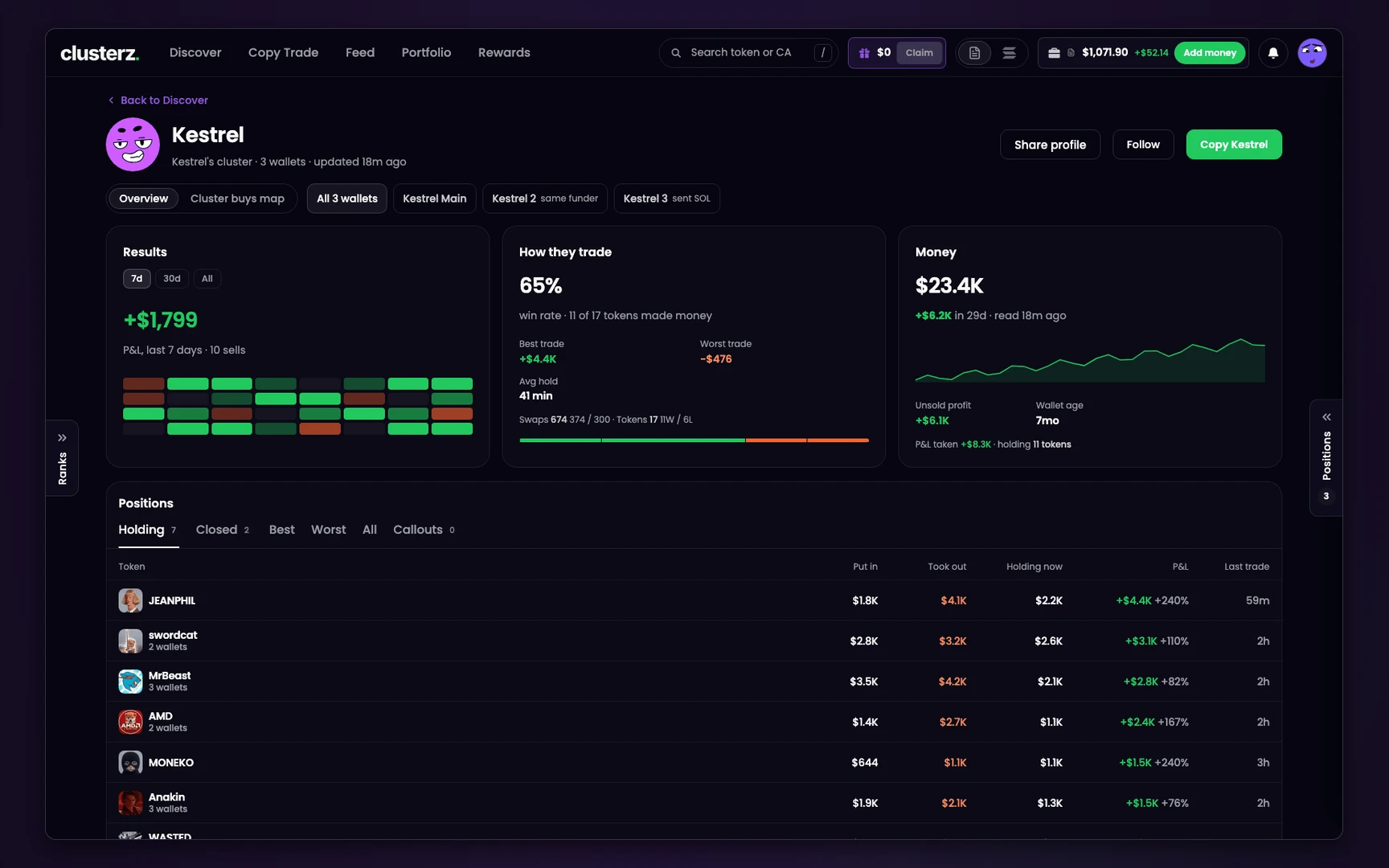 A trader's page, on an invented sample trader. Start top left.
Solana wallet tracker P&L: read the page in this order
- Results, 30d before 7d. This is banked P&L, from sells. A green 7d over a red 30d is a hot week, not a record. If All reads "the last 2,500 swaps", their history runs longer than what we read.
- Ignore Unsold profit. It sits under Money and it is a number until someone buys the bag. On a thin token the first real sell can erase it. Decide on Results and P&L taken.
- Win rate, with its count. Read the line under it: how many tokens made money, out of how many. A token counts once. Then set Best trade against Worst trade and the five return bands. One Best trade bigger than the rest of the record is a lucky ape, not a method.
- Avg hold and First 10s. Avg hold tells you if you can follow at all. Held for seconds, they are gone before you finish reading the post. First 10s is how often they were the first tracked wallet into a cluster buy. High means you were never getting their price.
- Holding against Closed. On Positions, find the token you want. Read Put in, Took out and Holding now. Took out above Put in with Holding now near zero means they have their money back. What is left is what they are done with.
A dash means no source gave us the figure. It never means zero.
Alts: how wallets get linked into one cluster
Serious traders split buys across a stack of wallets. clusterz links them into one cluster, and each linked wallet says why: sent SOL, same funder or same group. The full table is Wallets in this cluster.
Three reads the table will not do for you:
- Count people, not wallets. Five wallets with the same funder piling into one token is one person, not five believers.
- Open the wallets one by one. All N wallets adds everything up, so a row reading "3 wallets" hides who did what. Pick a single wallet tab. A main wallet that holds while an alt sells is not a holder.
- Check who paid. On a single wallet, First money from names the funder and Wallet age says how old it is.
What this cannot catch: a cluster is only the links we can see. Same funder ignores exchanges.
An alt funded through an exchange that never touches the others and trades on its own has no link. It is not on the page, and neither are its sells.
Callouts versus what the wallet really did
A callout says what they want you to do. The wallet says what they did. Hold one against the other:
- On Positions, open Callouts. Each post shows how long ago it went up and, on the token, the market cap when posted and now. X posts show only when we collect them.
- Press the token. Leave Tracked and Thesis on, and their trades and the callouts sit on one chart.
- Open Trades, pick Cluster, and read Market cap then against the post.
- Go back to Positions and read that token's row.
| You see | It means |
|---|---|
| Bought well under the market cap at the post | They were in first. Normal, and it is why you are late. |
| Sold after the post | They sold into the buying the post brought. |
| No sells, Holding now still large | Still in. Today. |
| No buy under Cluster | They called it and did not buy it, on any wallet we link. |
The holding and P&L printed on a callout come with the post, as they report it. Positions is our read of the wallets. When the two disagree, go with the wallets.
Why a post after the buy makes you exit liquidity
The order is the whole trick.
A trader buys at a low market cap. Then they post. Followers buy.
Every buy pushes the price up, on a curve or in a thin pool, so the first follower pays more than the trader did and the next pays more again. Now the trader has what every early buyer needs: someone to sell to.
If they sell into that wave, the money they bank is yours. That is what exit liquidity means. You are not following the trade. You are the trade.
Not every post is a dump. Plenty of traders post what they hold and keep holding.
Nothing on this page reads intent, and nothing here says what they do in the next minute. It says who has the cheaper entry and whether the selling has started.
Walk away when:
- The market cap is a multiple of their entry and Who's in marks them Sold.
- Most of the cluster's Holding now is gone while the post is still doing numbers.
- The post is the only reason you are looking at the token.
Before you send it
- Check Who's in before you press Buy. If they are marked Sold, you know who you are buying from.
- Judge the wallet on 30d and Results, never on a screenshot of one trade.
- Read the alts, not just the main wallet.
- Run the token through a rug check. A good trader can still ape a bad token.
- Like the record? Read your first copy trade before you copy anyone, and set your exits before you buy.
- This is a method, not advice. It cannot see wallets we have not linked, and it cannot see what happens next.