
KOL wallet tracker for Solana, alts included
Track KOL wallets on Solana with every alt wallet linked into one cluster: banked P&L, win rate, open bags and live buys on one page. Free to use.
Opens clusterz.fun. Sign in with Google, X, a wallet or an email code. Looking is free and needs no deposit.

How to track a KOL wallet on clusterz
Five steps from sign-in to knowing who you are really trading against.
Sign in
Open clusterz.fun and sign in with Google, X, a wallet or an email code. Trader pages are for signed-in accounts. Signing in is free and needs no deposit.
Find the trader
Open Ranks for the leaderboard of tracked traders, or click any face on the Map. Under Copy Trade, Top traders has a search by name, handle or address.
Read the record
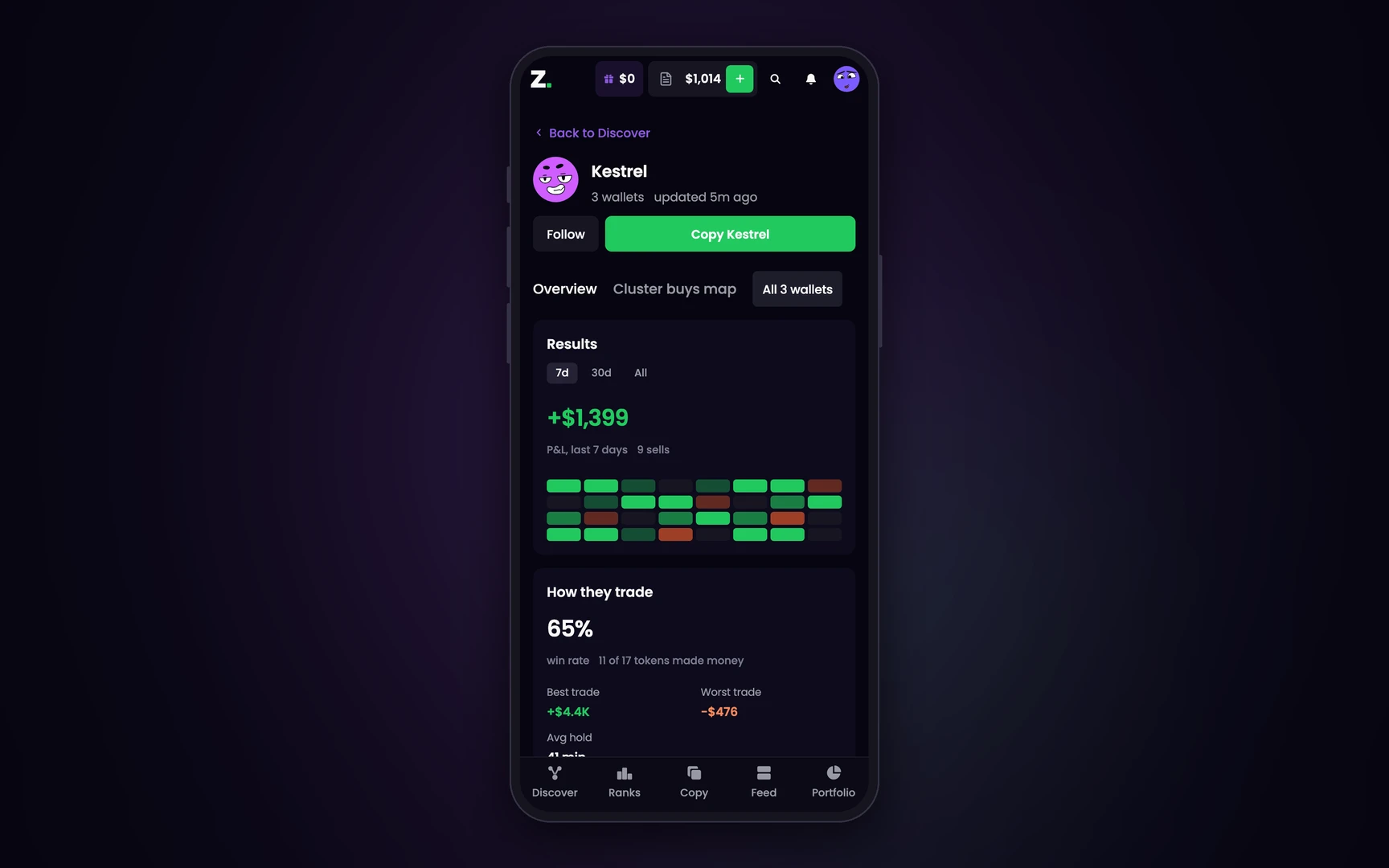
Results is the P&L they banked from sells, over 7 days, 30 days or all time. How they trade gives the win rate with the count behind it, the best and worst trade and the average hold.
Check the wallets
The tabs under the name are their wallets: the main one, then each alt with the reason it is linked: sent SOL, same funder or same group. All wallets adds the whole person up.
Follow or copy
Follow adds them to the traders you follow, which feeds the Only traders I follow or copy filter in Discover. Copy sets up a copy of them, all their wallets included.
Reading a trader page line by line: how to read a KOL wallet
Why one wallet is not the whole KOL
A tracker that follows one address at a time shows a pile of small buys, and you scroll past. It is one trader.
Alts linked
Most serious traders split their buys across a stack of wallets. clusterz links them into a cluster from SOL sent between them, a shared funder or trading together.
One buy, not twelve
When enough wallets from one cluster, usually 3, each buy the same token for $10 or more within 30 minutes, a cluster buy fires and the token glows on the Map.
Banked, not bragged
P&L is realised, from their sells. Not a net worth that went up because they deposited.
What they still hold
The Holding tab adds up every wallet in the cluster, so one wallet still holding cannot hide the others selling.
One trader, five wallets: what a tracker shows
A trader splits one buy across five alt wallets, $40 from each, a few minutes apart. Same token. The figures are made up. The rule behind them is not.
Track KOL wallets live, on any device
clusterz reads tracked wallets off the Solana network in real time. A tracked buy or sell lands on the Map and the Trending list as it happens.
- On the Map. A tracked trader is a face. Their line is green while they buy and turns orange when they sell.
- On Trending. Tokens with tracked buying rank on the list, with a Buy button on every row.
- On your phone. The same pages run in your phone's browser. There is nothing to download from an app store.
What a KOL wallet tracker cannot tell you
A record is evidence, not a forecast. Four things this page will not do for you.
- Unlinked wallets. An alt nobody has linked yet is invisible. A clean page is not proof a trader has no other wallets.
- Missing numbers. A dash means no source gave us that number. It never means zero.
- Tracked traders only. Lists and copies take the traders clusterz tracks. They do not take any address you paste in.
- The next trade. A record says what a trader did. It does not say what the next trade does.
Looking costs nothing. Our fee applies to Live trades only: 1% on trades you place yourself and 0.2% on copies and snipes. Practice uses play money.
Next: copy a trader, see them on the clusters map, or read what a KOL wallet is.
KOL wallet tracker: questions
What is a KOL wallet tracker?
A tool that follows the wallets of known crypto traders, called KOLs, and shows what they buy and sell on chain. clusterz tracks KOL wallets and other profitable traders on Solana, and links each trader's alt wallets into one cluster.
How do I track KOL wallets on Solana?
Sign in to clusterz, open Ranks or the Map and click a trader. Their page shows banked P&L, win rate, what they hold and every wallet linked to them. Press Follow to keep them in your filters.
What is an alt wallet?
An extra wallet run by the same trader as a main wallet. Traders split buys across alts so no single wallet shows the full size. clusterz links alts into a cluster from SOL sent between them, a shared funder or trading together.
Is the KOL wallet tracker free?
Yes. Signing in and reading trader pages costs nothing. A fee applies only when you trade in Live: 1% on trades you place yourself and 0.2% on copies and snipes.
Can I copy a KOL's trades?
Yes. Copy on a trader's page sets up a copy of all their wallets with your own size, exits and daily loss limit. You can run it with play money in Practice first. See copy trading on clusterz.
Does it show a trader's real P&L?
It shows the P&L banked from sells we read on chain, over 7 days, 30 days or all time. For a long history, All covers the last 2,500 swaps. Wallets we have not linked are not counted.
Does it work on a phone?
Yes. clusterz runs in your phone's browser with the same trader pages, so there is nothing to download from an app store.
Track KOL wallets on Solana
Free to look. Read the trader before you ape the bags.