The Map
Every chart you ever aped looked clean. Then six wallets you never saw dumped on you at once.
The Map draws that fight live. Tokens are tiles, tracked traders are faces, and every buy and sell is a line between them. You see which tracked wallets are in while it happens. Not after the candle.
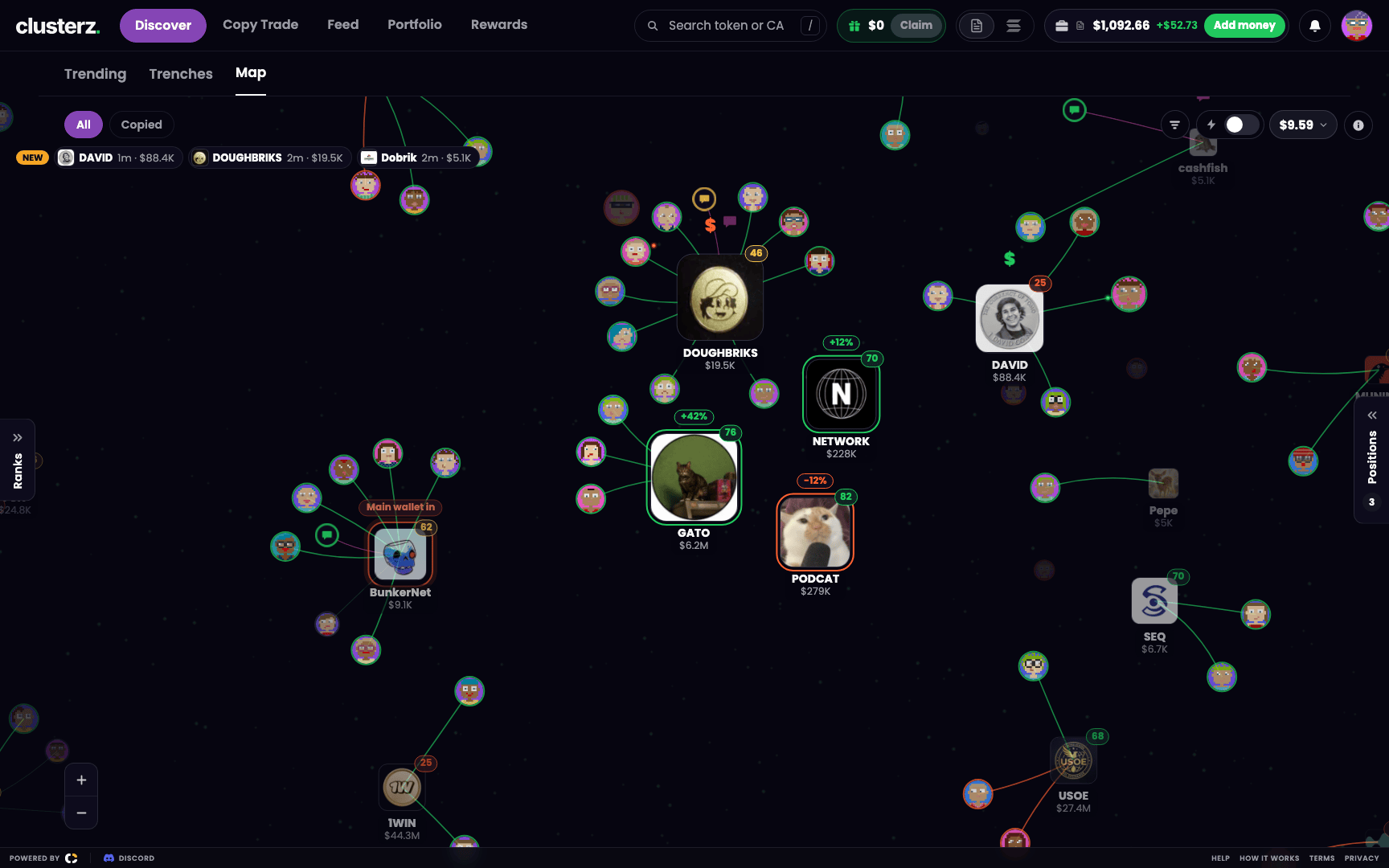 The Map: the busiest token in the middle, the tracked traders round it, every line a live trade.
Where it lives
Open Discover and pick Map. Or go straight to clusterz.fun/cluster.
The chips on top work like on the list: All, New when launches are available, Copied, and Faction while you are in one. Copied keeps the tokens your copied traders traded lit and fades the rest. Your filters hit the map too. See Discover.
How to read it
Tiles and faces
- A tile is a token. Its logo, with its symbol and market cap under it.
- A face is a tracked trader. No picture? You get a generated face. A trader in three tokens shows up three times, one face beside each.
- A token needs at least two tracked buyers to be drawn. One wallet buying alone is noise, so it stays off. Your own bags, fired cluster buys and tokens a trader you follow bought skip that rule.
Size and brightness
Size is buying. Right now, not yesterday.
The busiest token on the map sets the scale. A quiet token draws smaller than a trader's face. A fully busy one draws about 3.7 times as wide as the quietest. Busy tokens are bright, quiet ones go dim.
What counts as busy: how fast tracked wallets are buying, the net dollars they put in, and how many of them are in. Sells never add to it. They only eat into the net dollars. Nobody gets a bigger tile for dumping. It all cools off fast, so a token that was hot two minutes ago is already shrinking.
Position
The middle is earned. The busiest token sits in the middle, the next ones pack round it in rings, and the quiet stuff drifts to the edge.
Your own positions and live cluster buys always rank first. Places are re-checked every second, and a token only moves when it is clearly out of its place. So the map does not twitch every time someone buys $20.
Lines
| Line | Means |
|---|---|
| Green | The trader is buying |
| Orange | The trader is selling |
| Faint teal | Still holding, no trade on it for 5 minutes |
Live trades ride the lines as dots: green dots run toward the token on a buy, red dots run back to the trader on a sell. Bigger trade, heavier dot. A face shrinks a little once its trader is just holding.
The pops
When a tracked buy lands, a green $ floats up off the token. A tracked sell pops a red $. A callout pops a speech bubble. The pops stay readable when you zoom right out, so you can spot where the action is from across the map.
A token's first tracked buy hits with two green ripples. Fresh blood.
Rings and tags
- Violet glow: a cluster buy. Traders buying together. More on that below.
- Your bags: a ring round the tile, green while you are up, orange while you are down, grey before it has a price. Your P&L sits above it as a percent.
- Orange ring with Main wallet in: a cluster's main wallet is buying right now. That is the cluster's public wallet. The rest of the cluster are its alts.
- Your faction: a ring in your faction's colour on the tokens your faction holds. See Factions.
- Small dark circles joined to a token: the SI read, callouts and posts from tracked KOLs about it. Click a callout circle to read the callouts.
Fading out
Tokens leave on their own. A token fades when tracked sells swamp the buys, when the tracked wallets sold most of what they bought, when nobody tracked trades it for 5 minutes, or when it is past 5 minutes old with under $2,000 of liquidity or under 10 holders. Sold-off, sold-out and thin dead markets go in about eight seconds, the rest in about forty. Dead money doesn't get to hang around.
Your own bags do not fade out. A quiet position dims and stays put. The one exception: turn on Hide moonbags and the moonbags a take-profit left behind come off the map.
The background
The faint dust drifting behind everything is the tape. More trades, more dust, moving faster. If it freezes, the feed stalled. Don't read a frozen map as a quiet market.
How a cluster buy looks
Here is the move that cooked us for years. One trader, a pile of wallets. Each wallet buys a little. A one-wallet tracker shows five small buys and you shrug. It is one guy loading up, and he is about to sell it to you.
clusterz knows those wallets belong together. When enough alts from one cluster, usually 3, each buy the same token for at least $10 within 30 minutes, it fires a Cluster buy. By default a wallet only counts if it is not in the red over the last 7 days, not in the red over the last 30, and has at least 3 closed trades in 30 days. No data, no pass. Losers buying together is not a signal.
On the map you watch it happen:
- Faces from the same cluster appear round one token, green lines pointing in.
- Green $ pops stack up. The tile swells and pulls toward the middle.
- The cluster buy fires. A soft violet glow lights up behind the token, and it jumps to the top of the ranking, alongside your own bags.
The glow lasts up to 4 minutes, less if the token fades first. After that the token ranks on its trading like everyone else, so an old cluster does not keep the top spot on its glow alone.
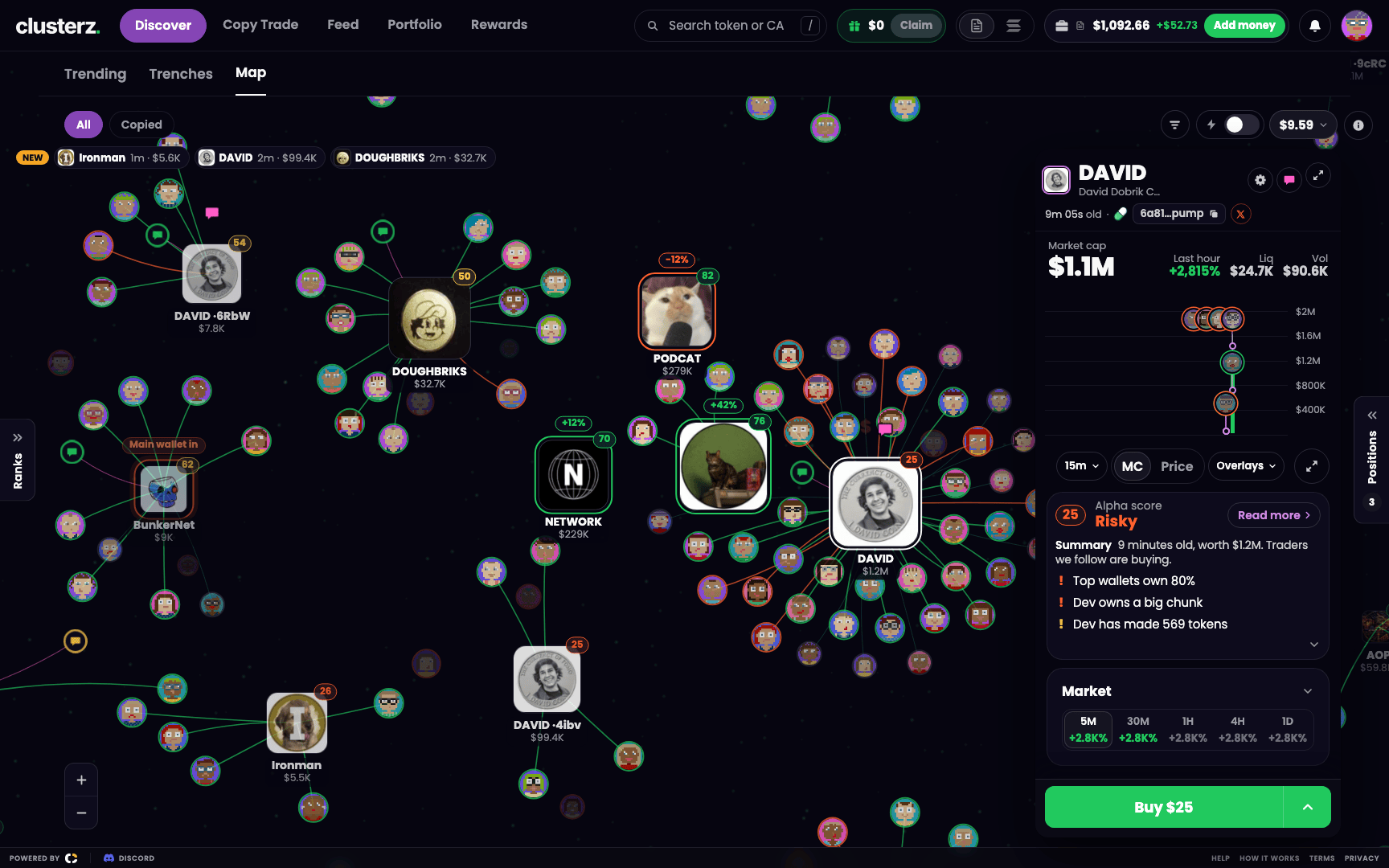 A busy token in focus: its cluster round it, green lines in, a $ popping off. You watch them load while they load.
Then watch the lines. Green turning orange while the glow is still on means they are already selling. And a Main wallet in tag after the alts loaded can be the classic setup: the public wallet buys, the followers ape after it, the alts have someone to sell to. Watch which way their lines turn.
What you can do from it
On a computer
| Action | Result |
|---|---|
| Hover a token | Preview its card |
| Click a token | Pin its card open |
| Click empty map | Close the card |
| Scroll | Zoom |
| Drag | Pan |
| Drag a token | Move it |
| Double-click | Fit everything |
| + and - (bottom right) | Zoom in and out |
The card has the chart, the market and the Buy buttons. Buy right there, no tab switch while the chart runs away. Holding it? The sells are there too. See Buying and selling.
On the card's top row:
- The eye is Watch. It adds the token to the Watching tab in your positions panel. Unwatch takes it off.
- The pin is Pin. It keeps the card on screen while you go look at other tokens. Drag pinned cards where you want them, resize them from the corner. They stay put after a reload.
- The arrows open the full token page.
Hover or click a face for that trader's card: their numbers, their holdings, how many people copy them, a Copy button with their name on it and See full profile. Everything outside their cluster dims while you look. See Copy Trade and Wallets.
One-tap buy
Turn on One-tap buy and a double-click on a token buys your one-tap amount in your current mode, Practice or Live. One click still just pins the card. While it is on, double-click on a token buys instead of fitting the map. See Buying and selling.
Search
Press / and type a symbol, a name or at least 4 characters of the address. The best match lights up on the map as you type. Hit Enter and the map flies to it and opens its card.
Toss the trash
Drag a token or a trader into the black hole at the bottom right and it is gone from Discover. The toast has an Undo. Changed your mind about a token later? Bring it back from Filters, under Tokens you hid. A token you hold stays in your positions either way.
The list beside it
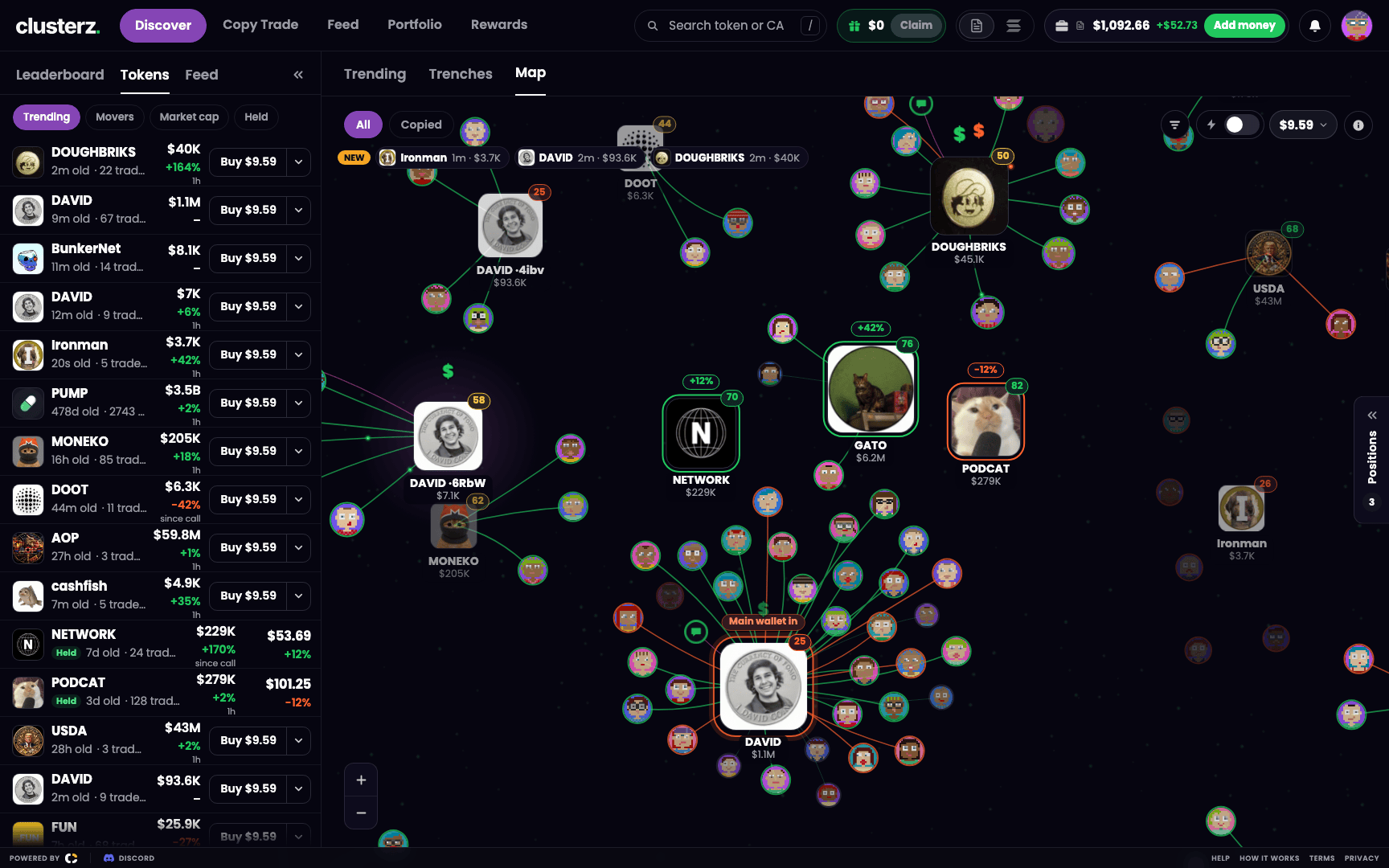 The Tokens panel beside the map: the same tokens, as a list.
Press [ to open the left panel and pick Tokens. It lists exactly the tokens on the map, filters and all. Sort it by Trending (latest tracked trade first), Movers, Market cap or Held. Click a row to pin that token's card.
Want the map's own order as a list? That is Trending in Discover. Its default Active sort ranks on the same number the map does, so row 1 is the token in the middle of the map.
On your phone
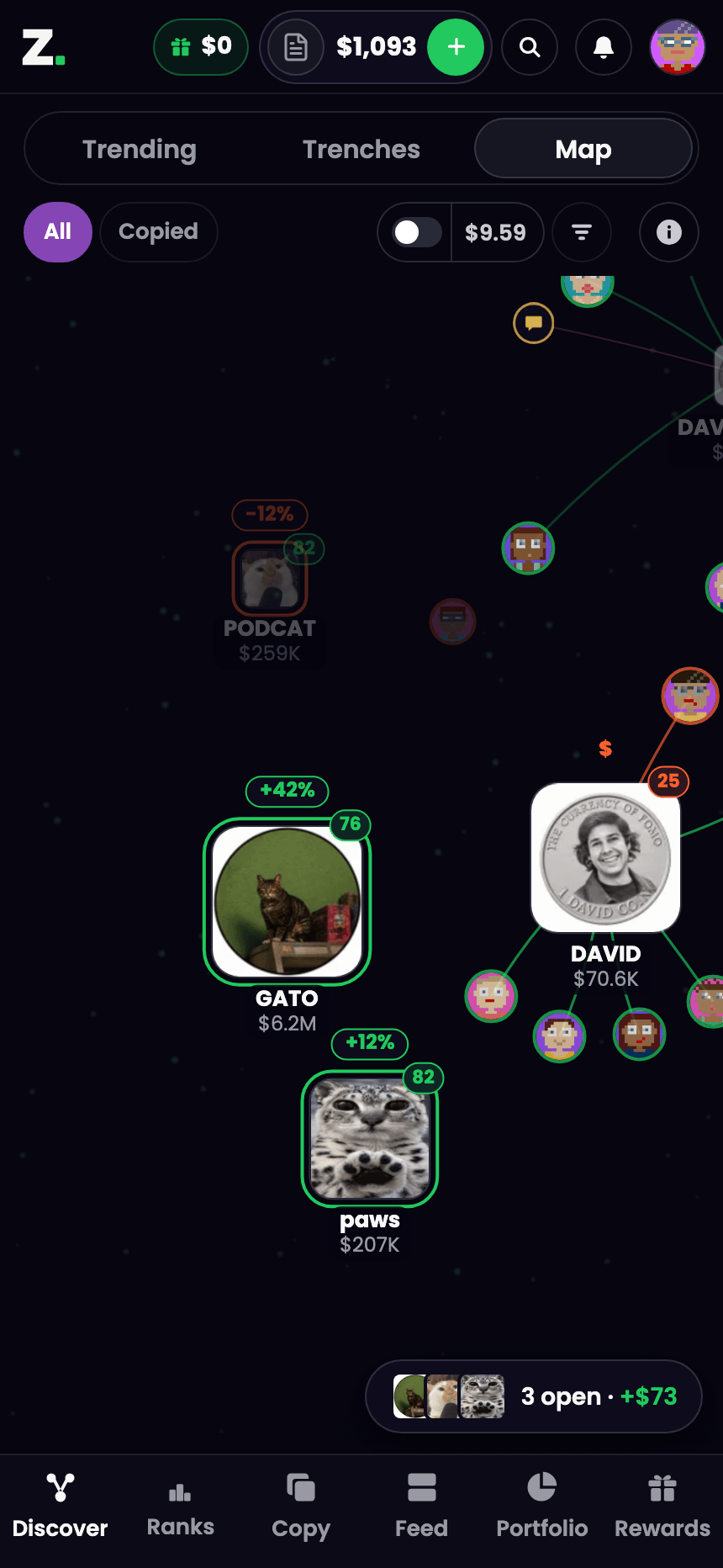 The Map on a phone. Same fight, one thumb.
- Trending, Trenches and Map share one switch at the top. The chips sit under it.
- One-tap buy and the filter button sit at the right end of the chip row. Tap the amount beside One-tap buy to change it.
- Pinch to zoom, drag to pan, tap a token to open its card. The card comes up from the bottom, and the token slides up so you can still see it. Swipe down to close.
- The map lays out taller to fit a portrait screen.
- No zoom buttons and no NEW strip. Your thumbs do the zooming.
Holding bags? The positions pill floats over the map. See Using clusterz on your phone.
Tips from the trenches
- Hunt the violet glow. It is the fastest way to catch a cluster buy as it happens. Glow means look now.
- The NEW strip under the chips (computer, All or New) shows up to three of the newest tokens on the map, under 5 minutes old. Click one to open its card.
- Size beats price. A tile swelling with green lines on it is tracked money arriving. A big tile going orange is tracked money leaving.
- Want more on the map? Show hot tokens in More filters adds busy pump.fun tokens tracked wallets have not piled into yet. They wear a dashed amber border and a flame until two tracked wallets buy.
- Lost? Double-click empty map to fit everything (with One-tap buy off), or hit Help in the footer and pick Replay the map walkthrough.
- Start in Practice. Get the feel for when to ape before real SOL is on the line.