Memecoin take profit strategy: your first exit plan
A memecoin take profit strategy you can set today: when to sell memecoins, a stop loss that fits, and a first exit plan so you stop round-tripping winners.
Round-tripping is a winner you held all the way back to red. We have the screenshots.
Every switch starts off, so until you set a plan nothing sells a bag you bought yourself. And a plan is not a fill. Exits decide when to sell. The market decides the price. Every control is in Exits, and every exit setting at a glance is in Settings explained. This guide is the plan.
Try a plan with play SOL before real SOL rides on it: paper trading memecoins.
When to sell memecoins: pick one take-profit side
Decide before you buy. Mid-pump you will not decide. You will hope.
There are three ways to bank a winner, and they do not stack:
| Way | What it does | Live, tab closed |
|---|---|---|
| Take-profit steps with Trailing exit | Sells parts on the way up, then the rest under the high | Waits for a tab |
| Trailing stop | Sells all under the high | Can run |
| Profit lock | Sells all when the gain falls back | Waits for a tab |
Profit lock stands the other two down, and your Take profit with them. A Trailing stop from Trade settings has a start gain, so it replaces the steps. Stop loss sits beside any of them.
Your starter exit plan
Every number here is the app's default: a starting point, not a promise.
- Press the gear (Trade settings) and scroll to Exits for new buys.
- Turn on Stop loss at 30% ("Sells all at -30%").
- Leave Trailing stop off. It would replace your steps.
- Press More. Turn on Take-profit steps and keep +100% sells 50% and +300% sells 25%. Each percent is of the position you bought, not of what is left.
- Turn on Trailing exit. After a step has sold, it sells the rest 18% under the high. It does not fire below your entry.
- Under Protection, turn on Pool drained (sells all if the pool loses 45% of its liquidity) and Failing sells.
- Press Save. Open positions keep their exits.
- In Account, turn on Keep a slice when selling all and pick 10%. Do it before you buy. A position takes its slice size when it opens.
What that does to a bag:
| Price | What sells |
|---|---|
| Down 30% from your entry | All of it, until the slice forms |
| +100% | 50% of what you bought |
| +300% | Another 25% of what you bought |
| 18% under the high, after a step, above entry | The rest, down to your 10% slice |
The slice is your moonbag. No rule sells it, and your Trade settings stop loss stops covering it. A level you set on that position yourself stays on. It rides to the moon or to zero, your call.
The hole in this plan: a token that peaks at +80% sold no step, so the Trailing exit never started. It can ride all the way back to your stop. That is the classic round trip.
If your tokens rarely reach +100%, move the first step down, say to +50%. You bank earlier and keep less of the rare runner.
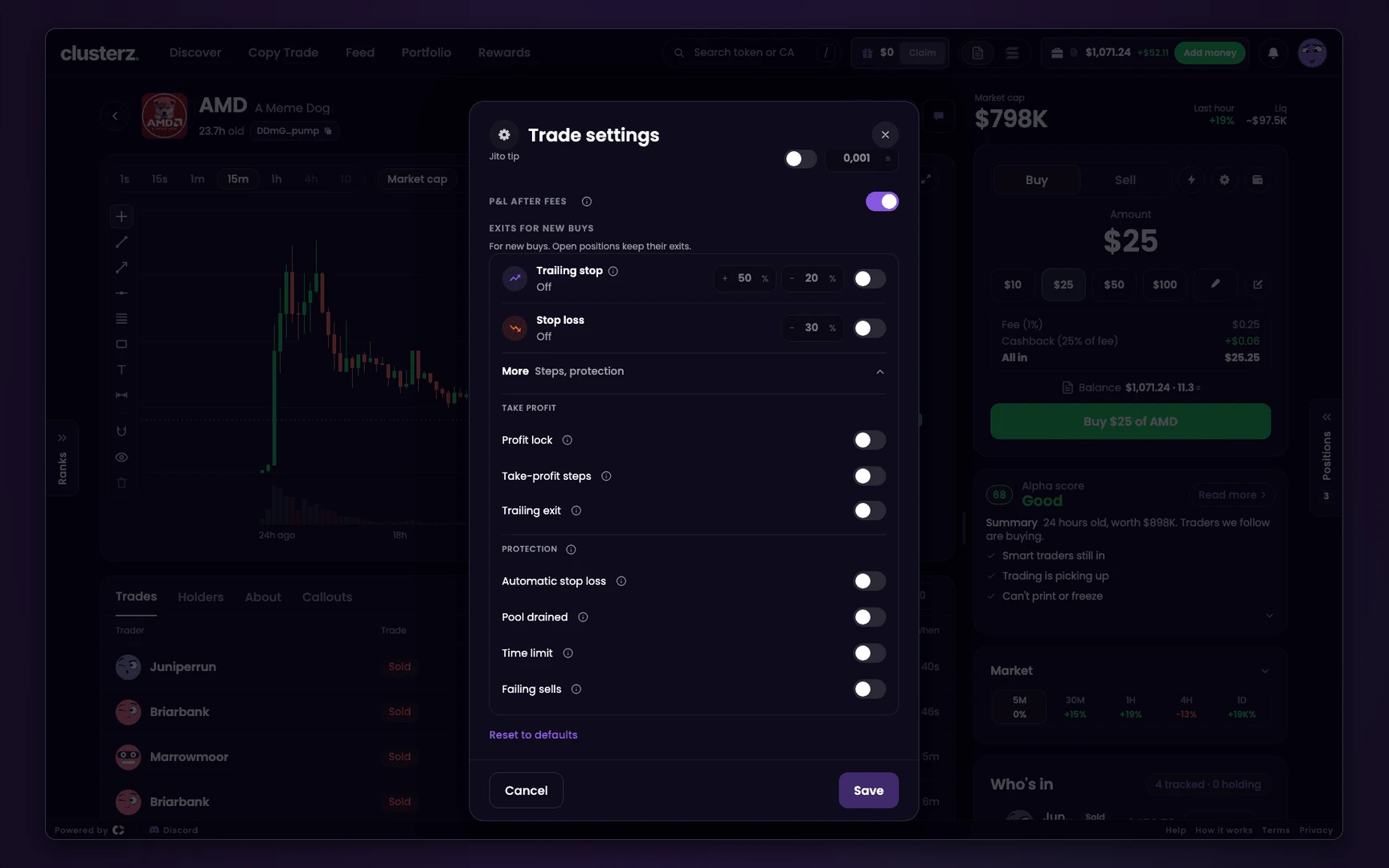 Trade settings, with More open.
Profit lock: the one-switch version
Do not want steps? Run Stop loss and Profit lock alone.
Once the position peaks at +50%, it sells if the price falls back to your entry. Past +100%, it sells if the gain falls to +50%. Past +300%, it sells 40% under the high.
That closes the +80% hole. The price: it sells the whole position, so nothing banks on the way up and it leaves no slice. A peak of +49% gets no cover from it at all.
Take profit and trailing stop on one bag
Take profit is set per position, not in Trade settings. Open the position and press Set exits, or Edit when it has some. It sells all at your level (presets +50%, +100%, +200%) and replaces that position's steps.
A Trailing stop set here trails from the moment you save. It can sell below your entry.
A Trailing stop from Trade settings waits for its start gain: "From +50%, sells 20% under its high". Set here, it replaces the Trailing exit. Your steps keep running.
These levels are what you want on a bag you plan to leave alone. Here is why.
Live exits with the tab closed
In Practice nothing needs signing, so exits sell with no tab open. Do not learn that habit. In Live your wallet signs each sell, so by default exits sell only while a clusterz tab is open.
With no permission, a level hit while you are away waits:
- Open clusterz within 15 minutes and it sells at once. The exception: the level was hit more than 2 minutes ago and the price is now more than 15 points below it. Then it asks.
- After 15 minutes it asks whatever the price did. The position shows Not sold. Press Sell now, or Keep to hold and clear only that level.
Keep exits running when I close the app, in Account, lets the server sign one thing: a sell of the whole position at your own Take profit, Stop loss or Trailing stop.
On a phone the row reads Keep exits running. Nothing partial, and no sell that keeps a slice.
So Take-profit steps, Trailing exit, Profit lock, Automatic stop loss, Pool drained, Time limit and Failing sells all still wait for an open tab.
The wallet permission itself is broader than that. clusterz enforces the limit, not your wallet. Turn it off in Account any time.
With it on, the starter plan's Stop loss runs while you sleep. Your steps do not.
A bag that matters overnight gets a Trailing stop on the position before you close the tab. Copies are different: they run on our server by their own exits. See Copy Trade.
What a memecoin stop loss cannot do
- Fill at your level. A stop loss is a trigger, not a price. In a thin pool the price gaps straight through it and you sell at the next real bid, well under your level. The toast gives the real return.
- Beat a rug. Pool drained reacts after the liquidity leaves. The dev moves first.
- Sell on a price it cannot confirm. That saves you from a bad print. It also means a real crash waits for a confirmed price.
- Ignore Max price move. On Live a sell obeys it, 10% by default. If the price runs past it the sell fails and the exit retries, and the position shows Retrying.
- Sell what nobody will buy. Failing sells tries every other way. No market, no sale.
- Run through an outage. If our Solana connection drops, nothing sells and the exit reads Paused. Your Main wallet's key is yours, so you can export it and sell elsewhere. See When Live trading pauses.
Before you send it
- Set the plan in Trade settings before the buy. It does not reach positions you already hold.
- Going to bed in Live? Turn on Keep exits running when I close the app and put a level on anything you care about.
- Try the plan in Practice first, knowing Practice exits run with no tab and Live ones do not.
- No plan is a promise. These numbers will not suit every token, and none of them is advice.