Funding your wallet
Load SOL into your own wallet to trade in Live. Pull it out to any Solana address whenever you want. Nobody holds it hostage.
How money moves
Sign in and you get your own Solana wallet: your Main wallet. Your keys, your bags. Export the private key any time. We never hold your funds. No identity checks, no deposit fee. You only need SOL here to trade in Live.
Money in: send SOL on the Solana network to your address. Money out: withdraw SOL to any Solana address. That is it. Both live under Portfolio (the Add money and withdraw page) and under Account > Wallets.
Your wallets
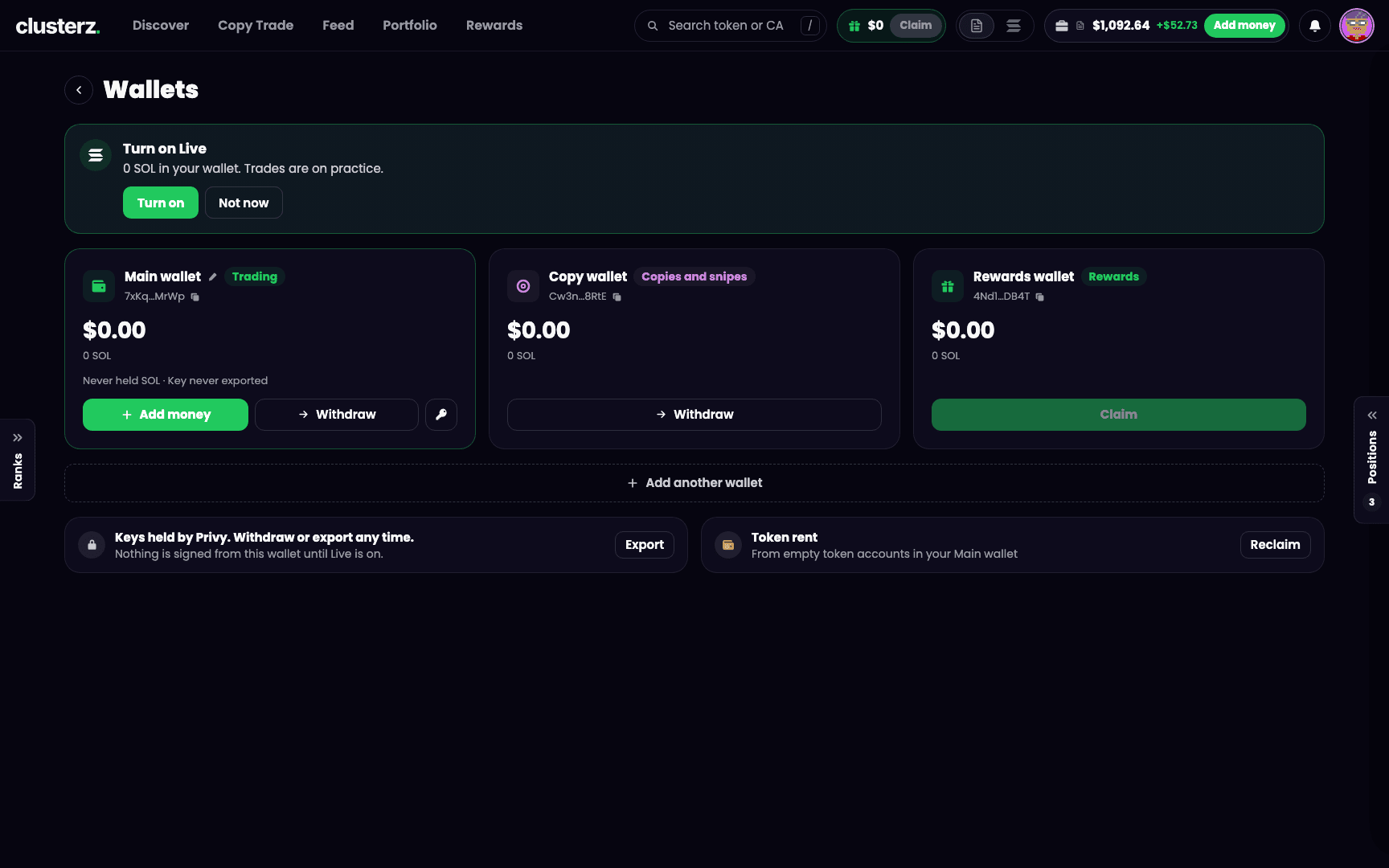 Three wallets, three jobs: Main for trading, Copy for copies and snipes, Rewards for payouts.
Open Account > Wallets. Every wallet on your account, its balance and its address.
- Main wallet (tagged Trading). Your Live buys and sells come out of this one. It has Add money, Withdraw and a key button that exports its key.
- Copy wallet (tagged Copies and snipes). Copies and snipes buy from this one in Live, so the bot's bags never mix with yours. Create it on Copy Trade (Copy on a phone) with Create Copy wallet. The server holds this wallet so copies and snipes can buy without a prompt, so its key cannot be exported. Fund it with Add money (From Main wallet, From another wallet, or Buy with card when available). Send SOL back with Move to Main. SOL in it can only go back to your own wallets.
- Rewards wallet (tagged Rewards). Cashback and referral payouts land here. Claim moves them to your Main wallet. See Rewards and referrals.
Want more? Add another wallet, then switch with Use for trading. One wallet trades at a time.
Add money
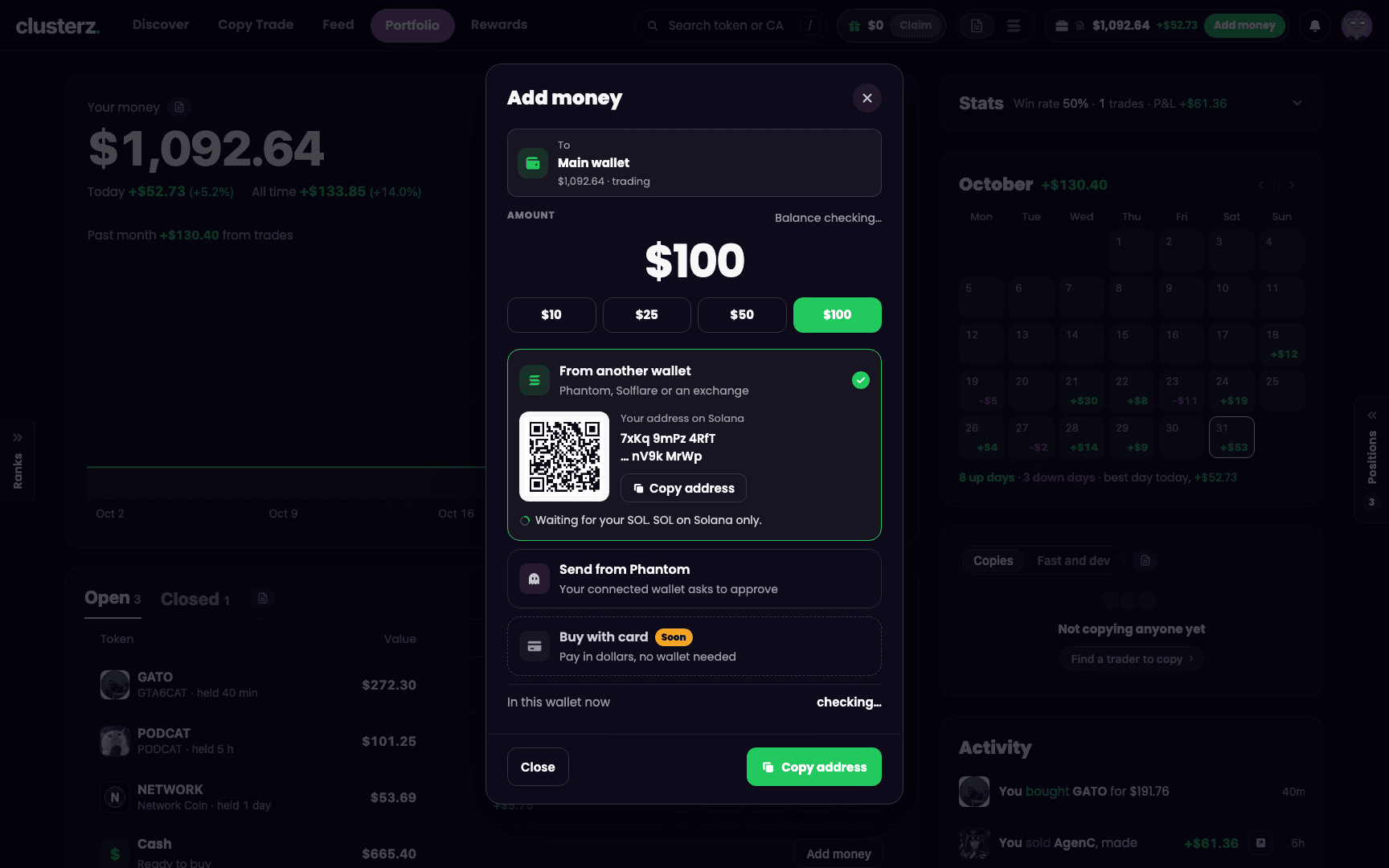 Add money: send SOL to your own address. That is the whole trick.
- Press Add money on Portfolio or on your Main wallet under Account > Wallets.
- Under From another wallet, press Copy address, or scan the code with your phone wallet.
- Send SOL to that address from Phantom, Solflare, or the withdraw page of your exchange.
- Wait for it to land. Usually under a minute. The sheet shows Waiting for your SOL, then the amount that landed, and your balance updates on its own.
Solana network only. SOL only. Send anything else, or from another network, and it can be gone for good.
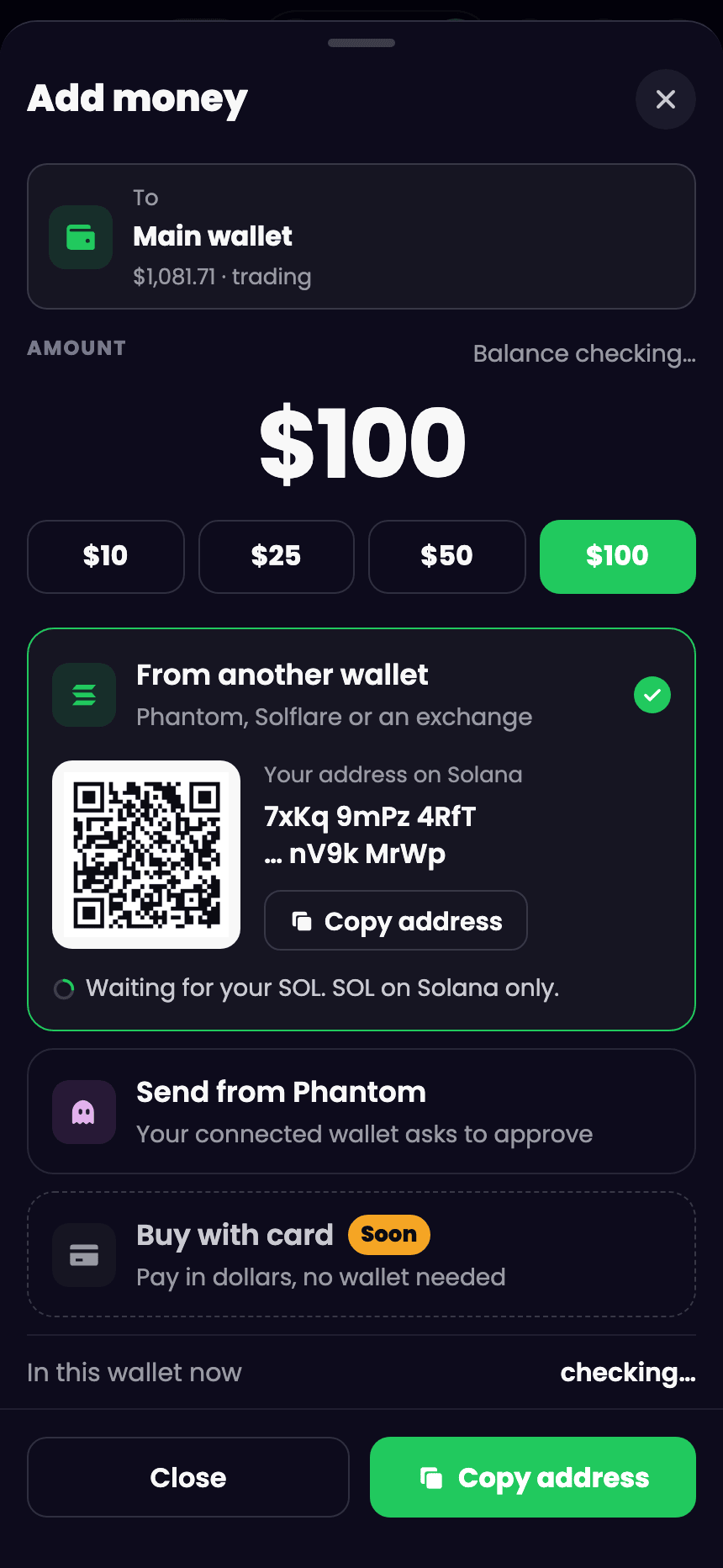 On a phone: copy the address or scan the code. Done from the toilet.
Send from Phantom
Got Phantom? Skip the copy-paste. The Add money sheet for your Main wallet has Send from Phantom (it names your wallet instead if you run another Solana wallet). Straight to your Main wallet. Not connected to clusterz yet? It asks you to connect when you send.
- Pick Send from Phantom.
- Choose an amount from the presets or type one.
- Press the button that names the amount, such as Send 0.5 SOL from Phantom.
- Before you press it, the sheet shows the exact SOL, the wallet it comes from and your Main wallet it goes to.
- Approve the transfer in Phantom. The sheet tells you when it has landed.
It only ever lands in your own Main wallet, and it cannot come from one of your clusterz wallets. Phantom short on the amount plus the network fee? The sheet tells you before anything moves.
Buy with card
Buy with card is on the sheet too: pay in dollars, no wallet needed. While it says Soon, it is not live. Use From another wallet. When it goes live, the card partner's page opens with its own fee and confirm. clusterz adds no fee.
Withdraw
- Press Withdraw on Portfolio or on your Main wallet under Account > Wallets.
- Paste a Solana address in the address field (or press Paste).
- Enter an amount, or press 25%, 50% or Max.
- Check the review: You get, Network fee and Balance after, plus a line naming the exact SOL, the address and what stays in your wallet.
- Press Withdraw with the amount on it. Your wallet signs the transfer. The receipt shows what you sent, the network fee and your new balance.
A withdrawal cannot be undone. Check the address. Then check it again.
The form keeps you honest:
- Only cash can be withdrawn. Want more out? Sell a token first.
- The address must be a Solana wallet address. A token account address gets refused with "That is a token account, not a wallet." The same wallet you send from gets refused too.
- If what stays behind is under 0.001 SOL, the form asks you to leave at least 0.001 SOL or send it all.
- If a withdrawal is not sent, the message says why and that nothing moved. Press Try again to send it fresh. If the network has it but has not confirmed it yet, you get "Sent, not yet confirmed. Check the balance in a minute."
What it costs
Only the Solana network fee: 0.000005 SOL, shown on the form before you send. clusterz charges nothing on deposits or withdrawals. Zero.
Reclaim rent
Every token you buy opens a small token account in your wallet, and the network holds a deposit (rent) on it, about 0.002 SOL each. Sell a token in full and that account sits there open and empty. Jeet enough tokens and that adds up. Reclaim rent closes those empty accounts and sends the rent back to your Main wallet.
- Open Account > Wallets and press Reclaim next to Token rent, or press Reclaim on the Token rent to get back line on Portfolio.
- Wait while it checks your token accounts.
- Review the preview. Close lists the empty accounts. Burn and close lists accounts holding only dust (worth under 0.0001 SOL, or with no way to sell them), which get destroyed before they close. Accounts it leaves alone are listed with the reason, such as still held or trading, or worth more than dust.
- Check Rent back, Estimated fee and You get. If anything will be burned, tick I understand to confirm it.
- Press Reclaim with the amount on it. Big wallets run in batches, each shown as it completes.
Tokens you still hold or are trading are never touched. A preview lasts two minutes. After that, press Preview again.
Export your key
Your Main wallet's private key is yours. Under Account > Wallets, press the key button on the wallet (Export key on wallets you added), tick I understand, and press Show key. The page records when you last exported it. Never share your key. Never paste it anywhere. clusterz never asks for it, so anyone who does is trying to rug you.
Before you send it
- New exchange or new address? Send a small test amount first.
- Run Reclaim rent after a busy day in the trenches. Get back the SOL stuck in empty token accounts.
- Fund your Copy wallet only with what you want copies and snipes to use. Your own trades keep using your Main wallet.