How to read the clusters map for Solana tokens
How to read the clusters map for Solana tokens: what a tile, a face, a line and a colour mean, how a cluster buy looks, and what the wallet card shows.
A clusters map turns wallets into shapes and money into lines. Pretty, until you misread it and buy the top.
Ours is the Map. It reads differently from the holder maps you may know, so start with that. The Map on one page: the Solana clusters map.
Clusters map versus holder map
A holder map draws the holders of one token.
Each circle is a wallet, sized by how much of that token it holds, with lines between wallets that have moved funds to each other. It answers one question: who holds this token, and are they connected?
The clusterz Map works the other way round:
| Holder map | The clusterz Map | |
|---|---|---|
| What it draws | The holders of one token | Every token tracked wallets are trading right now |
| A shape is | A holder wallet | A token (a tile) or a tracked trader (a face) |
| Size means | How much of the supply a wallet holds | How hard tracked wallets are buying, right now |
| A line means | A link between wallets | A trader's trade or holding in a token |
| Wallets shown | Anyone who holds it | Tracked wallets only, alts linked into clusters |
So the Map will not show you the top holders of a token. For that, read the holder checks: Holder checks. What the Map shows is where tracked money is moving, live, across every token at once.
How to read the clusters map in clusterz
Open Discover and pick Map. Then learn four things.
A tile is a token. Its logo, with its symbol and market cap under it. A token needs at least two tracked buyers to be drawn. Your own bags, fired cluster buys and tokens a trader you follow bought skip that rule.
A face is a tracked trader. No picture means a stand-in face. A trader in three tokens shows up three times, one face beside each.
A line is a trade or a hold. The colour says which:
| Line | Means |
|---|---|
| Green | The trader is buying |
| Orange | The trader is selling |
| Faint teal | Still holding, no trade on it for 5 minutes |
Live trades ride the lines as dots: green toward the token on a buy, red back to the trader on a sell. Bigger trade, heavier dot.
A colour round a tile is a state. Read it before the size:
- Violet glow: a cluster buy.
- Orange ring with Main wallet in: a cluster's main wallet is buying right now. That is its public wallet. The rest of the cluster are its alts.
- Green or orange ring with a percent: your own bag, up or down.
- Small dark circles joined to a tile: the SI read, callouts and posts from tracked KOLs about it.
Pops tell you what just happened: a green $ for a tracked buy, a red $ for a sell, a speech bubble for a callout. Two green ripples mark a token's first tracked buy.
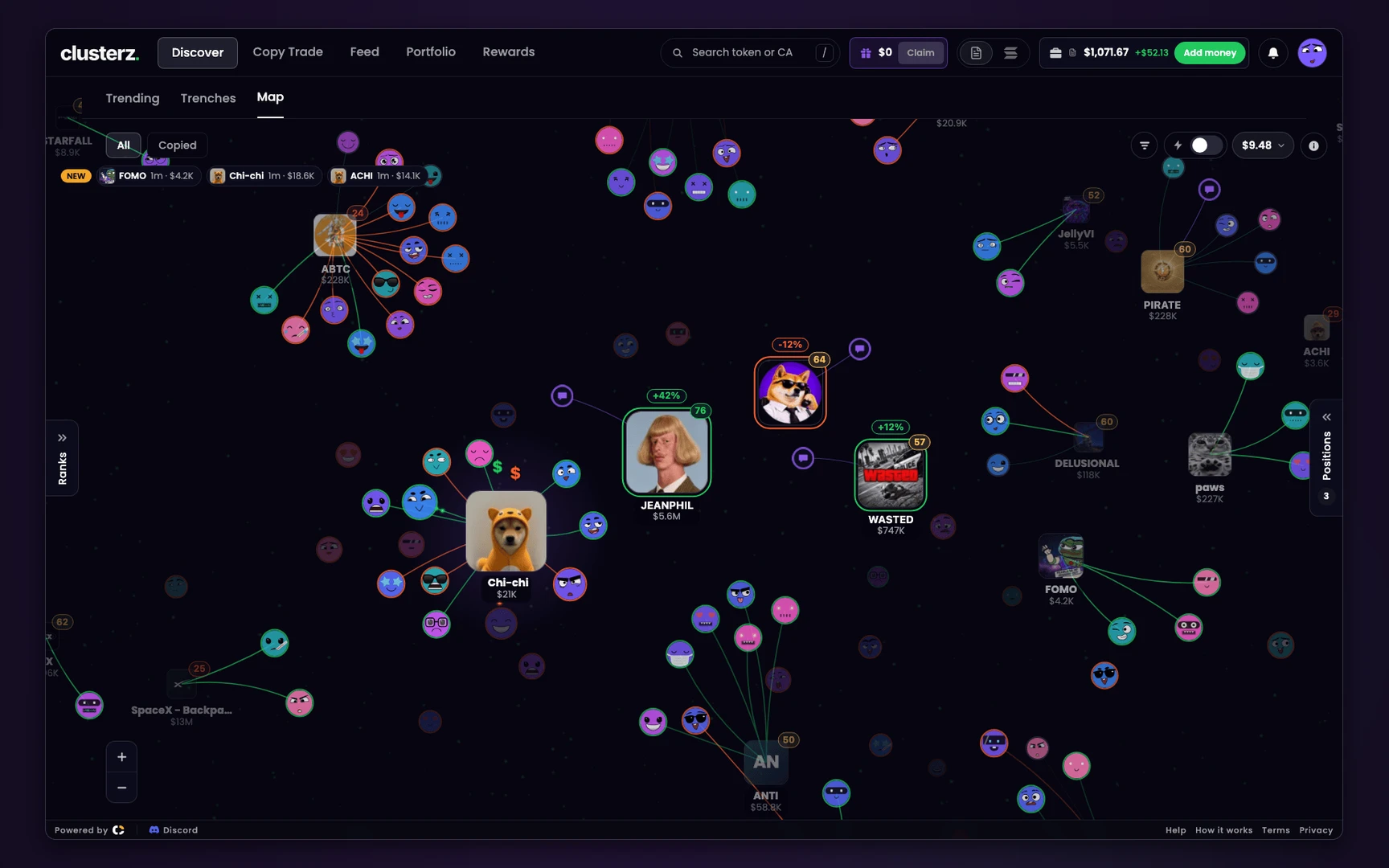 The busiest token in the middle, the tracked traders round it, every line a live trade.
Size, place and fading
- Size is buying now. How fast tracked wallets buy, the net dollars they put in and how many of them are in. Sells never add to it. They only eat into the net dollars. A fully busy tile draws about 3.7 times as wide as the quietest.
- The middle is earned. The busiest token sits in the middle. Your positions and live cluster buys always rank first.
- Tiles leave. A token fades when tracked sells swamp the buys, when tracked wallets sold most of what they bought, when nobody tracked trades it for 5 minutes, or when it is past 5 minutes old with under $2,000 of liquidity or under 10 holders.
It all cools fast. A tile that was huge two minutes ago is already shrinking. Read the lines, not the memory of the tile.
How a cluster buy looks on the Map
A cluster is one trader on several wallets. A Cluster buy fires when enough of that cluster's wallets, usually 3, each buy the same token for at least $10 within 30 minutes.
By default a wallet only counts if it is not in the red over 7 days or 30 days and closed at least 3 tokens in 30 days.
On the map, in order:
- Faces from one cluster gather round a tile, green lines pointing in.
- Green $ pops stack up. The tile swells and pulls toward the middle.
- The violet glow lights up, for up to 4 minutes.
Then the part that matters. Green lines turning orange while the glow is still on means they are already selling.
And Main wallet in after the alts loaded can be the classic setup: the public wallet buys, followers ape it, the alts sell into them.
Full read: How a cluster buy looks, and why it happens: What is a wallet cluster.
Connected wallets: read the wallet card
Hover a face (tap on a phone). The wallet card opens and everything outside that trader's cluster dims, so you see their connected wallets as one.
Read it top to bottom:
- Whose cluster, or Solo wallet, and how many wallets.
- P&L this week: realised, from sells. A deposit is not profit.
- Win rate, with "N of M won".
- Worth: what they hold now.
- Holding most: their top four tokens.
- Funding. "Funded via ..." or, in orange, "Same funder as N tracked wallets". The orange one is a connected wallets warning. Count people, not faces.
Then See full profile for the wallet page: every wallet in the cluster with Why linked, sent SOL, same funder or same group. See Wallets in this cluster and How to read a KOL wallet.
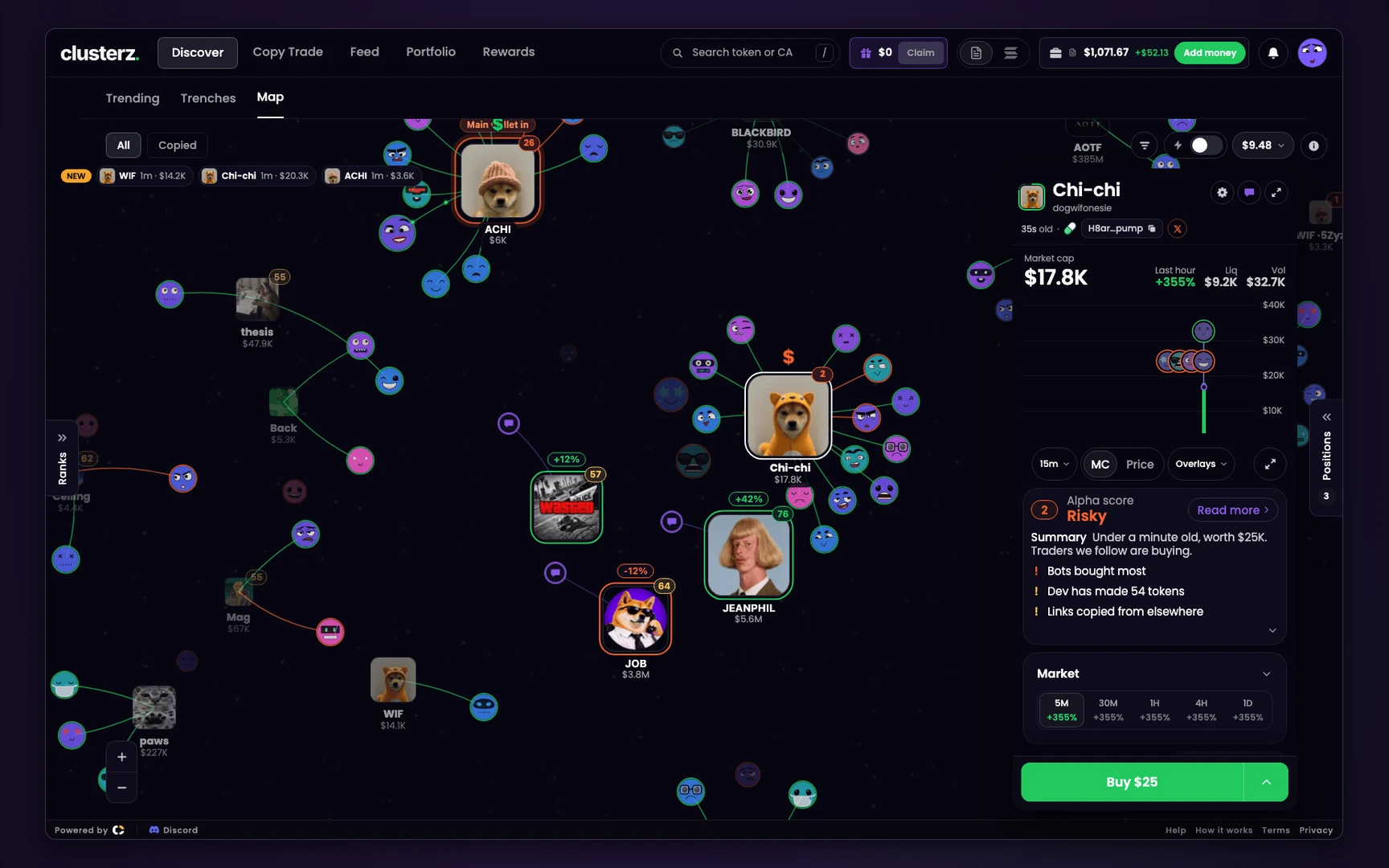 A busy token in focus. You watch them load while they load.
Using the map without getting played
- Hunt the glow, then check the lines. Glow plus orange is an exit in progress.
- Size beats price, but direction beats size. A big tile going orange is money leaving.
- Click a token to pin its card, then read the Alpha score and Against before Buy.
- Drag trash into the black hole at the bottom right. Undo in the toast brings it back. See Hide a token or a trader.
- If the faint dust behind everything freezes, the feed stalled. A frozen map is not a quiet market.
What the clusters map cannot show
- Holders who are not tracked. The Map draws tracked wallets only. The rest of a token's holders are not on it.
- Wallets we have not linked. An alt funded through an exchange that never touches the others reads as a stranger, or not at all.
- Transfers. They are not on our tape. A trader who moved a bag to another wallet still reads as holding it.
- Lone buys. One tracked wallet buying alone draws no tile.
- Intent. A glow says wallets bought together. It does not say why, or when they sell.
A bright map is not a buy signal, and nothing here is advice.
Before you send it
- Read the line colour before the tile size.
- Hover the faces. "Same funder as N tracked wallets" in orange means fewer people than faces.
- Main wallet in after the alts is the moment to be careful, not the moment to ape.
- Run the token through a rug check anyway.
- Finding launches before they reach the map: How to find new Solana memecoins early.