Discover: Trending, Map and filters
By the time a KOL posts it, you are the exit. So we put the buying itself on screen.
Discover shows you what tracked wallets are buying right now. Not two hours later in a KOL's Telegram. Now.
How we catch it
clusterz follows a list of tracked wallets on the network in real time. They buy or sell, the token shows up on Discover. Wallets that trade together form a cluster, so a pile of small buys from one trader counts as one move. Lots of wallets, one guy. Now you see him.
Three tabs up top:
- Trending: a ranked list of tokens with tracked buying. It opens when you go to Discover.
- Trenches: new launches in three live columns. See Trenches.
- Map: the same tokens drawn as tiles, with the traders buying and selling them.
Set your filters once. They hit the list and the map.
Trending
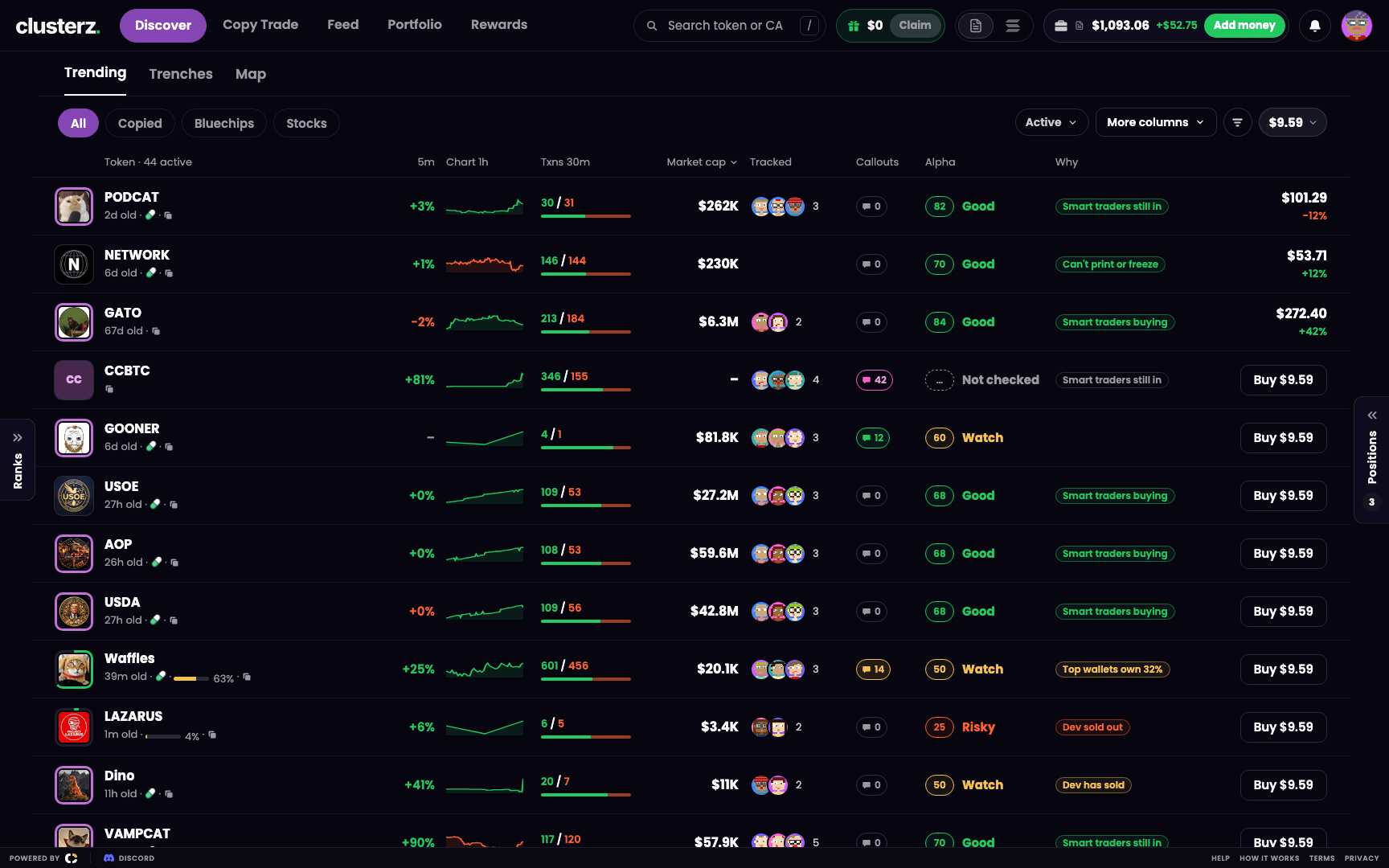 Trending: who is buying, how good it looks, and a Buy button right there.
One row, one token. Here is what each column tells you:
| Column | What it shows |
|---|---|
| Token | Symbol, logo, age, where it trades, bonding progress while on the curve, and a button to copy its address |
| 5m | Price change over the last 5 minutes |
| Chart 1h | A small price chart of the last hour |
| Txns 30m | Buys and sells in the last 30 minutes |
| Market cap | The market cap |
| Tracked | How many tracked traders are in, with their faces |
| Callouts | How many callouts callers have posted about it |
| Alpha | The Alpha score (1 to 99) and a word: Good, Watch or Risky, or Not checked before there is a read |
| Why | The main reason behind the score |
| Buy | Buys your preset amount in one click |
Token, Market cap and Buy always show. A Cluster buy tag marks the row of the latest cluster buy: tracked traders buying it together. Pay attention to that one. Turn the other columns on or off with More columns. On a narrow screen the list drops extra columns first, so the Buy button stays in sight.
The Why column gives the top reason behind the score. Stuff like "Smart traders buying", "A smart trader bought", "Smart traders still in", "Smart traders sold", "Callers still holding". Risk shows up the same way: "Dev sold out", "Creator can print more". Read those twice before you ape. Skip them and you are the exit liquidity. Alpha score breaks the score down in full.
Sorting
The sort button says Active by default: the Map's own ranking. Your positions and live cluster buys sit on top, then the most tracked activity. Row 1 is the biggest token on the Map. Want something else? Sort by Move, Traders, MC, Liq, Trades, Holders or Alpha. Every sort puts the biggest first.
Chips
The chips over the list cut the noise:
- All: every token with tracked activity.
- New: shows when new launches are available, and switches Discover to them.
- Copied: tokens traded by the traders you copy. The list shows only those tokens. On the Map the rest fade out.
- Bluechips and Stocks: two ready market lists. See Bluechips and Stocks.
- Faction: shows while you are in a faction, with the tokens your faction holds. See Factions.
Quick buy
Every row has a Buy button labelled with your preset amount, like "Buy $9.57". One click buys that amount in your current mode, Practice or Live. No order form, no second screen, no watching the chart run while you fill in boxes. On a token you hold, the row shows its value and P&L instead, with Buy and the sells (25%, 50%, 75%, All) on hover. To change the amount, press the amount chip on the toolbar and pick a new one in Buy amount. See Buying and selling.
Map
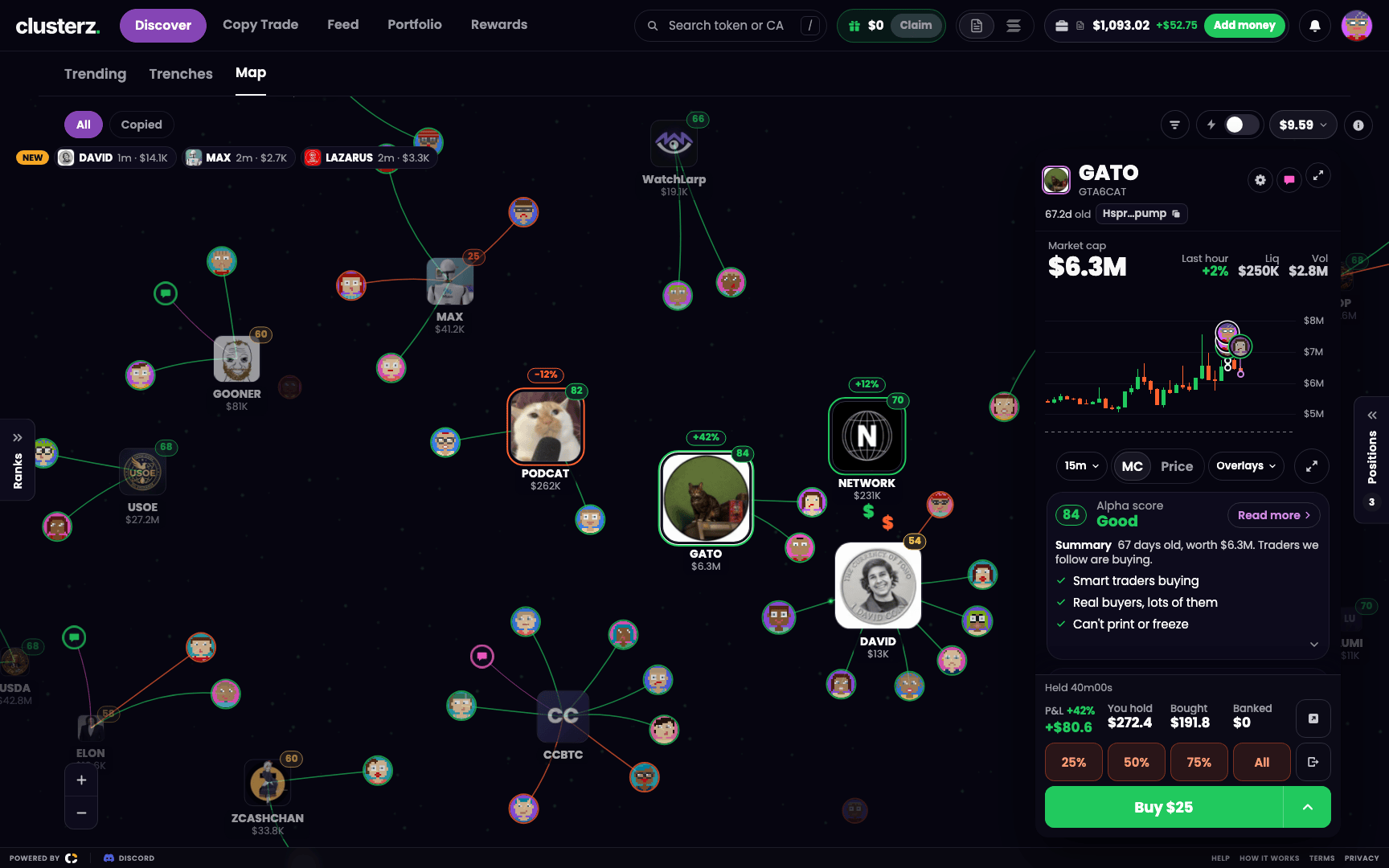 Hover a token to preview it. A glow means a cluster is loading up.
Same tokens as the list, drawn as tiles with the tracked traders round them and every trade as a line. Bigger means more tracked buying. A glow marks a cluster buy. The whole fight on one screen. How to read it, the controls and every trick: see The Map.
Chips on the map work like on the list: All, New when launches are available, Copied, and Faction while you are in one. Bluechips and Stocks are list only, so the Map shows All.
Filters
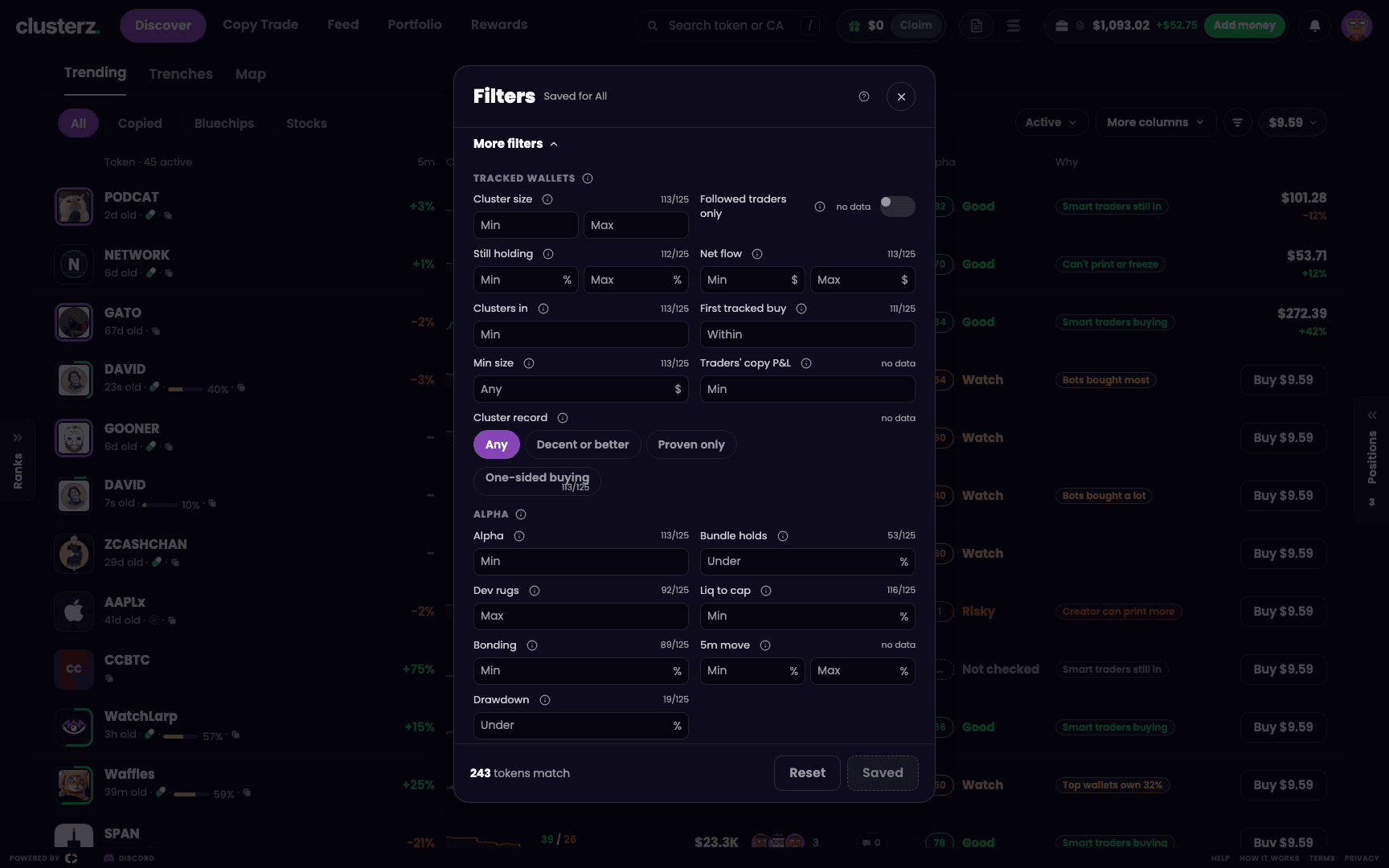 Filters: cut the trash before it hits your screen.
Hit Filters on the toolbar. The short set is all most of us ever touch:
- Show: All, Cluster buys or I hold. A New option also shows when new launches are available, and switches Discover to them.
- Hide risky tokens: hides tokens marked Risky. Tokens marked Watch stay.
- Market cap: a slider from $10K to $100M.
- Age: Any, Under 1h, Under 24h or Under 7 days.
- Tracked traders in, at least: Any, 5+, 10+, 25+ or 50+.
- Alpha, at least: Any, 40+, 65+ or 80+.
- No fake volume: hides tokens whose volume looks fake. Wash traders, bye. Tokens not read yet stay.
- Only traders I follow or copy: tokens where traders you follow or copy are in.
Want to go deep? Open More filters for the full set, grouped as Tracked wallets, Alpha, Market and Wallets, with the switches Active in the last 5m, Hide moonbags and Show hot tokens at the end. It covers Net flow, Clusters in, Still holding, No dev sold, Hide reused logo, Bundle holds, Dev rugs, Stage (On the curve or Graduated), Bonding, Liq, Fees paid, Top 10 holders, Dev holding, Holders, Snipers and Pro share. An empty box means no limit.
The header counts how many filters are on. The bottom counts how many tokens survive. Nothing applies until you press Save. Reset clears the controls, then Save applies that. Filters are saved per view, and the header says which one, like "Saved for All". Set it once, stop fiddling.
Tokens you hold always show, whatever the filters say. Filters don't hide your bags. The one exception is Hide moonbags, which takes your moonbags off the map.
Side panel and search
On desktop the left panel holds the Leaderboard, a Tokens board (Trending, Movers, Market cap, Held) and the Feed. Press [ to show or hide the left panel and ] for the right panel. More chart, less clutter.
Looking for one token? Press / or hit the search in the header, then type a ticker, a name or part of the address. Esc closes a card or sheet.
On your phone
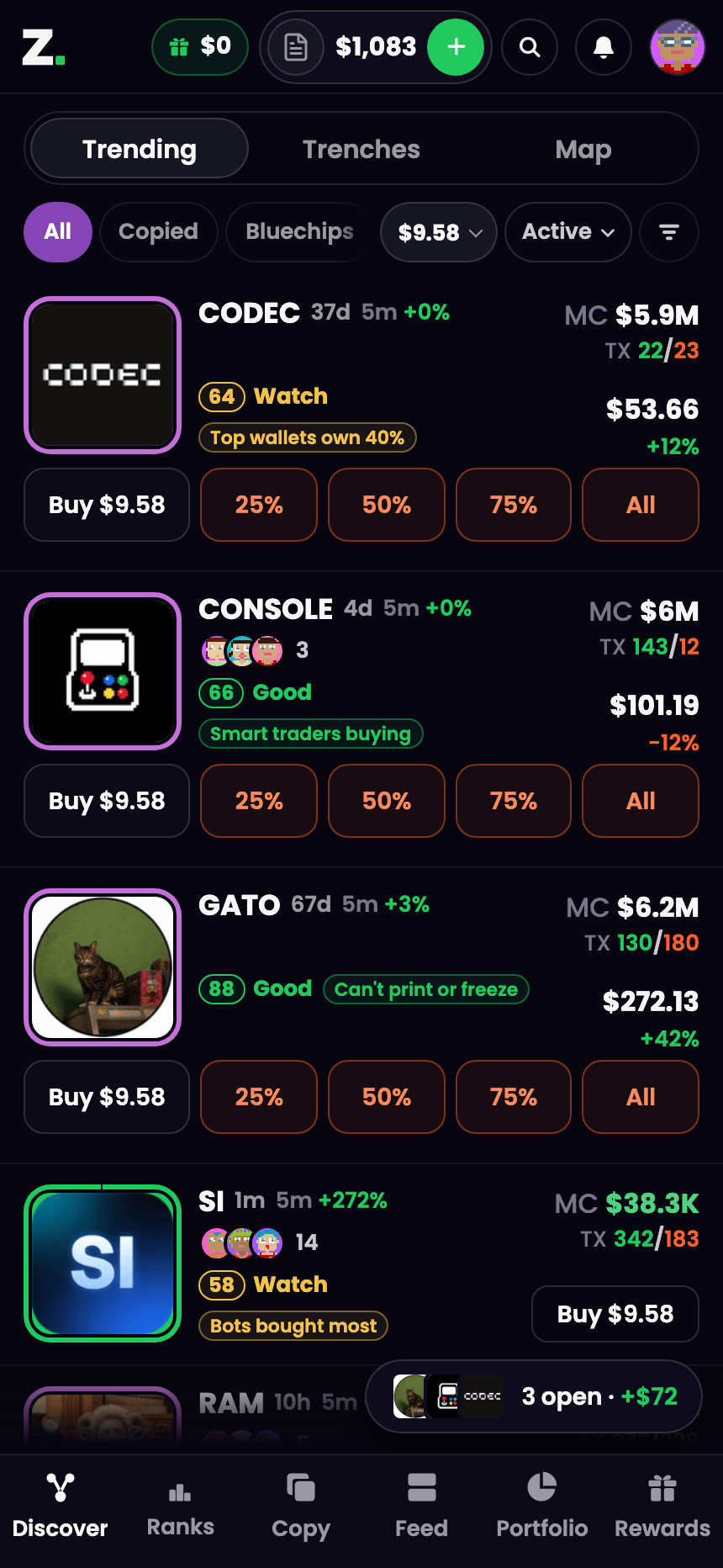 Trending on a phone. Same edge, smaller screen.
On a phone, Discover is the first tab in the bottom bar. Trending, Trenches and Map share one switch up top. Chips sit below it, and the filter button lives at the right end of the chip row. See Using clusterz on your phone.
How we run it
- Start with Hide risky tokens on and Alpha, at least at 65+. 65 and up reads as Good. Fewer red flags on your screen. A score is not a guarantee, so still read the reasons before you ape.
- Hit Copied to cut the list to the tokens the traders you copy traded. Nothing else. Their plays, not the whole casino.
- A glowing tile on the Map is a cluster buy as it happens. Glow means move.
- Help in the footer replays the map walkthrough and the filters walkthrough.