Token page
Before you ape, you check. We got rugged plenty while flipping between six tabs and the chart ran away. So one token gets one page: the chart, the Alpha score, Safety, the SI read, holders and trades. Buy and sell sit right next to it.
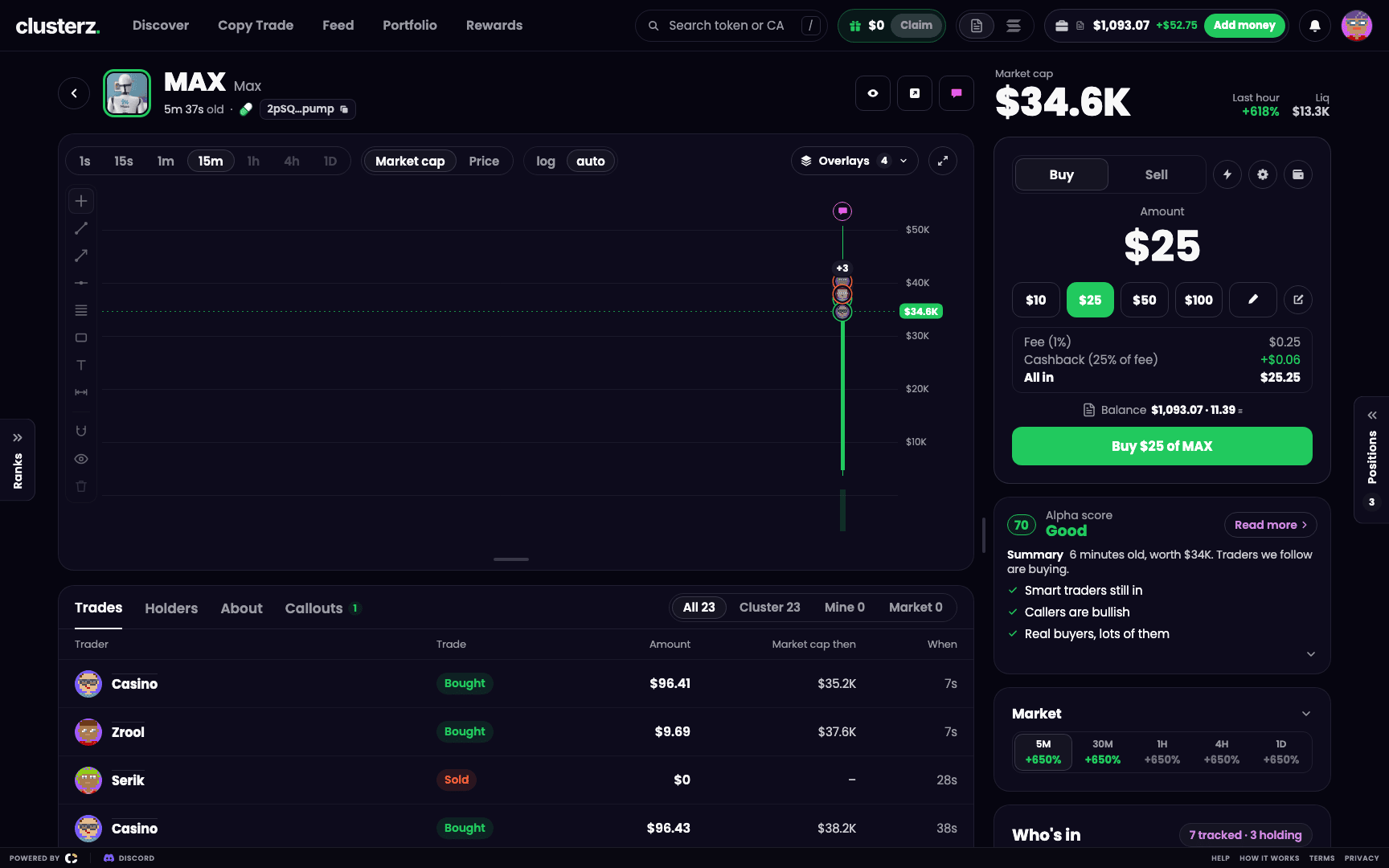 A token page: chart, Alpha score, Safety and Market, with trading on the right. Everything you need before you send it.
Where everything sits
Open a token from a list or its card and you land on its page. Every token has its own link, clusterz.fun/token/ followed by the token address. Bookmark it or send it to the group chat.
Left side: the head, the chart, the tabs. Right side: market cap, the Buy card, your position once you hold, the Alpha score card, Market, Who's in and Callouts. Prices and trades stream in live. No refresh button.
The head
Up top: logo, symbol, name, age, launchpad and token address (click it to copy), plus the token's X, website and Telegram. The ring round the logo is how far along the bonding curve it is. It goes violet once the token graduates.
- Watch adds the token to your Watching list. The button then reads Watching. Click it again to stop.
- Share copies the page's link.
- The speech bubble makes a callout on this token for the Feed.
The right column opens with Market cap, its move over the Last hour, Liq (liquidity) and Vol (volume traded).
The chart
15-second candles by default. Not enough 15-second history yet? It opens on a size that has enough. Once you pick a size, other tokens open on it when they have the history for it. From the toolbar you can:
- Pick a Candle size: 1s, 15s, 1m, 15m, 1h, 4h or 1D.
- Show Market cap or Price.
- Switch between log and auto scale.
- Open Overlays, or go full screen.
Drawing tools sit on a rail at the left of the chart. Drag the bar under the chart to resize it.
| Overlay | What it draws | Starts |
|---|---|---|
| My swaps | Your buys and sells, your average buy and sell, your break-even (with P&L after fees on), and your take profit and stop loss while an exit is active | On |
| Tracked | Tracked wallets' buys and sells, with the trader's face | On |
| Thesis | Callouts posted on this token, and a badge on the face of a trader who posted one | On |
| Cluster buy line | The moment a cluster bought, with its name | On |
| Named only | Only tracked traders who have a name | Off |
| Market | Every other trade (pump.fun tokens only) | Off |
Hide tracked under $ hides tracked trades below the amount you type. Dust buys gone.
Alpha score and Safety
The card on the right leads with the Alpha score, a number from 1 to 99, and its band:
- Good: 65 and up.
- Watch: 40 to 64.
- Risky: under 40.
A token gets a score once tracked traders or callers are in it. No score yet? The card shows the Safety check's word instead: Good, Watch, Risky, or Not checked yet when nothing has been read. Under it: a short Summary and up to three reasons.
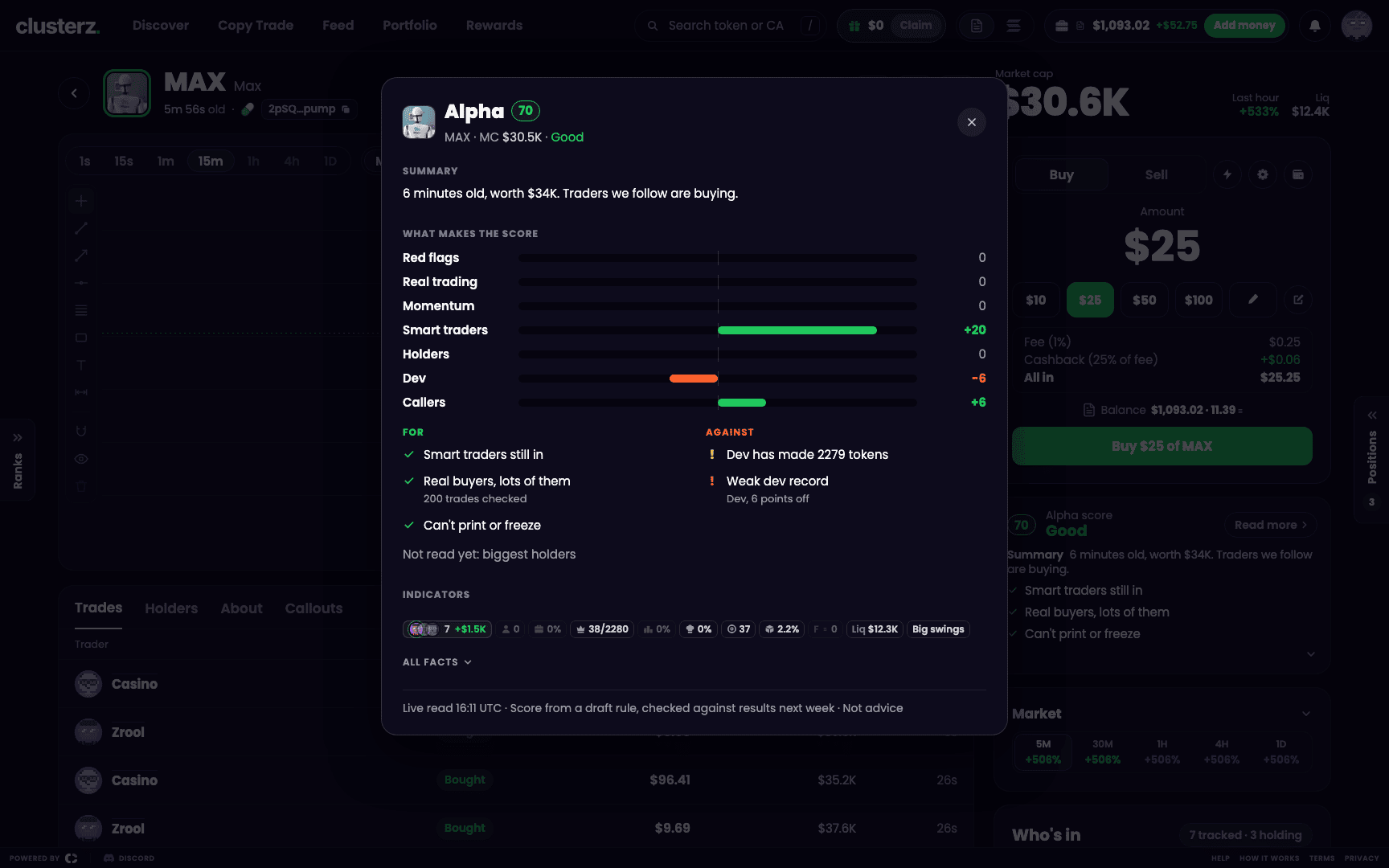 The Alpha score with the groups that raised or lowered it.
Click the ring or Read more for the full sheet:
- What makes the score: points added or taken off by Red flags, Real trading, Momentum, Smart traders, Holders, Dev and Callers.
- For and Against: every reason in plain words, such as "Smart traders buying" or "Callers hyped, then sold".
- Indicators: the token's badges.
- All facts: every safety check with its value.
A red flag caps the score at 25, whatever else looks good. Red flags include a mint that is still on, a token that can be frozen, the top 10 wallets owning half the supply or more, and the dev holding more than 20%. Any one of those can cook you.
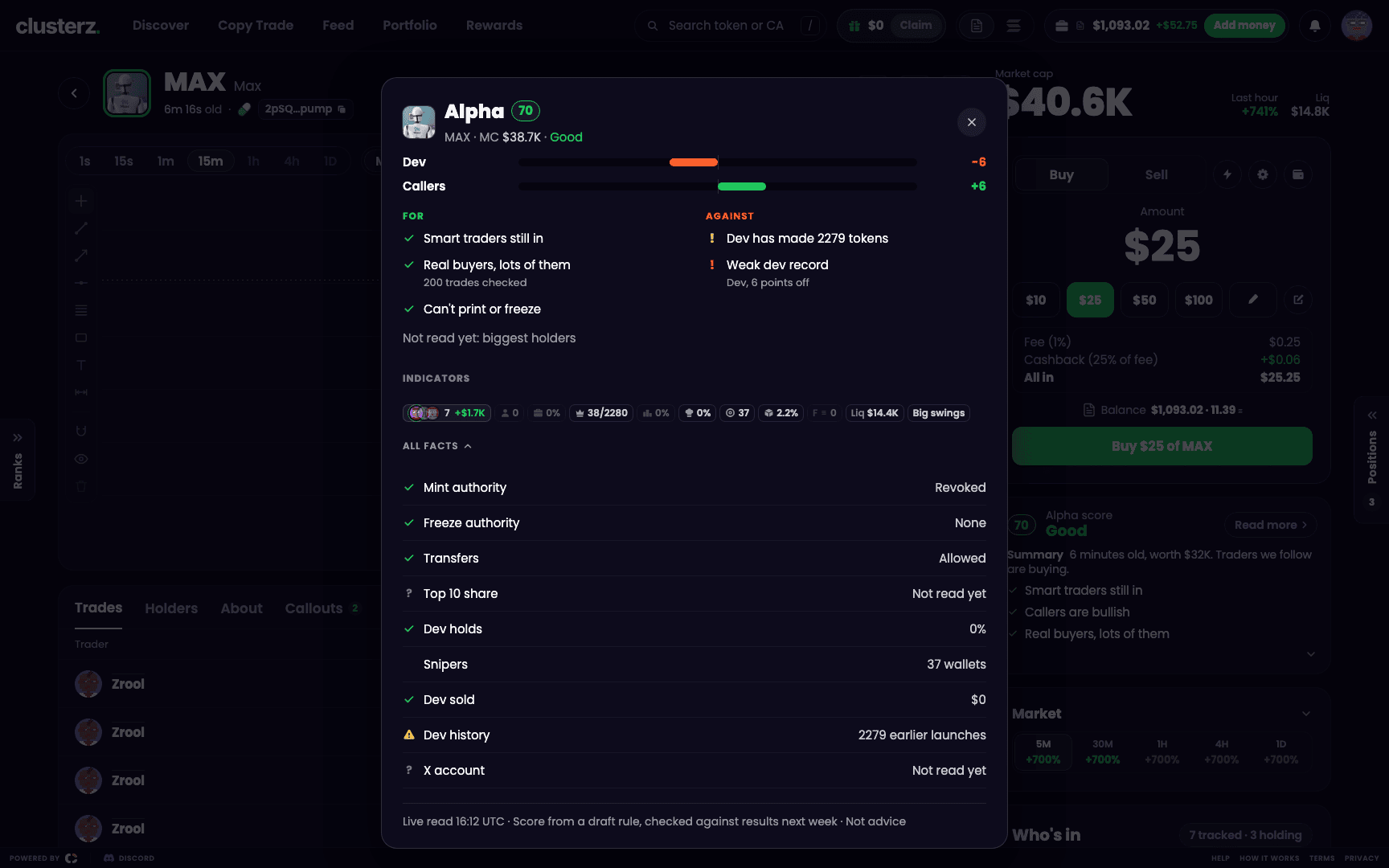 Safety facts: mint, freeze, dev and holders. Where the rugs hide.
The safety checks are Mint authority and Freeze authority ("Can't print or freeze" when both are off), Transfers, Top 10 share (under 30% reads "Holders spread out"), Dev holds, Dev sold, Dev history ("New dev" or the number of earlier launches), Snipers and X account. Lines such as "Dev has made 40 tokens", "Insiders bought at launch", "Linked wallets own a lot", "Logo copied from elsewhere" and "DexScreener paid" show up when they apply.
The Alpha score is not financial advice. Every group, every reason and what it does not promise: see Alpha score.
SI read
The SI read is the token written up in plain words. Not a KOL thread. It lives inside the Alpha card. When a token has one, Read more shows the whole thing with how long ago it was read. The Alpha score stays the one number on the page.
No read yet? Press Get a read while signed in. It reads Reading… while the read is made. Nothing back within a minute and it says "No read came back, try again". If a read cannot be made, it says why, for example "Not read: too little bought" or "Daily limit reached".
Market and Who's in
Market shows the move over 5M, 30M, 1H, 4H and 1D. Open it and pick a window to compare buys and sells, dollars bought and sold, and buyers and sellers.
Who's in lists the tracked traders in the token: what they put in, what they still hold, how many wallets they run, and their P&L when every wallet has one. Traders who sold out are marked Sold. If the smart money already left, guess who the exit liquidity is. Click a name to open the trader, or Copy to copy them.
The tabs
- Trades: Trader, Trade, Amount, Market cap then and When, filtered by All, Cluster, Mine or Market. Buys show the app the buyer used when known (Axiom, GMGN, Photon, Trojan, pump.fun, FOMO, Jupiter). Show 100 more loads more.
- Holders: Tracked holders with average entry, Top holders with tracked wallets marked, and Top traders 24h. Hidden when there is nothing to show.
- About: description, links and Token facts (Created, Launchpad, Supply, Creator, Dev fees, Price age, Contract), with a Solscan link.
- Callouts: posts naming the token, newest first. Fetch latest checks for new ones.
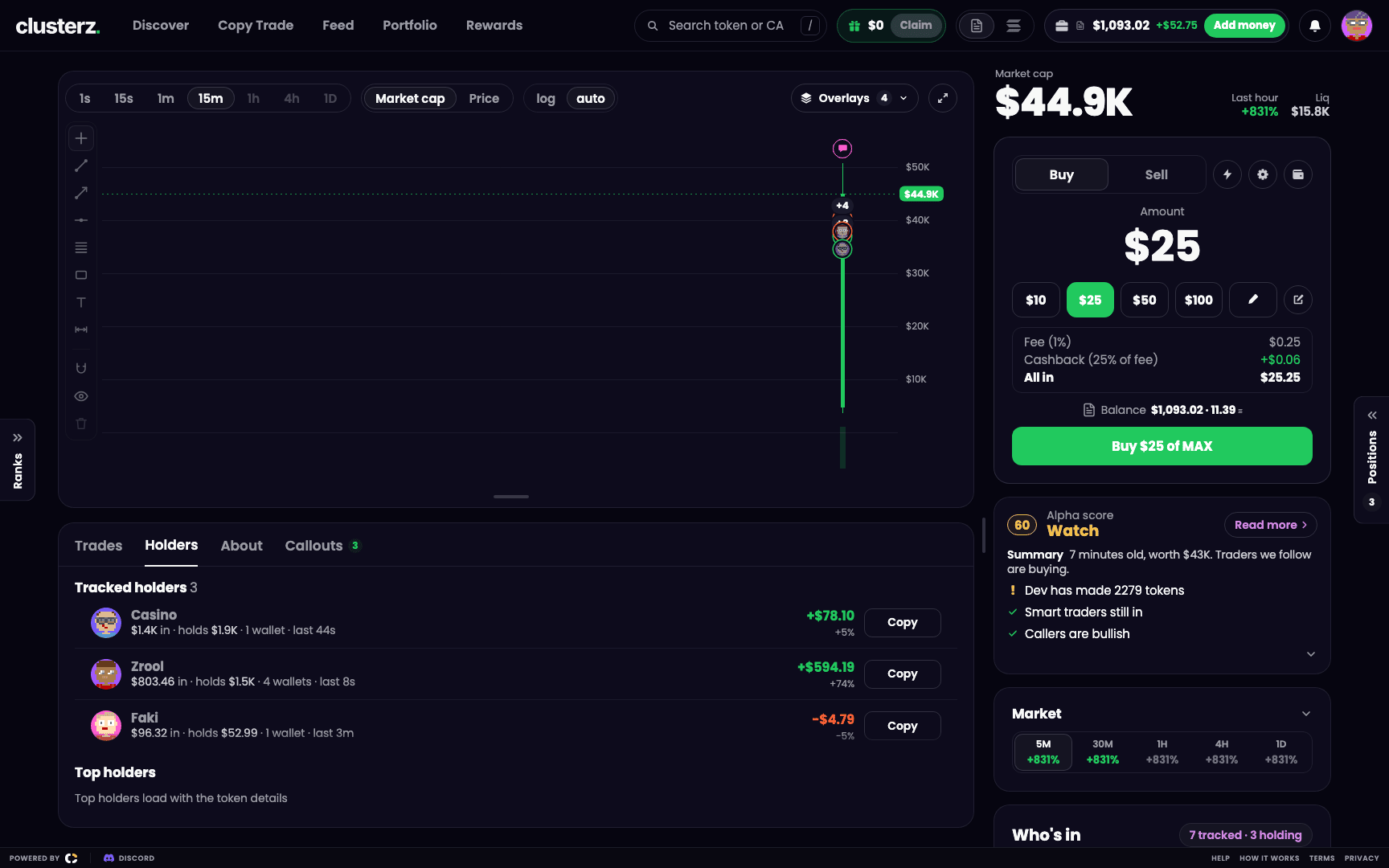 Holders, with tracked wallets marked. Know who is holding the bag with you.
Trading from the page
Seen enough? Send it from right here. The Buy card has two views: the amount panel, and the quick-buy grid that buys at your preset amounts in one click. The bolt icon switches between them. Once you hold the token you see P&L, You hold, Bought and Banked, sell buttons (25%, 50%, 75% and All by default), and Exits for your take profit and stop loss (see Exits). The gear opens Trade settings. Signed out, the page shows Sign in to trade with the token's name.
A Live buy or sell you make here is signed by your own wallet. Your keys, your bags. See Buying and selling.
On a phone
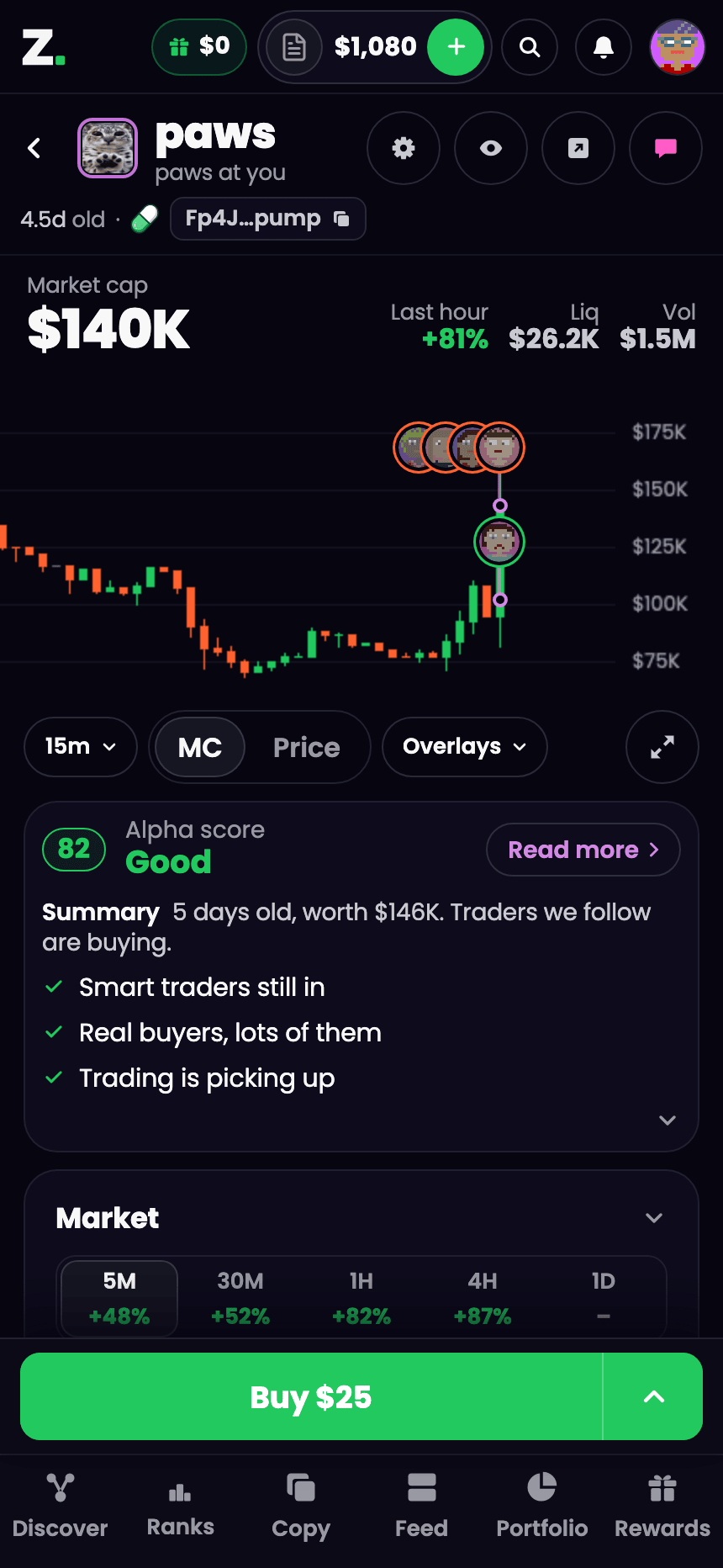 A token page on a phone. Same page, in your pocket.
The page stacks into one column. The candle size is one chip under the chart, Overlays opens as a sheet, and Who's in shows faces you tap for the full list. Buy and sell sit in a bar fixed to the bottom. See Using clusterz on your phone.
Before you ape
- Read Against before you buy. A good score with a long Against list is worth a second look.
- Turn on Named only and set Hide tracked under $ to see only traders you know at sizes that matter.
- Pick Mine in Trades to see your own fills on the token.