How to cash out Solana memecoin profits
How to cash out Solana memecoin profits: sell the token for SOL, keep a moonbag, check what you banked after fees, then withdraw SOL to your own address.
A profit on the screen is a number. A profit in a wallet you control is money. This is the walk between the two.
Two moves: sell the token for SOL, then send the SOL out. clusterz charges nothing on the second one. All of this is Live. Practice money is play money and never leaves.
How to take profits on Solana: sell the memecoin for SOL
Selling a memecoin for SOL is one tap. Once you hold a token, four sell buttons sit on the token page, on its row in Portfolio and in the Positions panel: 25%, 50%, 75% and All.
- Open the token, or find it under Open in Portfolio.
- Press a size. Each percent is a share of what you still hold, so 50% twice leaves a quarter. All sells everything, unless you keep a slice (below).
- Read the toast, like "Sold 50% of $FROG". A Live sell that takes longer shows "Still confirming" in amber. A failed one turns red and says why.
Want an exact amount? The panel's Sell tab takes a typed value, and the button names it, like "Sell $40 of FROG".
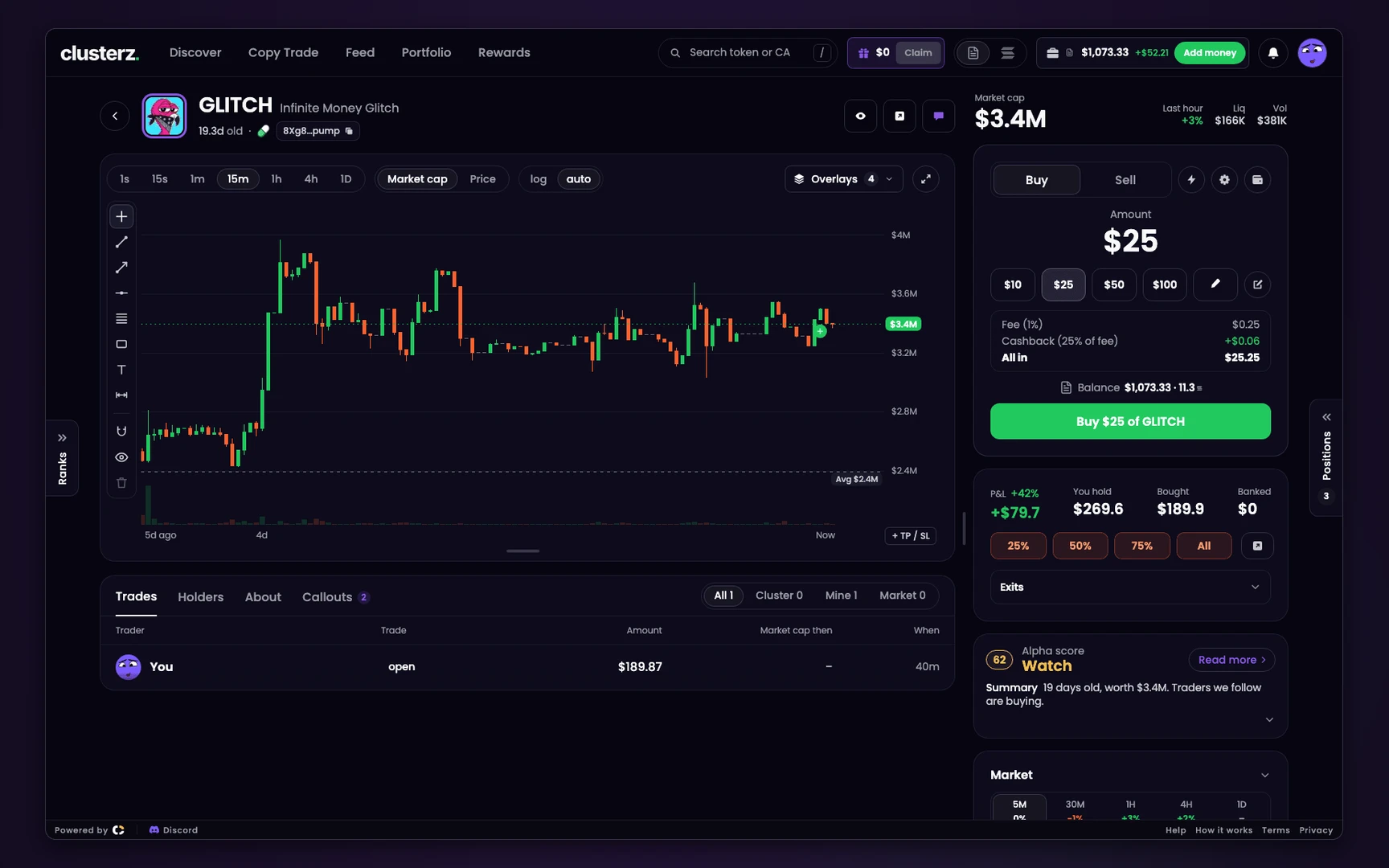 25%, 50%, 75% or All.
Two things that look like a failed sell and are not:
- "Not sold: another sell is landing" means nothing sold. In Live one trade per token lands at a time. Sell again once the other lands.
- Verifying price on a fresh buy means the sell waits until the price check is done.
Exits that sell for you at a level are in your first exit plan. This is the cash-out by hand.
Partial sells and keeping a moonbag
A partial sell banks part of the gain and leaves the rest in play. 25% or 50% after a run is the plain version.
A moonbag is a slice you keep when you press All:
- In Account, turn on Keep a slice when selling all.
- Pick 5%, 10%, 20% or Other, from 1% to 50%.
- Do it before the buy. A position takes its slice size when it opens.
The sell row then reads "Keep 10% when I sell all", and the toast says "Sold 90% of $FROG, kept 10%". To sell all of one position anyway, switch the keep line off on that position.
The slice sits under Moonbags in Portfolio. No exit rule ever sells it, so it rides to the moon or to zero. See Keep a slice when you sell all.
See what you banked after fees
Before you withdraw, check what you actually made. The balance is not the answer. It includes what you deposited.
- Closed in Portfolio lists every sold trade with Sold for, Change and You put in.
- On the token page, a held token shows Bought and Banked.
- Stats shows Made on sold tokens, which is banked P&L, apart from On tokens you hold, which is hope. Fees paid sits under them.
P&L shows after fees by default. A sell pays our fee too: 1% on a position you bought yourself, 0.2% on one opened only by copies, as a share of the minimum SOL the sell is set to return.
Turn off P&L after fees in Trade settings only if you want the price move alone. See Portfolio and P&L.
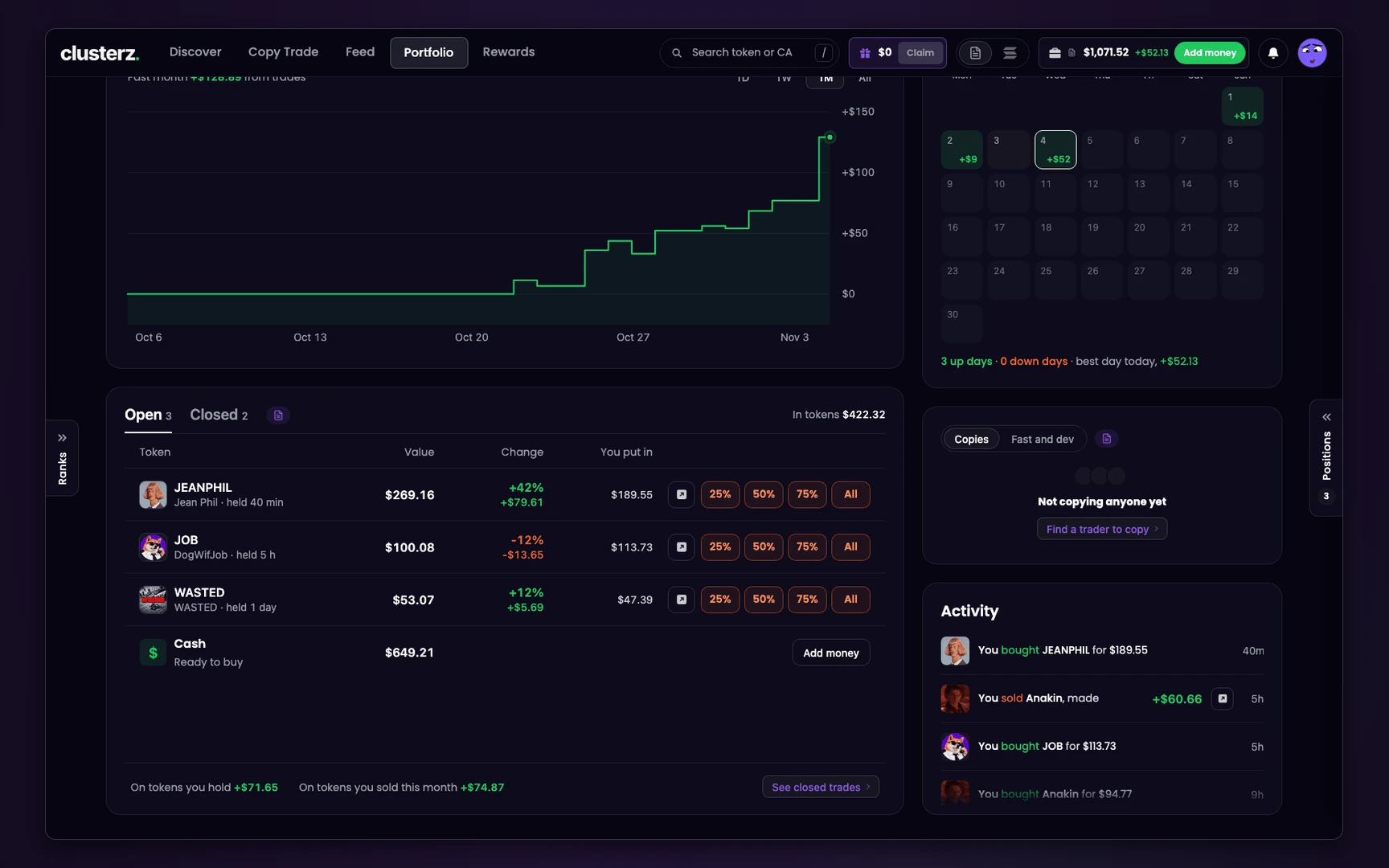 Open bags and closed trades, side by side.
Reclaim rent from sold tokens
Every token you buy opens a token account, and the network holds about 0.002 SOL of rent on it. A full sell closes the account and the rent comes back, when that close can run. Some stay open and empty. Collect them before you cash out:
- Press Reclaim on the Token rent to get back line in Portfolio, or next to Token rent in Account > Wallets.
- Check the preview. Close lists empty accounts. Burn and close lists dust worth under 0.0001 SOL, destroyed before it closes. Tick I understand if anything burns.
- Check Rent back, Estimated fee and You get, then press Reclaim.
Tokens you hold are never touched. A preview lasts two minutes. Details in Reclaim rent.
Withdraw SOL to an exchange or your own wallet
Withdrawing sends SOL from your Main wallet to any Solana wallet address: your exchange deposit address, Phantom, a hardware wallet.
- Press Withdraw on Portfolio, or on your Main wallet under Account > Wallets.
- Paste the address, or press Paste. For an exchange, use its SOL deposit address on the Solana network.
- Enter an amount, or press 25%, 50% or Max.
- Check the review: You get, Network fee and Balance after, plus a line naming the exact SOL, the address and what stays behind. "This cannot be undone."
- Press Withdraw with the amount on it. Your wallet signs it, and the receipt shows what you sent, the fee and your new balance.
The checks the withdraw screen makes before it lets you send:
- Cash only. Tokens do not withdraw. Sell first.
- A real address. "That is not a Solana address." for a typo. "That is a program or a token account, not a wallet." for a token account. "That is this wallet." for your own sending address.
- Enough left. "More than you have." if the amount and the fee do not fit. If what would stay is under 0.001 SOL, it asks you to leave at least 0.001 SOL or send it all.
- A clear result. Not sent means the message says nothing moved, and Try again sends it fresh. Sent but not confirmed yet reads "Sent, not yet confirmed. Check the balance in a minute."
It costs the Solana network fee, 0.000005 SOL. clusterz charges nothing on withdrawals. New address? Send a small test amount first, then the rest. See Withdraw.
Rewards wallet: claim to Main first
Cashback and referral payouts land in your Rewards wallet, not your Main wallet. To cash them out, claim them first.
- On Rewards, press Claim ... to balance, or Claim rewards on Portfolio in Live.
- Check From Rewards wallet, To Main wallet, the amount, the Network fee and Balance after. Change amount claims part of it.
- Press Claim. It costs the 0.000005 SOL network fee, paid from your rewards.
A partial claim must leave enough to keep the Rewards wallet open, or it reads Leave at least ... SOL or claim it all. Then withdraw from Main as above. See Claim it.
Copy wallet: Move to Main first
The Copy wallet is the exception to "your keys". The server holds it so copies can buy while you sleep. SOL in it can only go back to your own wallets, never straight to an outside address.
- Sell or close what your copies hold. Stop on a copy that holds positions bought with real SOL lets you keep them or sell them now.
- Open the Copy wallet from the Copies card in Portfolio, or under Account > Wallets, and press Move to Main (the button reads Withdraw on some screens).
- Pick an amount, 25%, 50% or Max, and press the Move button with the amount on it. The toast reads like "Withdrew 0.42 SOL to your main wallet".
Now it is in your Main wallet, and you withdraw it from there. Details in Your wallets.
What this cannot do
- Sell at the price you see. A sell obeys Max price move. In a thin pool, a big sell moves the price against you.
- Sell what nobody buys. No buyers, no SOL.
- Undo a withdrawal. A wrong address is gone for good. So is SOL sent on another network.
- Cover the Copy wallet in an outage. If Live trading pauses, you can export your Main wallet's key and sell elsewhere. The Copy wallet's key cannot be exported. See When Live trading pauses.
- Anything after the SOL leaves. What an exchange charges, how it converts SOL to cash, and what you owe in tax happen outside clusterz. We do not cover them, and nothing here is tax or financial advice. Activity and the Closed tab are the record of what you did.
Before you send it
- Sell, then check Made on sold tokens, not the balance.
- Reclaim rent, claim rewards, move Copy wallet SOL to Main. Then withdraw once.
- Paste the address, then read it against the source. A test amount first on any new address.
- No sell and no withdrawal promises a result.