Wallets
Every rug we ate had a wallet behind it. Usually a stack of wallets. Same guy.
So every tracked trader gets a page. Who he is, what he made, what he holds, which wallets are his. Read the man before you ape his bags.
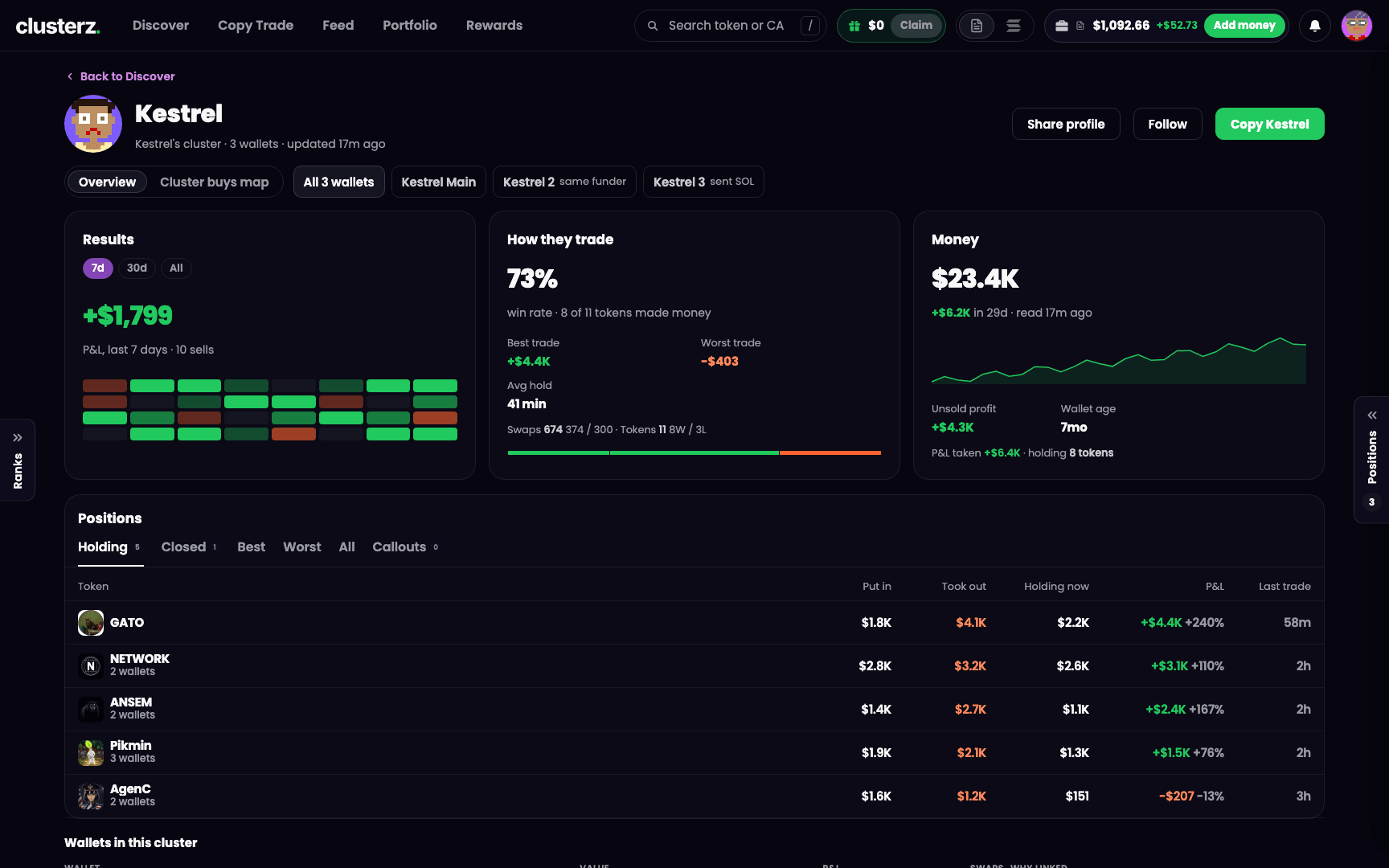 A tracked trader's page. His record, his bags, his wallets. Not his Telegram bio.
One trader, not one wallet
A wallet page is one person. Most serious traders split their buys across a stack of wallets, and clusterz links them into a cluster. The page adds them all up.
It lives at its own address, /wallet/<address>, so Back, Forward and a reload land on it, and you can send the link to the boys. Back to Discover takes you out.
The head
- The name. A clusterz trader shows his handle, and the name opens his Feed profile. A pump.fun caller shows his caller name. Anyone else shows his label, or a generated username. Never a chopped-up address.
- #N this week: his place on the 7-day trader board, when he has one.
- X and TG links when we know them.
- The line under the name: whose cluster it is (or Solo wallet), how many wallets, his style, his last buy on the map ("bought EVOLVE 12s ago") and how many accounts copy him ("212 copying").
- clusterz attribution: what clusterz's own portfolio made off this trader, in SOL. Not yours.
- updated 3m ago: how old the numbers are. While a fresh read runs, it says refreshing and the page repaints when it lands.
Three buttons sit on the right:
- Share profile copies the link to the page.
- Follow adds him to the traders you follow, which feeds the Only traders I follow or copy filter in Discover. It flips to Following. Signed out, the button isn't there.
- Copy
sets up a copy of him, all his wallets included. Already copying? It reads Copying and opens your copy to edit. It stays greyed out until his wallets load, so you don't copy half a guy.
Overview or Cluster buys map
A switch under the head picks the view: Overview for the numbers, Cluster buys map for the picture. Your pick sticks for every trader you open until you close the tab.
Next to it sit his wallets as tabs. All N wallets is the whole person. Then each wallet: his main one as
- sent SOL: SOL moved between them.
- same funder: the same wallet paid for both.
- same group: they trade together.
The first four show. +N opens the rest, Fewer folds them back.
Pick one wallet and you get just that wallet: its name, its short address with a copy button, how many of its fills we caught on our tape, and In the cluster: with the reason it is linked.
Results
The P&L he actually banked. Realised, from his sells. Not his net worth going up because he deposited.
Pick 7d, 30d or All. The big figure is his P&L in that window with the number of sells under it. All is every sell we read, or "the last 2,500 swaps" when his history is longer than that. Below sits a grid of the last 32 days: green days up, red days down, darker for bigger. Hover a day for the figure.
How they trade
- His win rate, with the count behind it: "12 of 20 tokens made money". A token counts once.
- Best trade and Worst trade.
- Avg hold.
- First 10s: how often he gets in first.
- Swaps (buys / sells) and Tokens (won / lost).
- Five bands showing how his tokens ended: >500%, 200~500%, 0~200%, 0~-50% and <-50%. Each token counted once by its total return, sold plus unsold.
A dash means no source gave us that number. It never means zero. A guy with no data is not a guy who never won.
Money
What he holds right now, with when we read it. Under the figure: how much it moved over the days we have, how much sits in SOL and how much in tokens. Then a Net worth chart over those days.
Plus Unsold profit, Wallet age (from his oldest wallet's first funding), P&L taken and how many tokens he holds. On a single wallet you also get First money from: who funded it.
Positions
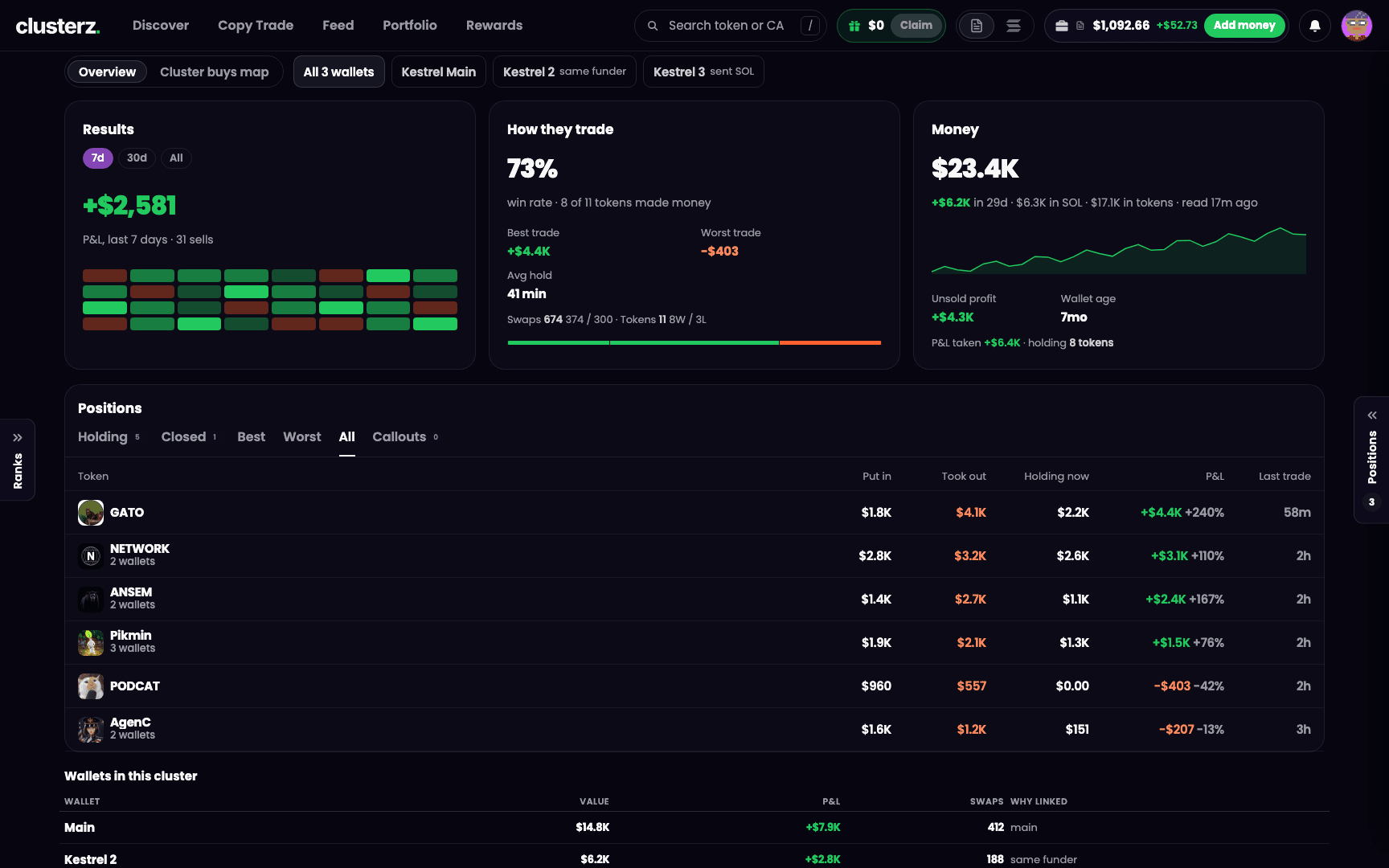 His positions, one row per token, every wallet added up. See if he is still holding or already dumped.
One row per token, all his wallets added together. A token he bought on several wallets says so: "3 wallets".
Columns: Token, Put in, Took out, Holding now, P&L and Last trade. Hover a dollar figure for the token count. Up to 40 rows show.
Tabs cut the list:
- Holding, with a count: what he still has.
- Closed, with a count: what he is out of.
- Best: only his winners, biggest first.
- Worst: only his losers, biggest loss first.
- All.
- Callouts: his callouts on Fomo, plus his X posts when we collect them, with a count. Open one to read it, press the token to go to its page.
A tab with nothing in it is greyed out, not hidden, so the row doesn't jump around under your cursor.
Wallets in this cluster
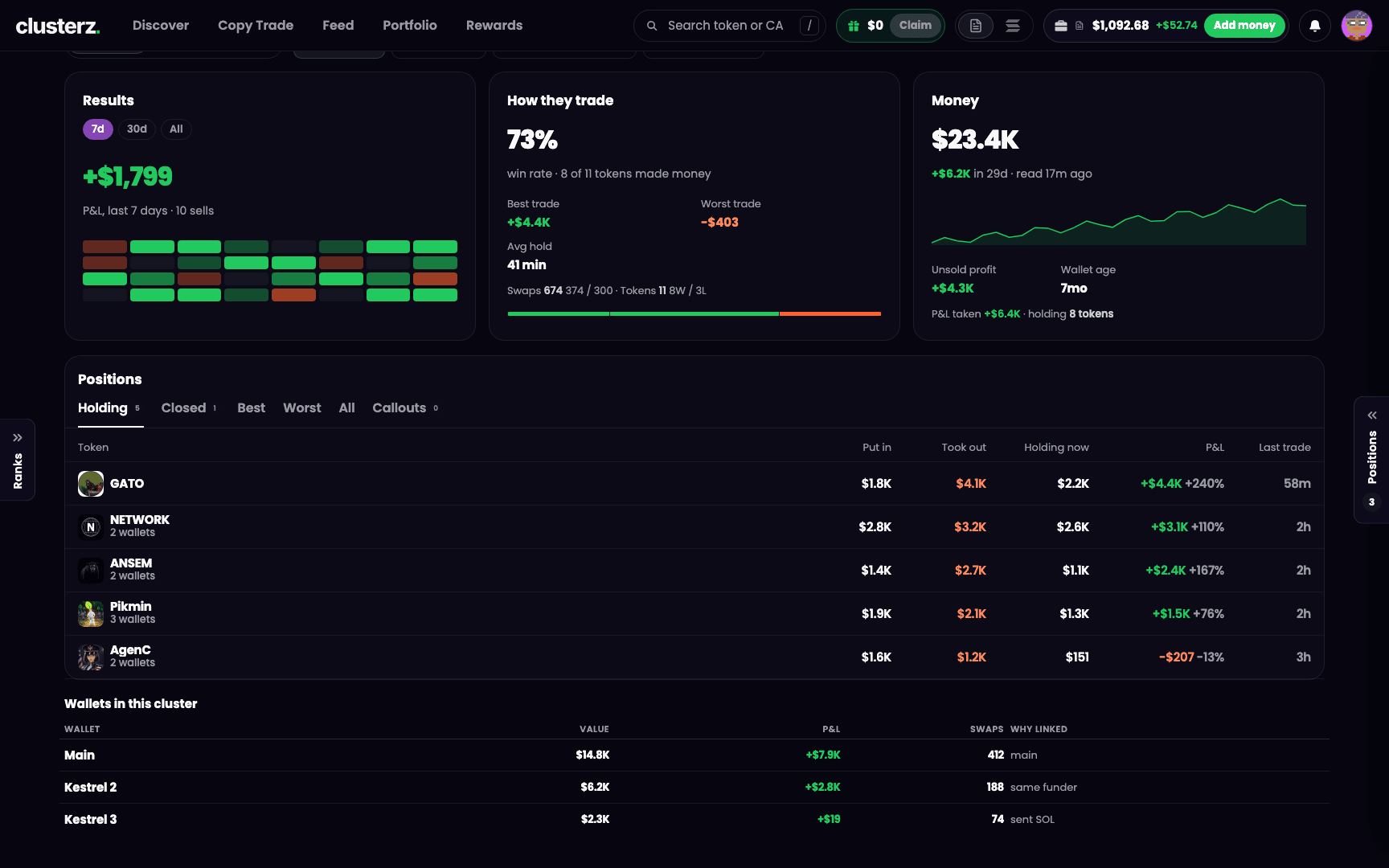 Every wallet in the cluster and the receipt for linking it. One guy, many wallets.
Under the positions, a table of every wallet in the cluster: Wallet, Value, P&L, Swaps and Why linked. His main wallet says main. The rest say sent SOL, same funder or same group.
When some wallets gave no figure, a line on top says so, like "balance from 4 of 5 wallets, the others gave no figure". When he runs more wallets than we read in one go, the foot says how many were left out. We tell you what the sum covers. No fake totals.
Cluster buys map
His bags as a picture: him, his wallets and the tokens they hold. Tap a token to open its holding card. Tap a wallet to jump to that wallet's numbers. A line under it says how many wallets, how much is held across how many tokens, how many of the biggest are drawn when there are more, and how many dust tokens under $1 were left out.
Overview in the switch takes you back to the numbers.
The wallet card
 The wallet card. The quick read before you open the whole page.
Hover a trader on the Map (tap on a phone) and his wallet card opens. The short version:
- His face, name, style tag, whose cluster (or Solo wallet), how many wallets and how many accounts copy him. Signed in, the Follow icon sits top right.
- His address with a copy button, plus X and TG when we know them.
- P&L this week: realised, with his trade count under it. It reads just P&L when his history is too long to read in full.
- Win rate, with "N of M won".
- Worth: what he holds now. No weekly change next to it, because deposits move a balance too and that is not profit.
- One quiet line of extras: volume, trades in 24h, positions won and lost, Avg hold, what share of his trades are buys, how fast he gets in and how often he is first, his trades here with what clusterz made on them, and his last trade.
- Holding most: his top four tokens, and how many he holds in all when it is more than four.
- His funding: "Funded via ..." or, in orange, "Same funder as N tracked wallets". Orange for a reason. Read it.
Two buttons at the foot: Copy
A practice trader you follow gets a smaller card: "A clusterz player · practice trades", his 7d P&L, trades, last trade and See profile.
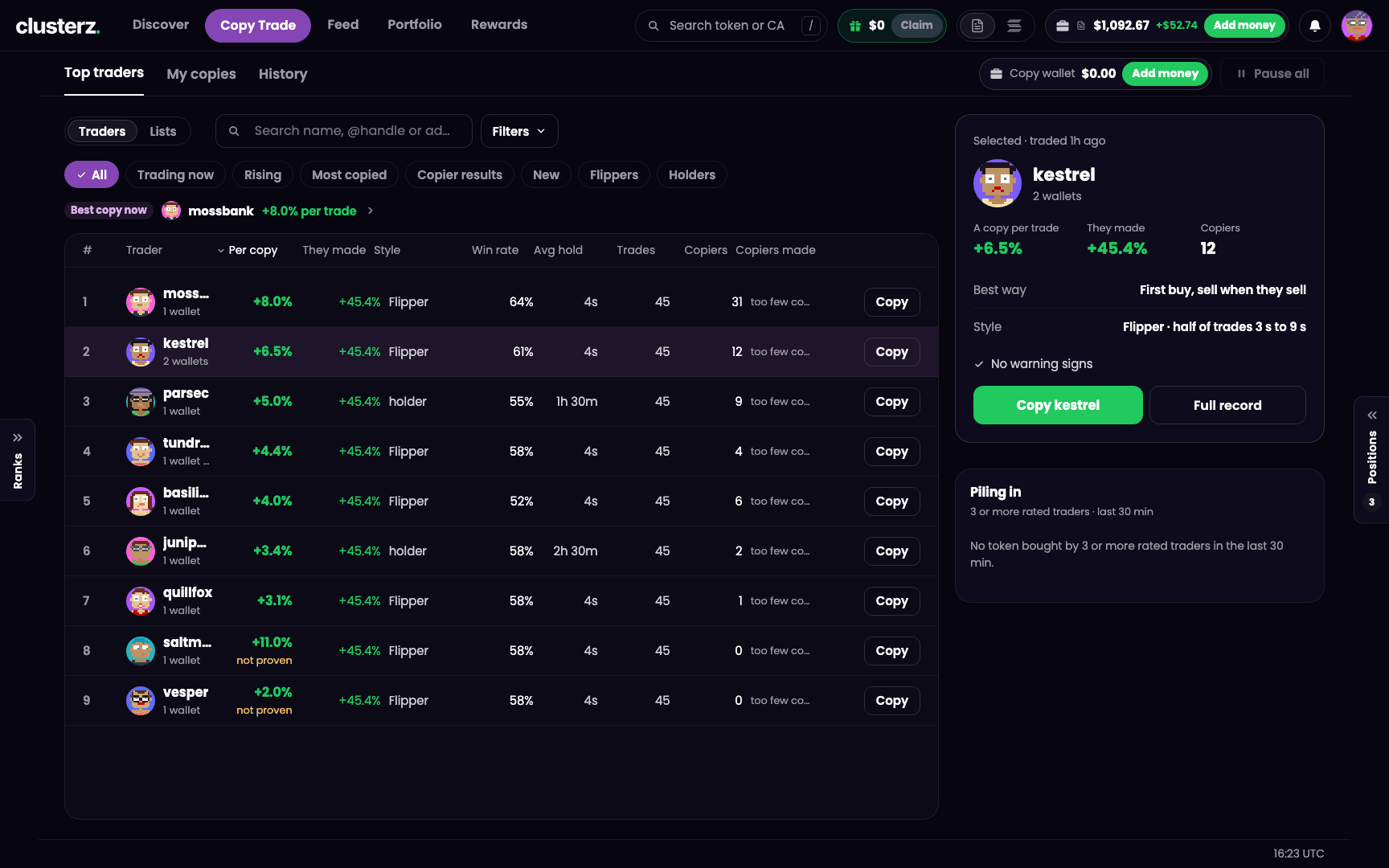
Copy Trade has its own trader page too, built around what copying him would have made. See Copy Trade.
What "tracked" means
A tracked wallet is one clusterz reads off the network live. Its buys and sells show up on the map and the list. Every account sees the same house list of tracked wallets. Your plan doesn't decide who you get to see.
Not every wallet gets in. A wallet put up for tracking is checked against its own record first:
- It has to have made money. A measured loser is turned away.
- Its win rate has to be at least 40%.
- It needs a real record: at least 10 tokens traded, or 20 trades when the token count isn't known.
- It has to be at least 7 days since it was first funded.
Clear all four and it is in. A thin record or a fresh wallet goes to a person on our side. pump.fun callers' wallets go through the same check, which is why some traders wear a caller name. A caller the numbers can't decide on is turned away, not sent to a person.
Getting in is not forever. A solo wallet in the red over both 7 and 30 days gets retired, and can come back once its last 7 days turn green. Any tracked wallet down more than $10,000 over 7 days and still red over 30 gets archived. That cut spares known KOLs, so you can keep watching them.
We cut the dead weight so you don't follow it.
Getting to a wallet
Any tracked trader's name is a door. Click it from:
- The Map: hover or tap a trader for the wallet card, then See full profile.
- The token page: names in Who's in, the Trades tab and the Holders tab open the trader. A tracked marker on the chart opens a card with See
. See Token page. - Ranks: tap a tracked trader's row. See Ranks.
- The Feed: a trader on a post.
- Search: paste a tracked wallet's address and search tells you "That is a wallet, not a token", whose cluster it is in, and gives you Open
.
On your phone
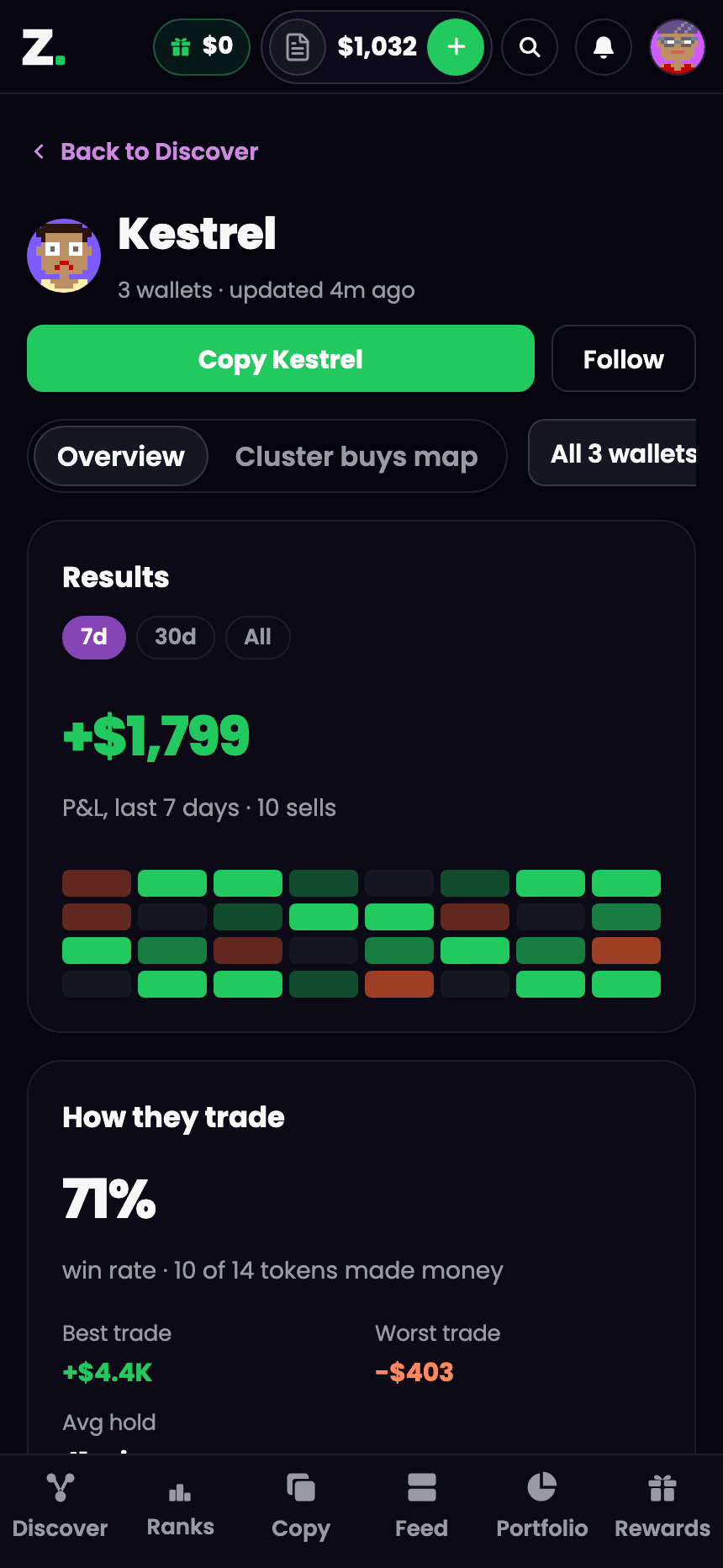 Same intel, one thumb.
- The wallet card opens as a drawer from the bottom, with its own close button.
- The line under the name keeps it short: "13 wallets · Flipper · 212 copying".
- clusterz attribution stays on desktop.
- The position tabs scroll sideways, and the one you picked stays in view.
- Your phone's Back leaves the page, same as Back to Discover.
Before you ape his bags
- Check Holding before you buy what he bought. If he already sold, you are the exit.
- Look at Wallets in this cluster. Five wallets with the same funder piling into one token is one guy, not five.
- Best trade a mile above the rest? One lucky hit is not a strategy. Check his win rate and the bands.
- Read 30d next to 7d. Anyone looks like a genius for a week.
- A dash is missing data, not a zero. Check back later. Don't read it as a clean record.
- Like what you see? Follow him to watch, Copy
to ride. See Copy Trade.